Purchase Order Template (Free Fillable PDF)

A clean, fillable PO form for ordering from suppliers — numbered, itemized and signed off.

Download the ready-made PDF — no options, no sign-up. Variants below.
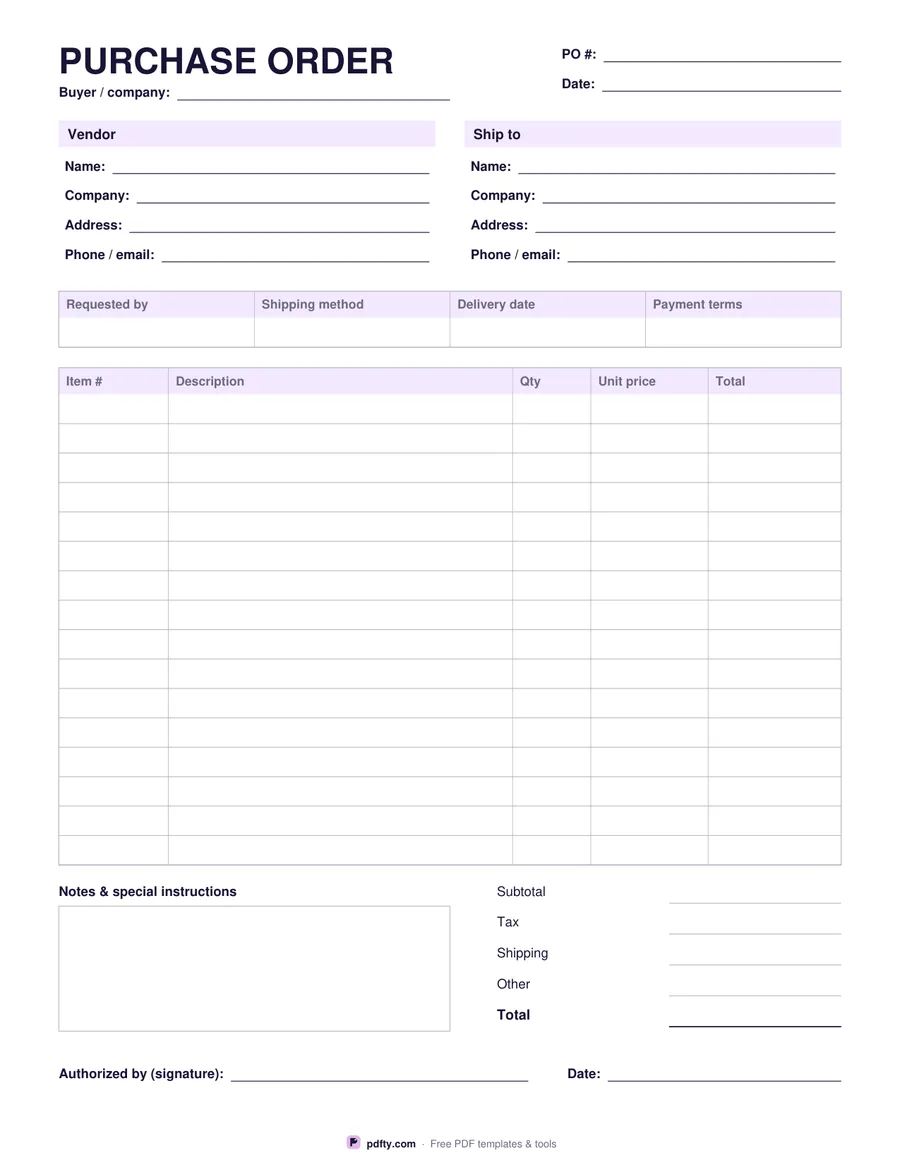
Free fillable purchase order template
Paper size
Fill & edit free online

Free · no watermark · no sign-up for your first 20 downloads a day

Fillable PDF — type into the fields online or in any PDF viewer before printing.

A purchase order tells a supplier exactly what you are buying, at what price, and where to deliver it. This template covers the essentials: PO number and date, the buyer, vendor and ship-to blocks, a terms row for requester, shipping method, delivery date and payment terms, and sixteen line items with item number, description, quantity, unit price and total.

Below the items are subtotal, tax, shipping, other costs and the grand total, a box for notes and special instructions, and an authorization line for signature and date.

Every field is fillable — complete it on screen, save it and email it to your vendor as a PDF. US Letter or A4.
How to use it

  1. 1

    Number and date the PO

    Use a unique PO number so invoices can be matched to it later.

  2. 2

    Fill in vendor and ship-to

    Supplier details on the left, delivery address on the right.

  3. 3

    List the items

    Item numbers, descriptions, quantities, unit prices and line totals.

  4. 4

    Total, sign and send

    Add tax and shipping, sign as the authorizer and email the PDF.

Frequently asked questions

Yes. There is no watermark and no sign-up for your first 20 downloads each day; after that a free account keeps downloads going. You may print the file as often as you like for personal, school or business use.
The buyer sends a purchase order to place an order; the seller sends an invoice to ask for payment. The PO number is usually quoted on the invoice.
No — amounts are typed manually so the form behaves the same in every PDF viewer. Double-check the sums.
Yes — open the form in pdfty's online editor and insert your logo as an image.
Use pdfty's Sign PDF tool on the filled form, or sign in the online editor.

More free templates

Work with your PDF