Employee Onboarding Checklist (Free PDF)

Four stages, twenty-five tasks and a column that says whose job each one is, so nothing is left for somebody else to notice.
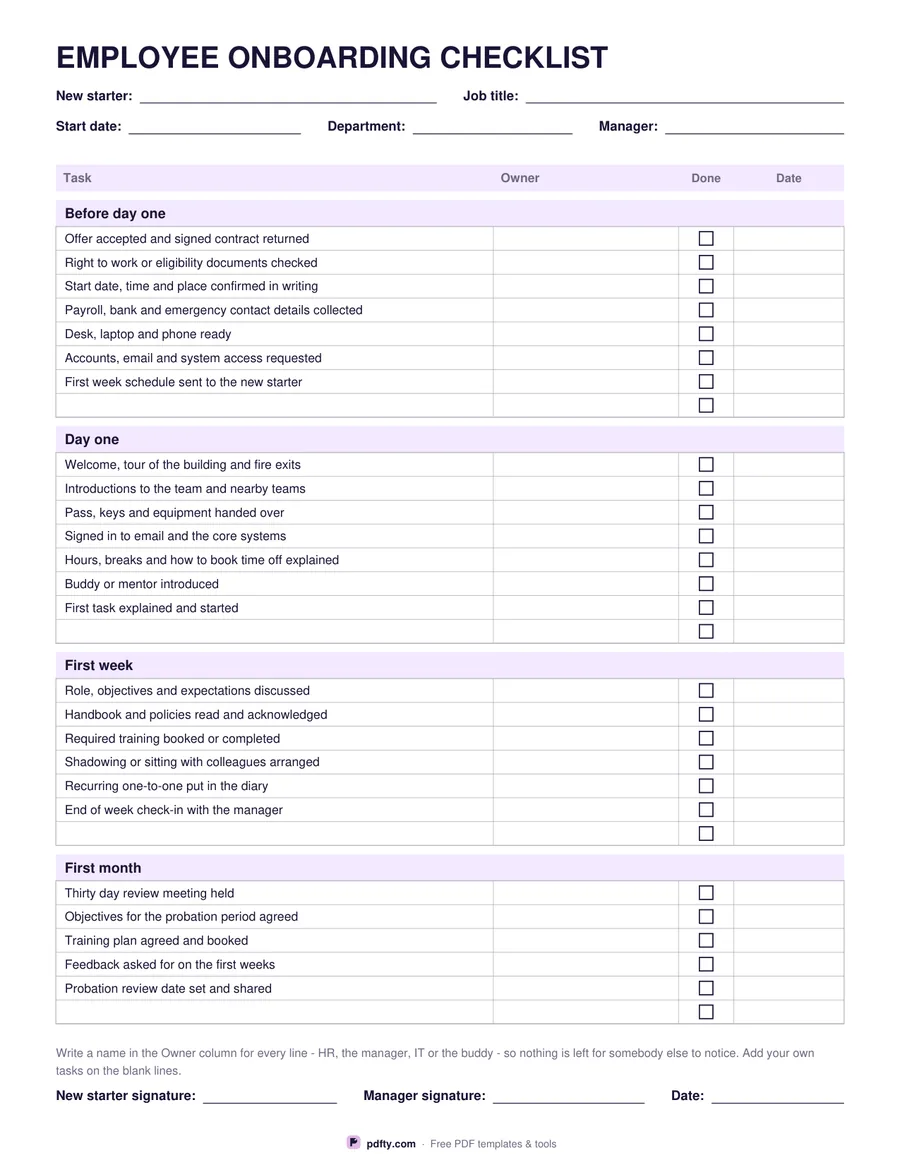
Printable employee onboarding checklist with four stages, owner column and tick boxes
Blank lines per section
Paper size
Fill & edit free online

Free · no watermark · no sign-up for your first 20 downloads a day

Fillable PDF — type into the fields online or in any PDF viewer before printing.

Onboarding goes wrong in the gaps between people, so every line on this sheet has an owner column next to it. The four sections follow the only order that matters: before day one, day one, the first week and the first month. Each task has a tick box and a date, so a half-finished list still tells you where it stopped. The header takes the new starter's name, job title, start date, department and manager.

Before day one covers the contract, the right to work documents, confirming the start details in writing, collecting payroll and emergency contacts, getting the desk, laptop and phone ready, requesting accounts and access, and sending the first week's schedule. Day one covers the welcome and fire exits, introductions, handing over passes and kit, signing in to the core systems, explaining hours and time off, the buddy, and the first real task. The first week and first month cover objectives, policies, training, shadowing, the recurring one-to-one and the probation review.

You can add one blank line to each section or three, depending on how much of your own process the list misses - security clearance, a uniform, a vehicle, a licence. Every task cell on those blank lines is typable, as are all the owner and date columns, so the sheet works as a file you fill in on screen or as a printed page on a clipboard. New starter and manager signature lines close it. One page, US Letter or A4.
How to use it

  1. 1

    Choose how many blank lines you want

    One per section keeps it tight; three leave room for your own steps.

  2. 2

    Download the PDF

    US Letter or A4, no sign-up and no watermark.

  3. 3

    Print or fill it in

    Print at 100% ("Actual size") so lines and boxes keep their exact spacing, or fill the form fields on screen in any PDF viewer.

  4. 4

    Give every line an owner

    Write HR, IT, the manager or the buddy in the owner column before the start date, then tick and date each task as it is done.

Frequently asked questions

Yes. There is no watermark and no sign-up for your first 20 downloads each day; after that a free account keeps downloads going. You may print the file as often as you like for personal, school or business use.
Yes. The owner and date columns and the blank task lines are all form fields, and the tick boxes work on screen, so the checklist can live as a PDF per new starter.
Twenty-five printed tasks: seven before day one, seven on day one, six in the first week and five in the first month, plus the blank lines you choose.
No. It talks about checking right to work or eligibility documents and about a probation review without naming any country's law, so the sheet works anywhere; add your own legal steps on the blank lines.
Yes. Cross out the lines that do not apply, or type over the blank rows with the ones that do.
The whole checklist is one page, so there is nothing to print on the back. If you run one per starter, print several copies at once.

More free templates

Work with your PDF