Freelance Income Tracker (Free PDF)

Every invoice you send on one page, with a column for the money you put aside the day it lands.
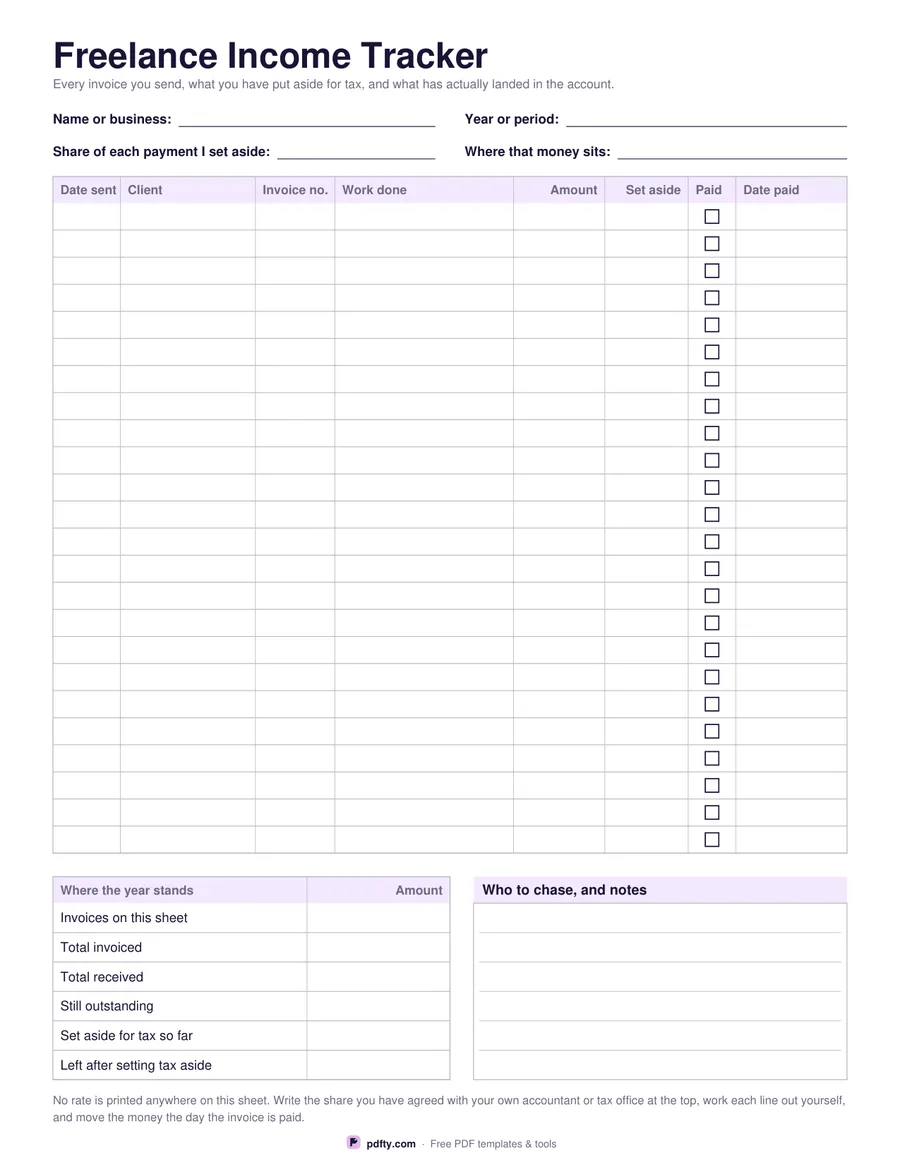
Printable freelance income tracker with client, invoice, amount and tax set aside columns
Invoice rows
Paper size
Fill & edit free online

Free · no watermark · no sign-up for your first 20 downloads a day

Fillable PDF — type into the fields online or in any PDF viewer before printing.

Eight columns per line: the date the invoice went out, the client, the invoice number, what the work was, the amount, the share you set aside for tax, a tick for paid and the date it was paid. Twenty-four rows fit a steady year of larger invoices; twenty-eight suit smaller, more frequent ones. The header records your name or business, the year or period, the share of each payment you set aside and where that money sits, so the sheet says what your own rule is instead of inventing one.

Under the table, a six-line summary panel adds up the year as it stands: invoices on this sheet, total invoiced, total received, still outstanding, set aside for tax so far, and what is left after setting that aside. That last line is the number freelancers actually live on, and it is the one that goes missing when income is tracked by looking at a bank balance. Beside the summary is a ruled panel for who needs chasing and any notes about a late payer.

No rate, allowance or threshold is printed anywhere on the sheet, and no currency symbol either. The share you set aside is a field you fill in, because it depends on where you file, what you earn and what your accountant has told you. Every cell is a form field, so the tracker can live as a PDF on a laptop and be printed when it is time to hand something over. One page, US Letter or A4.
How to use it

  1. 1

    Choose how many rows you need

    Twenty-four rows give more space per line; twenty-eight fit a busier year.

  2. 2

    Write your own set-aside share at the top

    Fill in the share of each payment you put aside and the account it goes to. Nothing is printed for you.

  3. 3

    Print or fill it in

    Print at 100% ("Actual size") so lines and boxes keep their exact spacing, or fill the form fields on screen in any PDF viewer.

  4. 4

    Add a line when you invoice, tick it when you are paid

    Move the set-aside amount the day the payment lands, then update the summary panel.

Frequently asked questions

Yes. There is no watermark and no sign-up for your first 20 downloads each day; after that a free account keeps downloads going. You may print the file as often as you like for personal, school or business use.
No, and deliberately so. No rate, allowance or threshold is printed anywhere on the sheet, because they differ by country and by circumstance. Write the share you have agreed with your own accountant or tax office in the field at the top.
Yes. Every cell, including the summary panel and the chase notes, is a form field, so the tracker can be kept on a computer and printed only when you need a copy.
Twenty-four or twenty-eight, depending on the version. Print a second sheet and carry the totals forward when the first fills up.
None is printed. The amount and set-aside columns are blank money columns, so the tracker works in any currency.
No. The fields are plain text boxes with no calculation script, which keeps the file opening properly in every PDF reader. Total the columns yourself and write them into the summary.

More free templates

Work with your PDF