Packing Slip Template (Free PDF)

The sheet that goes in the box: what shipped, what did not, and nothing about money.
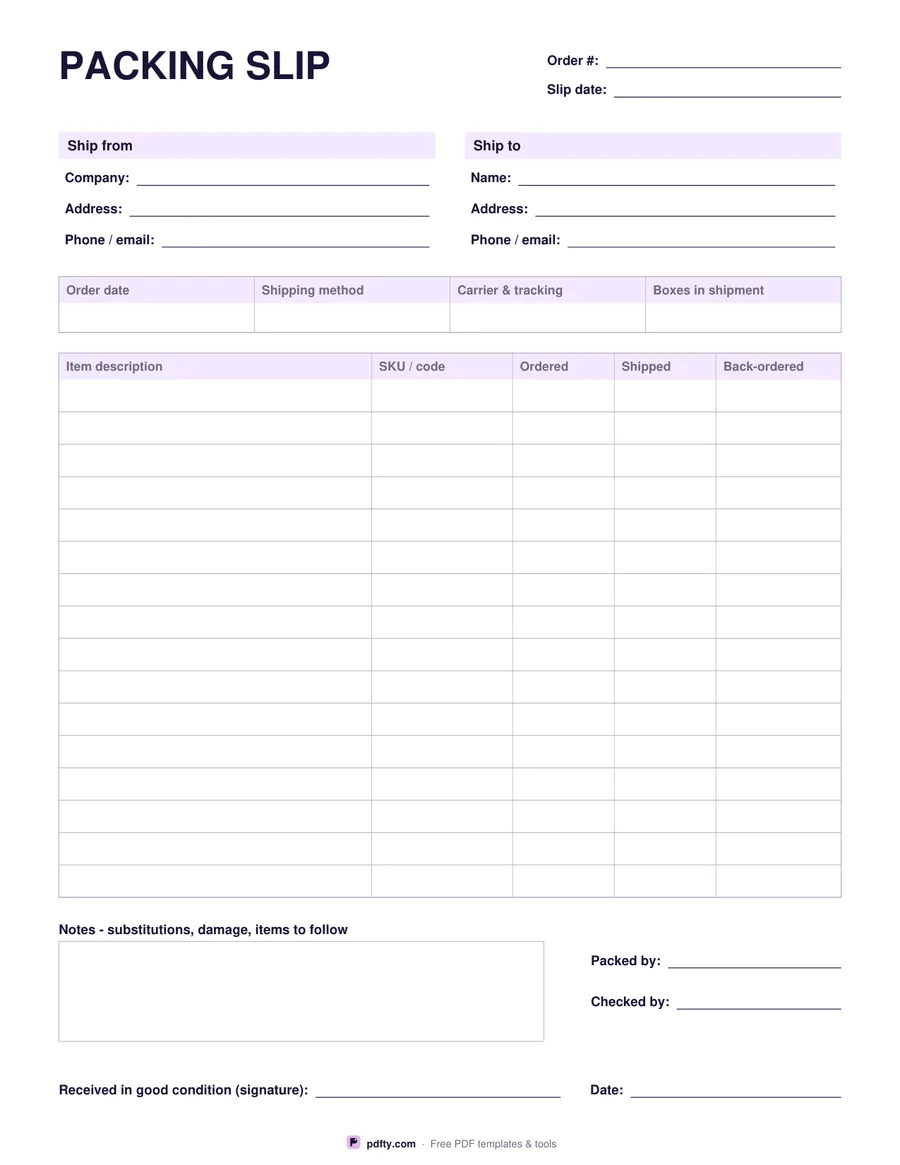
Free printable packing slip with ship-to details and item table
Paper size
Fill & edit free online

Free · no watermark · no sign-up for your first 20 downloads a day

Fillable PDF — type into the fields online or in any PDF viewer before printing.

A packing slip travels inside the parcel so whoever opens it can check the contents against the order. This one starts with the order number and slip date, then ship-from and ship-to blocks for the sender and the delivery address. A four-cell strip underneath records the order date, the shipping method, the carrier and tracking number, and how many boxes make up the shipment.

The body is a sixteen-row table with columns for item description, SKU or product code, quantity ordered, quantity shipped and quantity back-ordered — so a short shipment is obvious at a glance instead of turning into an email thread. Below it is a notes box for substitutions, damage or items still to follow, lines for who packed and who checked the order, and a signature and date for the person receiving it.

There are deliberately no prices anywhere on the sheet: a packing slip is a contents list, and the invoice handles the money separately. Every cell is a fillable form field, so you can type a slip from the order, print it and drop it in the box, or print a stack of blanks for the packing bench and fill them in by hand. The sheet prints at full size on US Letter or A4.
How to use it

  1. 1

    Fill in the order and addresses

    Order number, slip date, who the parcel is from and where it is going.

  2. 2

    Record the shipment details

    Order date, shipping method, carrier and tracking number, and the number of boxes.

  3. 3

    List the items

    Description and SKU, then how many were ordered, shipped and back-ordered on each line.

  4. 4

    Print or fill it in

    Print at 100% ("Actual size") so lines and boxes keep their exact spacing, or fill the form fields on screen in any PDF viewer.

Frequently asked questions

Yes. There is no watermark and no sign-up for your first 20 downloads each day; after that a free account keeps downloads going. You may print the file as often as you like for personal, school or business use.
That is what makes it a packing slip rather than an invoice. The parcel can be opened by a warehouse, a gift recipient or a customs officer, so the costs stay on the invoice you send separately.
Sixteen rows. For a bigger order, print a second sheet and number them, or merge two filled copies into one PDF with pdfty's Merge PDF tool.
Yes. Every cell, including the item table, is a form field. Fill it on screen, then print or save it with the order.
The quantity you owe the customer from this order. Leave it blank when the line shipped in full.
Yes — print two and keep one signed copy as a delivery record. Set your printer to 100% ("Actual size") so the table lines stay aligned.

More free templates

Work with your PDF