Printable 50/30/20 Budget Worksheet (Free PDF)
Split your take-home pay into needs, wants and savings, then check what you actually spent against each target.
Free · no watermark · no sign-up for your first 20 downloads a day
Fillable PDF — type into the fields online or in any PDF viewer before printing.
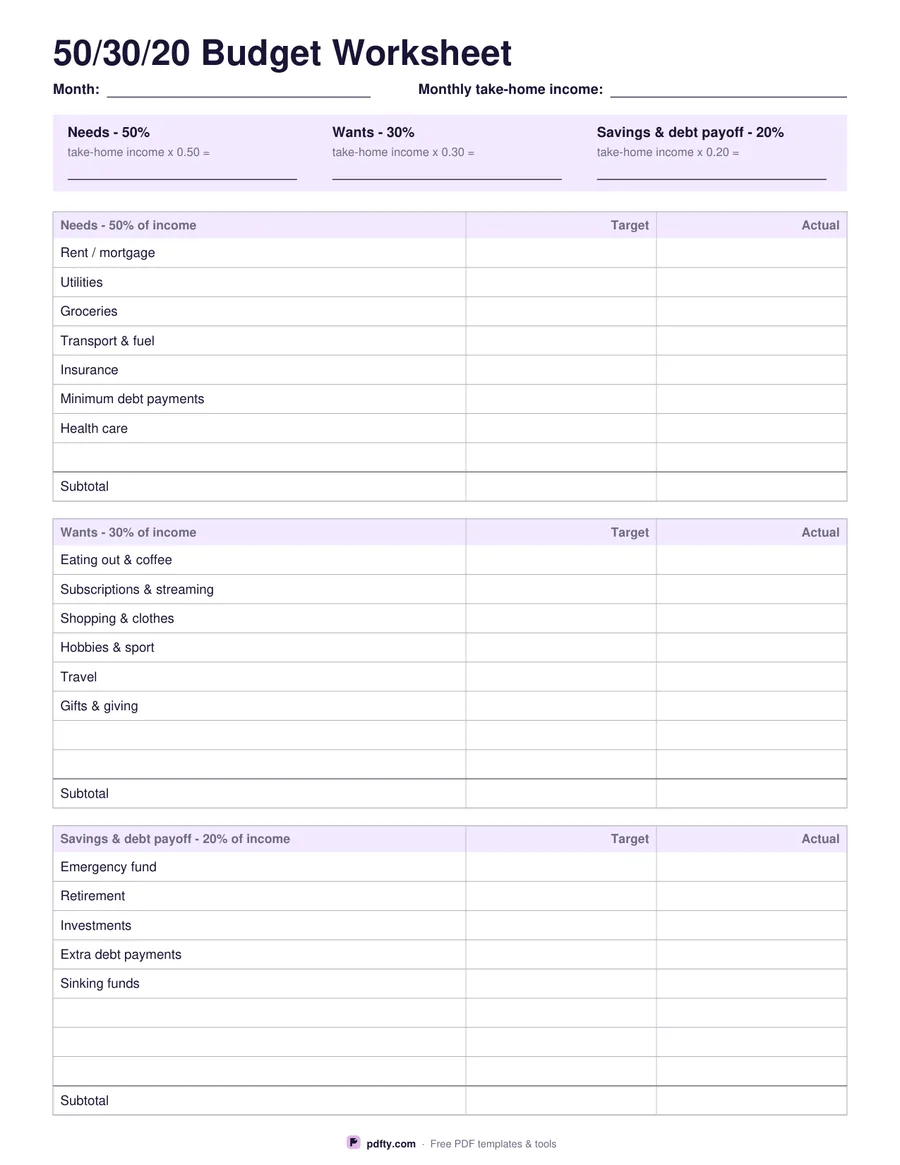
The 50/30/20 rule splits take-home pay three ways: half to needs, three tenths to wants, a fifth to savings and debt payoff. This worksheet starts with a field for your monthly take-home income, then a lavender calculation strip that spells out each target — take-home income times 0.50, times 0.30 and times 0.20 — with a box to write the worked figure in. No arithmetic is hidden; the sheet shows you exactly what to multiply.
Below the strip are three blocks, one for each share. Needs lists rent or mortgage, utilities, groceries, transport and fuel, insurance, minimum debt payments and health care. Wants lists eating out and coffee, subscriptions and streaming, shopping and clothes, hobbies and sport, travel and gifts. Savings and debt payoff lists an emergency fund, retirement, investments, extra debt payments and sinking funds. Every block has blank rows for your own lines and ends in a Subtotal row above a heavier rule.
Each block has a Target column and an Actual column, both right-aligned and free of currency symbols, so you plan on one side and record on the other. Everything is a fillable form field, which means you can save one copy per month and compare the subtotals against the targets in the strip at the top. Printed at full size, the income line, the calculation strip and all three blocks sit on a single US Letter or A4 page.