Meeting Minutes Template (Free PDF)

Minutes that record what was decided and who is doing what, not every word that was said.
Free printable meeting minutes with decisions, discussion and actions
Paper size
Fill & edit free online

Free · no watermark · no sign-up for your first 20 downloads a day

Fillable PDF — type into the fields online or in any PDF viewer before printing.

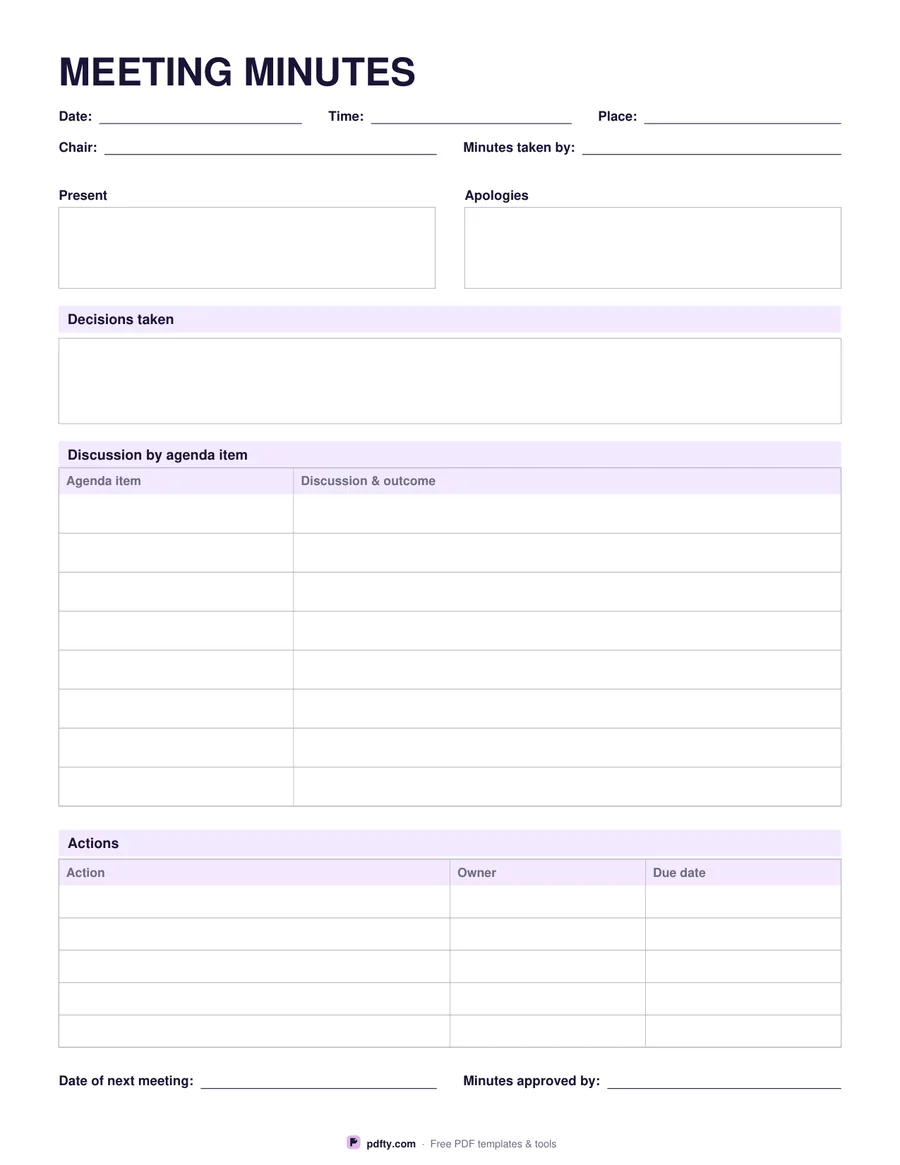
Good minutes are short. This sheet is built around that: the decisions and the actions get the most space, and the discussion is summarised a line at a time. The header records the date, time and place, who chaired, and who took the minutes. Two side-by-side boxes list who was present and who sent apologies — worth recording, because attendance is often what a decision later hangs on.

A full-width decisions box comes next, for the resolutions the meeting actually reached. Under it, an eight-row table pairs each agenda item with its discussion and outcome, so the minutes follow the agenda rather than wandering. The actions table then gives five rows for the action, its owner and a due date, which is the part most people read when the minutes land in their inbox.

The sheet ends with the date of the next meeting and a line for whoever approves the minutes at the following one. Every box and cell is a fillable field, so you can type the minutes straight after the meeting and circulate them as a PDF, or print the blank sheet and write on it while the meeting is running. It prints at full size on US Letter or A4.
How to use it

  1. 1

    Fill in the header

    Date, time, place, who chaired and who is taking the minutes, then list who is present and who sent apologies.

  2. 2

    Record decisions and discussion

    Write the decisions in the box, then one line of discussion and outcome per agenda item.

  3. 3

    Write down the actions

    Each action with a named owner and a due date — this is the part people act on.

  4. 4

    Print or fill it in

    Print at 100% ("Actual size") so lines and boxes keep their exact spacing, or fill the form fields on screen in any PDF viewer.

Frequently asked questions

Yes. There is no watermark and no sign-up for your first 20 downloads each day; after that a free account keeps downloads going. You may print the file as often as you like for personal, school or business use.
Yes. Every field is fillable, so you can type during the meeting, then save and email the PDF. To stop anyone editing it afterwards, flatten the file first.
Eight discussion rows and five actions, plus a decisions box of several lines. For a long meeting, print a second sheet and merge the filled copies.
No, and they are better when they do not. Record the decisions, the reasons behind them and the actions; leave the running commentary out.
Yes. The agenda template on pdfty uses the same item and action structure, so you can copy straight across.
The sheet is one page, so two meetings fit on one sheet of paper if you print double sided.

More free templates

Work with your PDF