Sight Words Practice Sheet (Free PDF)

Type the week's words into the PDF, print it, and the child traces each word once and then writes it twice on three-line guides.
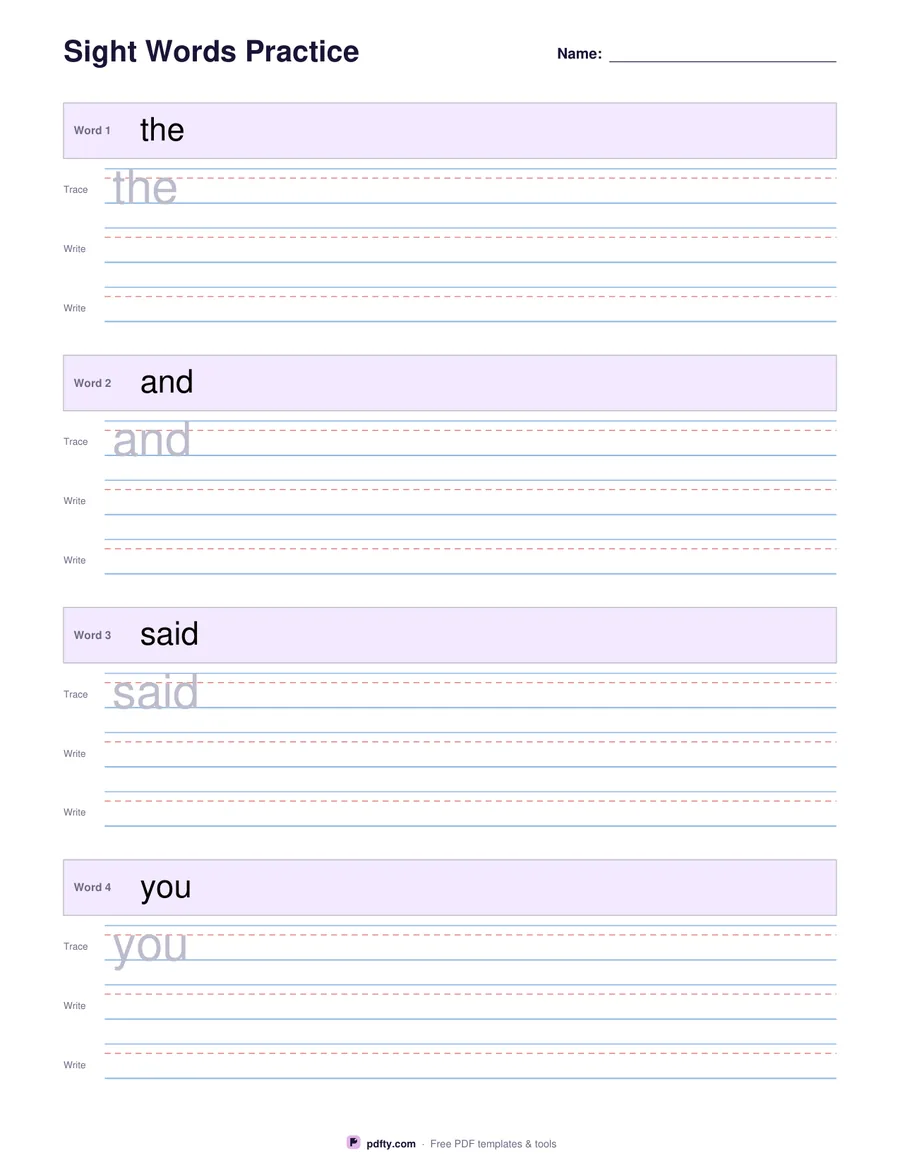
Printable sight words practice sheet with a word bar, a tracing line and two writing lines per word
Words per page
Paper size
Fill & edit free online

Free · no watermark · no sign-up for your first 20 downloads a day

Fillable PDF — type into the fields online or in any PDF viewer before printing.

Each word gets its own block on this sheet. The word sits in a shaded bar at the top of the block, a tracing line follows in light gray, and two empty writing lines come after it. Every line is a three-line guide: a solid top line, a dashed middle line at the x-height and a solid baseline, which is the guide children are taught to write between in kindergarten and first grade.

Choose four words per page for the biggest letters, or six words when your reader is ready for smaller handwriting. Four words give rows about a third of an inch tall; six words give slightly shorter rows and fit a longer list on one sheet. Both layouts fill the page from the title to the footer, so nothing is wasted.

The words are form fields, so a teacher or parent can type this week's list before printing instead of writing it out by hand. The sheet opens with the, and, said and you already filled in as an example; select a word and type over it. Print one copy per child, or a fresh copy each week with a new list.
How to use it

  1. 1

    Pick the layout

    Choose 4 words per page for the largest letters or 6 words for a longer list, then US Letter or A4.

  2. 2

    Type this week's words

    Click the shaded word bar in each block and type the word, then type the same word on the gray tracing line below it so the child has something to trace.

  3. 3

    Print or fill it in

    Print at 100% ("Actual size") so lines and boxes keep their exact spacing, or fill the form fields on screen in any PDF viewer.

  4. 4

    Trace, then write

    The child traces the gray word once and writes it twice more on the empty guide lines.

Frequently asked questions

Yes. There is no watermark and no sign-up for your first 20 downloads each day; after that a free account keeps downloads going. You may print the file as often as you like for personal, school or business use.
Yes. The word bar and the gray tracing line in every block are form fields. Fill them in Adobe Reader, Preview, Chrome or Edge and print, or leave them as they are and write the words by hand.
The dark word at the top of the block is the model the child reads, and the light gray copy on the first guide line is what the child traces. They are separate fields so you can leave the tracing line empty if you only want writing practice.
Four or six, depending on the option you choose. For a ten-word list print two sheets.
Yes. The four-word layout gives rows roughly a third of an inch tall with a dashed middle line, which matches the handwriting paper used in most kindergarten classrooms.
Yes. Open the PDF in an app such as GoodNotes, Notability or Xodo and the child can trace and write with a stylus.

More free templates

Work with your PDF