Book Report Template (Free Printable PDF)

One page that walks a student through a book: what it was, who was in it, what happened and what they thought of it.
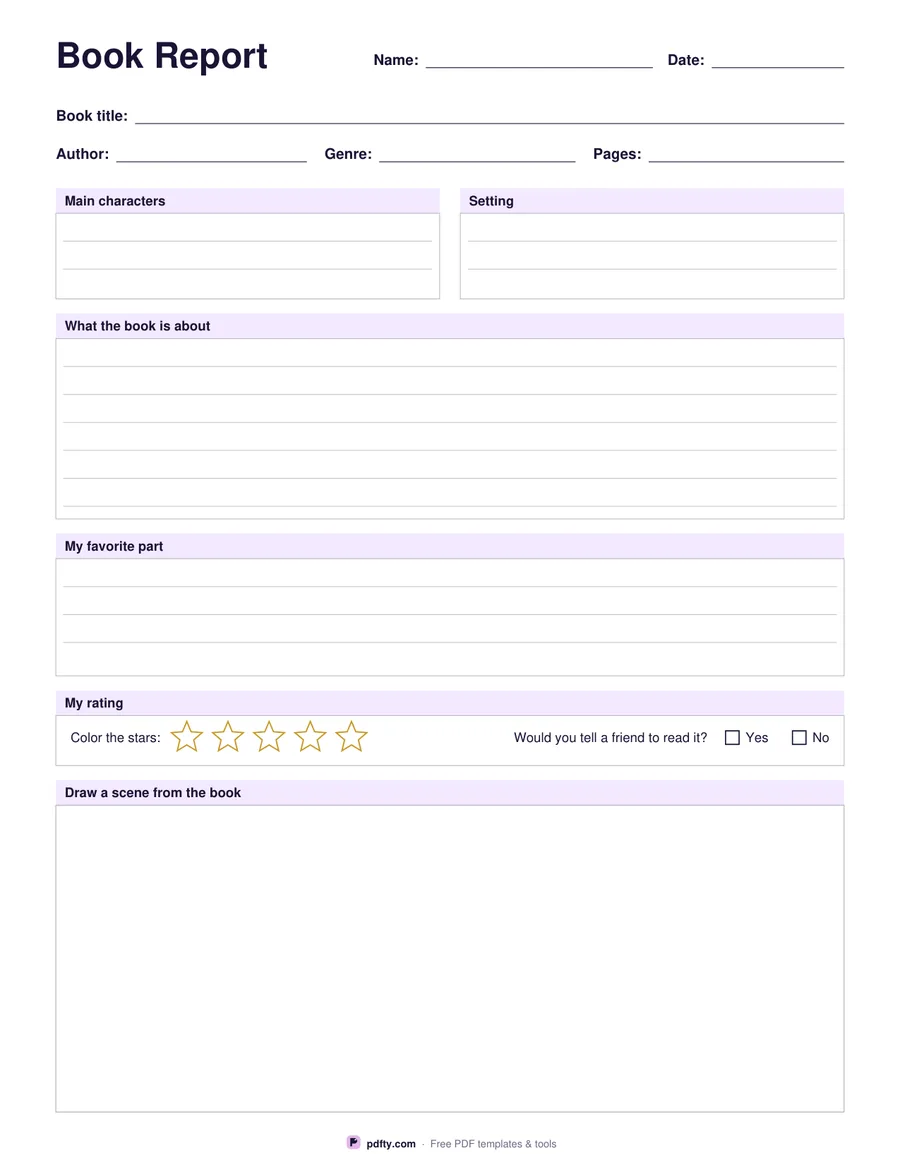
Printable book report template with title, characters, summary, star rating and a drawing box
Grade level
Paper size
Fill & edit free online

Free · no watermark · no sign-up for your first 20 downloads a day

Fillable PDF — type into the fields online or in any PDF viewer before printing.

The sheet starts with the facts: book title, author, genre and page count on ruled lines across the top. Below that are boxes for the main characters and the setting side by side, then a wide box for what the book is about, then a box for the student's favourite part. Every box is ruled, so handwriting stays straight, and every box is also a form field if the report is being typed.

The rating strip near the bottom has five outline stars to color in and a yes or no tick box for whether the student would recommend the book to a friend. Under that is a large empty box for drawing a scene, which is often the part younger readers finish first and the part that shows most clearly whether they followed the story.

The grade option changes how the page is divided. Elementary gives wider ruled lines, shorter writing boxes and a large drawing box, which suits a reader who writes a sentence or two and then wants to draw. Middle school shrinks the drawing box, tightens the line spacing and roughly doubles the room for the summary and the favourite part, so an older student can write in paragraphs instead of single sentences. Everything else on the page stays the same.
How to use it

  1. 1

    Choose the grade level

    Elementary gives bigger lines and a large drawing box; middle school gives more writing room and a smaller drawing box.

  2. 2

    Fill it in on screen or print it

    Type the title, author and the written sections in any PDF viewer, or print the page and write by hand.

  3. 3

    Print or fill it in

    Print at 100% ("Actual size") so lines and boxes keep their exact spacing, or fill the form fields on screen in any PDF viewer.

  4. 4

    Color the stars and draw

    The student colors in the star rating, ticks yes or no, and draws a scene from the book in the box at the bottom.

Frequently asked questions

Yes. There is no watermark and no sign-up for your first 20 downloads each day; after that a free account keeps downloads going. You may print the file as often as you like for personal, school or business use.
The name, date, book title, author, genre, pages, characters, setting, summary and favourite part are all form fields, and the recommend question is a tick box. The stars and the drawing box are for pen and paper.
Elementary has wider ruled lines, a short summary box and a drawing box that fills the lower third of the page. Middle school narrows the lines and gives the summary and favourite part about twice as much space.
Yes, one page in either grade level, at US Letter or A4.
Yes. Nothing on the page is tied to a particular book, so the same template works all year. Print a stack and keep them in the reading corner.
Yes. Text typed into the fields prints like any other text. To lock it in place before sharing the file, flatten it with pdfty's Flatten PDF tool.

More free templates

Work with your PDF