Printable Award Certificate (Free PDF)

A landscape certificate with a decorative border, a centred layout and blanks for the award, the name, the reason, the date and two signatures.
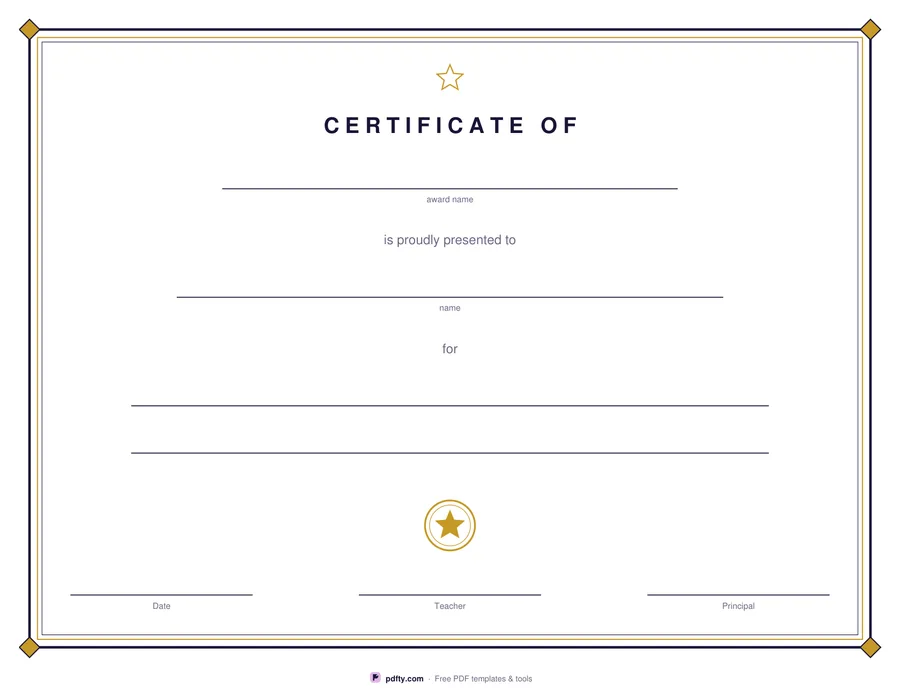
Printable award certificate with a decorative border, blanks for the name and reason, and two signature lines
Border style
Paper size
Fill & edit free online

Free · no watermark · no sign-up for your first 20 downloads a day

Fillable PDF — type into the fields online or in any PDF viewer before printing.

The certificate is laid out the way a certificate should be: a ruled border around the whole sheet, generous space in the middle and everything centred. The heading reads CERTIFICATE OF above a blank for the award itself, so the same sheet can say achievement, perfect attendance, most improved or star reader. Below it are a wide blank for the name and two more for the reason the award was given.

At the foot of the page a printed seal sits above three short blanks: a date on the left and two signature lines, labelled Teacher and Principal, in the middle and on the right. Small gray captions under each blank say what belongs there, which keeps a hand-filled certificate tidy without cluttering the design. The two signature lines mean a class teacher and a head of year can both sign the same sheet, which is how most school awards are given out.

Classic uses a double rule in dark ink and gold with a diamond at each corner. Playful swaps it for a rounded lavender and rose frame with small gold stars around the edge, which suits younger classes and end-of-year assemblies. Both print landscape on one page at US Letter or A4, and every blank is a form field so names can be typed before printing.
How to use it

  1. 1

    Choose a border

    Classic for a formal double border, playful for a rounded frame with stars, then US Letter or A4.

  2. 2

    Type the award and the name

    Fill in the award, the recipient's name and the reason in any PDF viewer; the text centres itself on each blank.

  3. 3

    Print or fill it in

    Print at 100% ("Actual size") so lines and boxes keep their exact spacing, or fill the form fields on screen in any PDF viewer.

  4. 4

    Date and sign it

    Add the date and sign the two lines at the bottom by hand before you hand it over.

Frequently asked questions

Yes. There is no watermark and no sign-up for your first 20 downloads each day; after that a free account keeps downloads going. You may print the file as often as you like for personal, school or business use.
Yes. The award, the recipient's name, the two reason lines, the date and both signature lines are form fields, and text you type centres itself on the blank in Adobe Reader, Preview, Chrome and Edge.
Yes. The certificate always prints landscape on one page, at US Letter or A4.
Anything you award: reading, attendance, effort, sports day, end of year, a club or a staff thank you. The award name is a blank, so the wording is yours.
The border sits a little inside the paper edge so that home and school printers, which cannot print to the very edge, reproduce all four sides.
Flatten the PDF with pdfty's Flatten PDF tool before you share or print it; the text stays exactly where it is and the fields disappear.

More free templates

Work with your PDF