Printable Attendance Sheet (Free PDF)

A landscape class register with student names down the side, school days across the top and a key for present, absent, late and excused.
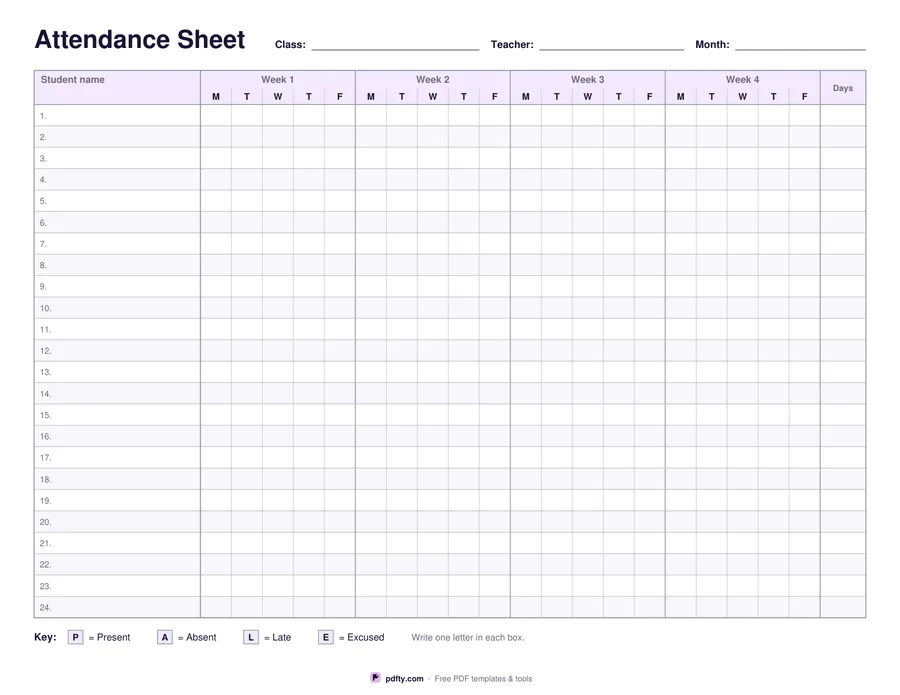
Printable class attendance sheet with student rows, weekly day columns and a marks key
Weeks
Paper size
Fill & edit free online

Free · no watermark · no sign-up for your first 20 downloads a day

Fillable PDF — type into the fields online or in any PDF viewer before printing.

Names run down the left in twenty-four numbered rows and the school days run across the page, grouped under Week 1, Week 2 and so on with M, T, W, T and F beneath each week. The last column is a running total of days present. Rows are lightly shaded in alternating bands so your eye stays on the right student when you are marking the far right of the sheet.

Choose four weeks for a short month or a half term, or five weeks to cover a full calendar month without starting a second page. Four weeks gives twenty day boxes per student and the widest squares to write in; five weeks gives twenty-five slightly narrower boxes and still leaves room for a letter in each one. Both fit on a single landscape page with the key printed underneath the grid, so nothing is lost when the sheet is photocopied.

The key at the bottom sets out the four marks the sheet expects: P for present, A for absent, L for late and E for excused. Student names, the class, teacher and month lines and the totals column are form fields, so you can type your register once and reprint it every month. The day boxes are deliberately left empty to be marked by hand.
How to use it

  1. 1

    Choose the length

    Pick 4 weeks for a short month or half term, or 5 weeks for a full month, then US Letter or A4.

  2. 2

    Type your class list

    Click each numbered row and type the student's name, then fill in the class, teacher and month lines at the top.

  3. 3

    Print or fill it in

    Print at 100% ("Actual size") so lines and boxes keep their exact spacing, or fill the form fields on screen in any PDF viewer.

  4. 4

    Mark the register

    Write P, A, L or E in the box for each student and day, and add up the days present in the last column.

Frequently asked questions

Yes. There is no watermark and no sign-up for your first 20 downloads each day; after that a free account keeps downloads going. You may print the file as often as you like for personal, school or business use.
Yes. All twenty-four name rows are form fields, along with the class, teacher and month lines and the totals column. Type the list once, save the file and print a fresh copy each month.
No. The daily boxes are left empty on purpose so the register can be marked by hand; a grid of hundreds of tiny fields would be slow to click through and hard to read.
Twenty-four per page. For a larger class, print a second sheet and continue the numbering by hand.
The grid covers Monday to Friday, which is the normal school week. If you teach on a weekend day, use the notes space beside the key or mark the extra session in the totals column.
P is present, A is absent, L is late and E is excused. The key is printed under the grid so a substitute teacher can read it straight off the page.

More free templates

Work with your PDF