Work Order Template (Free Fillable PDF)

The job sheet a trade carries to site: what was asked for, the hours, the parts, and both signatures.
Free fillable work order form with labour, parts and signatures
Paper size
Fill & edit free online

Free · no watermark · no sign-up for your first 20 downloads a day

Fillable PDF — type into the fields online or in any PDF viewer before printing.

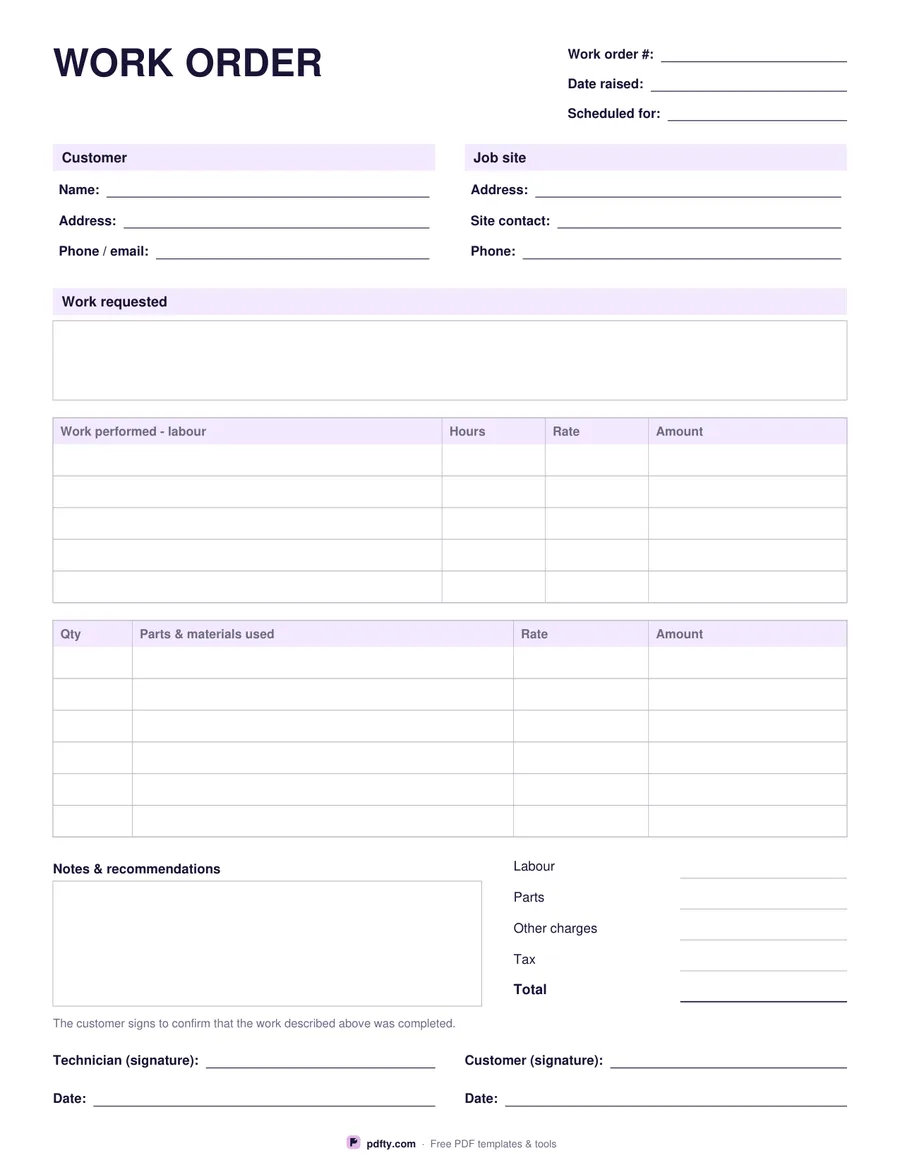
A work order is the paper trail for a single job, from the call-out to the sign-off. The header holds the work order number, the date it was raised and the date it is scheduled for. Two blocks follow: the customer's name, address and contact details, and the job site — which is often somewhere else entirely, so it gets its own address, site contact and phone. A wide box records the work requested, in the customer's words.

The labour table gives five rows for the work actually performed, with hours, rate and amount on each line. Under it, a six-row parts table records quantity, the part or material used, the rate and the amount. The totals block then covers labour, parts, other charges, tax and the total, with a notes and recommendations box beside it for anything the technician spotted that needs doing next time.

Two signature lines close the job: the technician and the customer, each with a date, under a short line confirming the work described was completed. Every field is fillable, so the office can type the job details before the visit and the technician fills in the rest on site. Money columns are labelled Rate, Amount and Total without a currency symbol. US Letter or A4.
How to use it

  1. 1

    Raise the order

    Number it, add the date, the customer and the job site address, and write down the work requested.

  2. 2

    Record labour and parts

    Hours and rate for each piece of work, then the parts and materials used with their amounts.

  3. 3

    Total the job

    Fill in labour, parts, other charges, tax and the total, and note anything that needs attention next visit.

  4. 4

    Get both signatures

    The technician and the customer sign and date to confirm the work was completed.

Frequently asked questions

Yes. There is no watermark and no sign-up for your first 20 downloads each day; after that a free account keeps downloads going. You may print the file as often as you like for personal, school or business use.
No. Amounts are typed by hand — the form does not add anything up, so it behaves the same in every PDF viewer.
For a small job, many trades do. If you need a proper invoice with payment terms and a due date, use pdfty's invoice template and copy the totals across.
Because they often are: a landlord, letting agent or main contractor books the work, while the job happens at another address with a different contact.
Yes. Open the PDF in a form-capable app, type the hours and parts, and capture the customer's signature with pdfty's Sign PDF tool.
Yes — open the file in pdfty's editor and place your name and logo beside the heading before you print a batch.

More free templates

Work with your PDF