Estimate Template (Free Fillable PDF)

Quote a job on one page: fourteen line items, clear totals, your terms, and a line for the customer to accept.
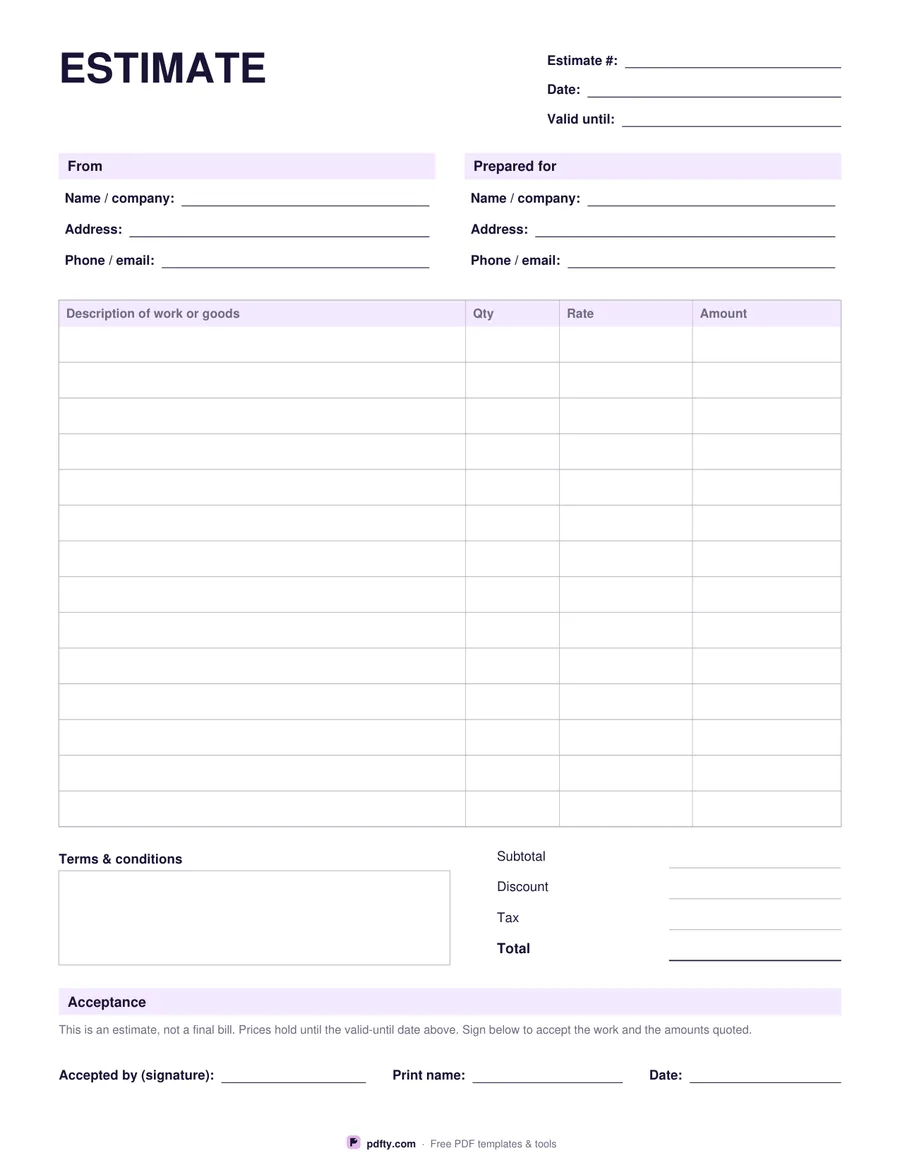
Free fillable estimate template with line items, totals and acceptance signature
Paper size
Fill & edit free online

Free · no watermark · no sign-up for your first 20 downloads a day

Fillable PDF — type into the fields online or in any PDF viewer before printing.

An estimate is a priced offer, not a bill, and this sheet is laid out to make that clear. The header carries an estimate number, the date and a valid-until date so the customer knows how long the prices hold. Below it are two blocks: your name, address and contact details on the left, the customer's on the right. Then comes the work itself, fourteen lines with a description, quantity, rate and amount.

Totals run down the right-hand side: subtotal, discount, tax and the final total. Beside them is a terms and conditions box for deposits, lead times, what is excluded, and anything else that should be agreed before work starts. The page ends with an acceptance strip — a short note explaining that this is an estimate rather than a final bill, then lines for the customer's signature, their printed name and the date they accepted.

Everything on the sheet is fillable, so you can quote on screen, save the PDF and email it to the customer, then print the accepted copy for your job file. Money columns are labelled Rate, Amount and Total with no currency symbol printed, so the form suits any country and any currency. It prints on US Letter or A4 without rescaling, and the filled fields print as ordinary text.
How to use it

  1. 1

    Number and date the estimate

    Give it a unique number and set a valid-until date so the quoted prices do not run on forever.

  2. 2

    Describe the work

    One line per item or task, with quantity, rate and line amount.

  3. 3

    Add totals and terms

    Fill in subtotal, discount, tax and total, then write your payment and scheduling terms in the box.

  4. 4

    Send it for acceptance

    Email the PDF or print it; the customer signs and dates the acceptance line to approve the work.

Frequently asked questions

Yes. There is no watermark and no sign-up for your first 20 downloads each day; after that a free account keeps downloads going. You may print the file as often as you like for personal, school or business use.
An estimate quotes a price before the work; an invoice asks for payment after it. Many trades send the estimate first, then copy the agreed figures onto an invoice.
No. Amounts are typed by hand — the form does not add anything up, so it behaves the same in every PDF viewer.
Fourteen lines. For a longer quote, print a second copy, write "page 2" on it and merge the two files with pdfty's Merge PDF tool.
That depends on your local law and on what your terms say. The acceptance line records that the customer agreed to the work and the amounts; check with a professional if the job is large.
Yes. Open it in any PDF app that supports forms, type into the fields, and sign with a stylus or with pdfty's Sign PDF tool.

More free templates

Work with your PDF