Printable Mileage Log (Free PDF)

A clean record of business trips: odometer readings, distance, purpose and route, with a rate line and a total at the foot.
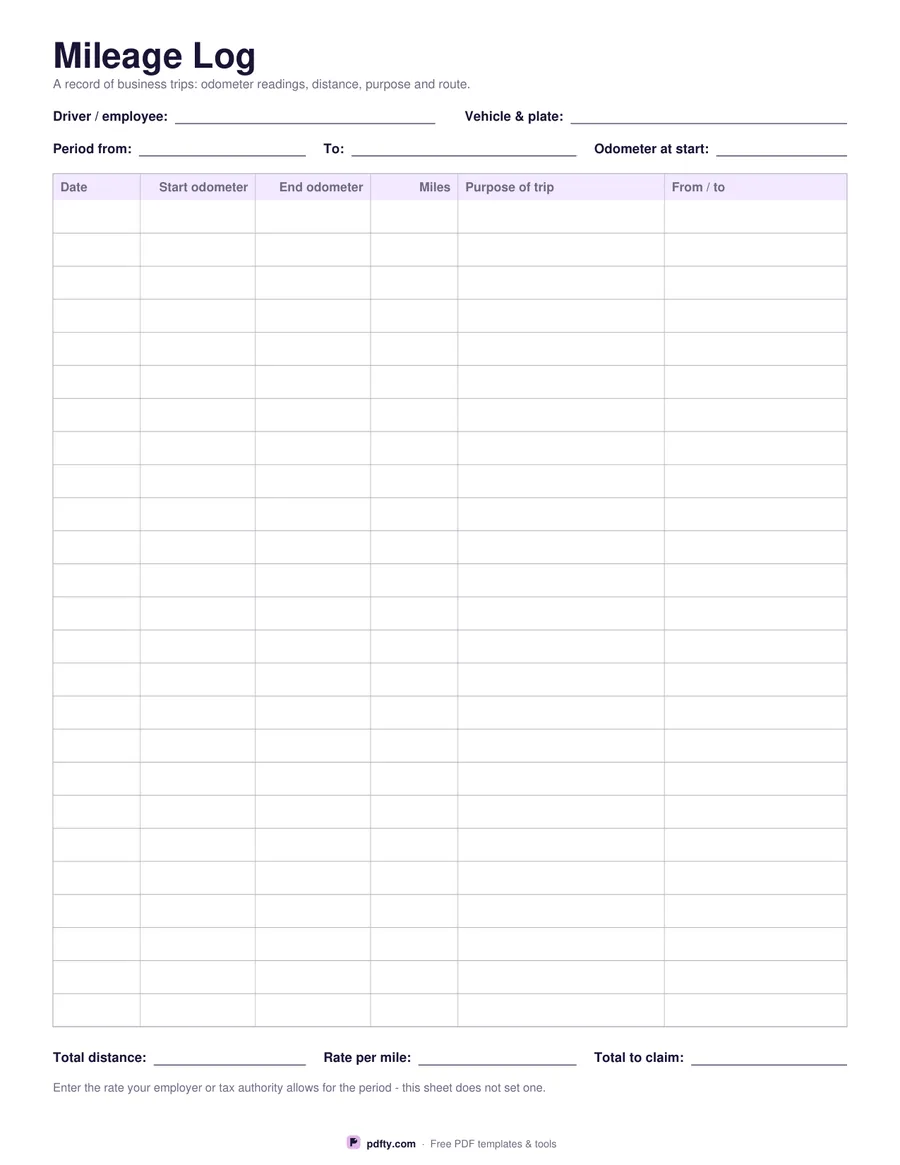
Printable mileage log with 25 rows for date, odometer readings, distance, purpose and destination
Distance unit
Paper size
Fill & edit free online

Free · no watermark · no sign-up for your first 20 downloads a day

Fillable PDF — type into the fields online or in any PDF viewer before printing.

If you claim business travel, the record has to show more than a number. This log gives you twenty-five rows with the date, the odometer reading when you set off, the reading when you arrived, the distance driven, the purpose of the trip and where you went. The three numeric headers are right-aligned over their figures. Above the table there are fields for the driver, the vehicle and plate, the period the sheet covers and the odometer reading at the start of that period.

At the foot of the page sit three lines: total distance, rate per mile or kilometre, and total to claim. The rate is deliberately left blank. Mileage rates differ by country, by employer and by tax year, and they change, so this sheet does not print one — enter whatever rate your employer or tax authority allows for the period you are claiming.

Choose miles or kilometres and the distance column header and the rate line change to match. Every cell is a fillable form field, so you can keep the log on a laptop and type each trip in, or print it, leave it in the glovebox and fill it in by hand. Nothing else on the sheet changes between the two units, so a team split across countries can use one layout. One page, US Letter or A4.
How to use it

  1. 1

    Pick miles or kilometres

    The distance column and the rate line are labelled with whichever unit you choose.

  2. 2

    Fill in the header

    Enter the driver, the vehicle, the period the log covers and the odometer reading at the start.

  3. 3

    Print or fill it in

    Print at 100% ("Actual size") so lines and boxes keep their exact spacing, or fill the form fields on screen in any PDF viewer.

  4. 4

    Record each trip

    Log the odometer in and out, the distance, the purpose and the route, then total the distance and work out the claim.

Frequently asked questions

Yes. There is no watermark and no sign-up for your first 20 downloads each day; after that a free account keeps downloads going. You may print the file as often as you like for personal, school or business use.
The sheet does not state a rate, because rates differ by country, employer and tax year. Check the rate your employer or tax authority allows for the period you are claiming and write it on the rate line.
Twenty-five. For a busy month, print several copies and number them, or print double sided.
Yes. All twenty-five rows and the header and total fields are form fields, so you can type the log in any PDF viewer and save it.
That depends on your employer or tax authority's own requirements. The log records the details most of them ask for — date, odometer readings, distance, purpose and destination — but check their rules before you rely on it.
Yes. Choose the kilometres option and the distance column and the rate line are labelled in kilometres instead of miles.

More free templates

Work with your PDF