Printable Receipt Template (Free PDF)

A fillable payment receipt you can hand over on the spot — a full sheet, or two or three tear-off slips.
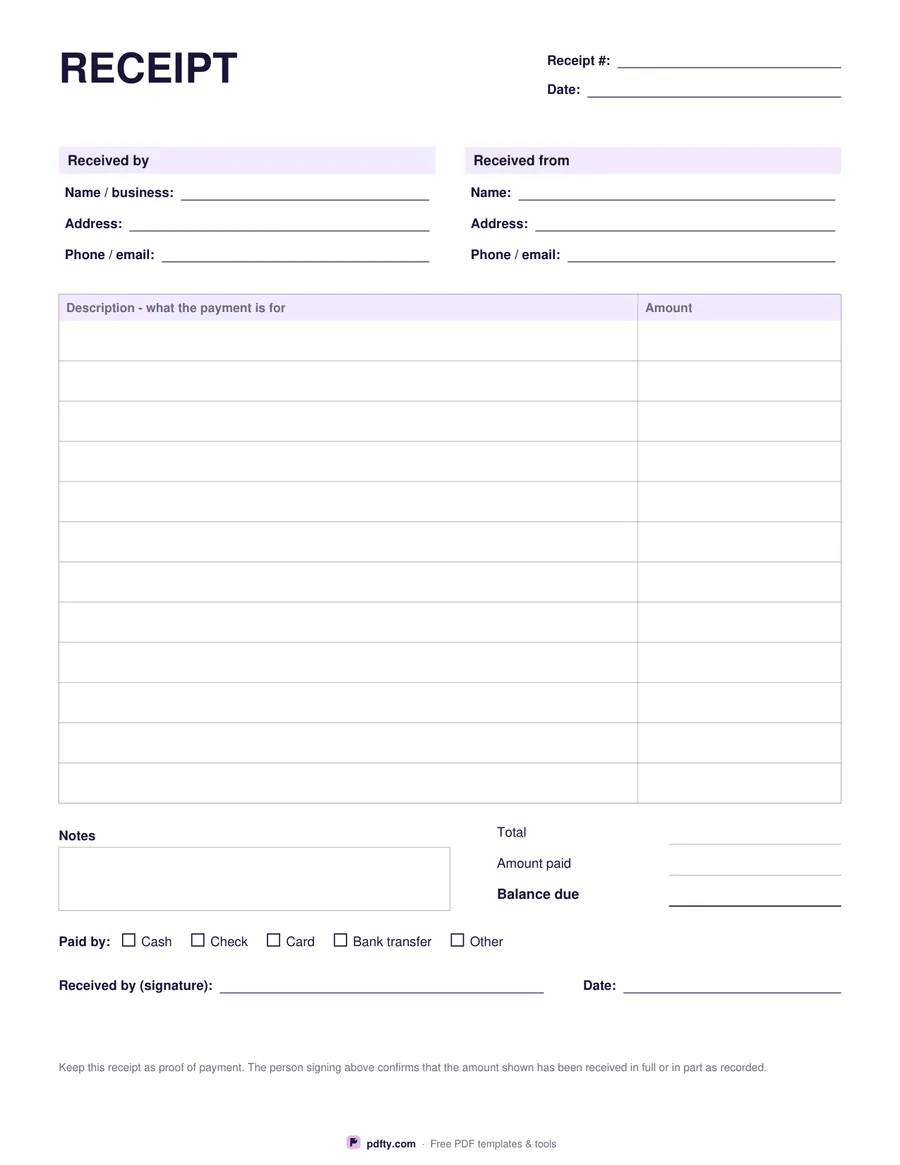
Free printable receipt template with payment details and signature line
Receipts per page
Paper size
Fill & edit free online

Free · no watermark · no sign-up for your first 20 downloads a day

Fillable PDF — type into the fields online or in any PDF viewer before printing.

A receipt is the proof that money changed hands, so it has to carry the same handful of facts every time: who paid, who received, how much, what for, and what is still owed. This template has all of them. The full-page version starts with a receipt number and date, then blocks for the business receiving the payment and the person paying, a twelve-row table for describing what the payment covers, and totals for the amount, the amount paid and the balance due.

Under the totals sit a notes box, a row of payment-method boxes for cash, check, card, bank transfer or other, and a signature line with a date. Choose two or three receipts per page instead and you get the same fields in a compact slip: number and date, received from, amount, balance due, payment method, a free-text box for what the payment is for, and a signature line. A dashed cut line between the slips shows where to tear.

Every line is a real form field, so you can type a receipt on screen and email it to the payer, or print a stack of blanks and keep them by the till to fill in with a pen. Money columns are labelled Amount and Balance due with no currency symbol printed, so the same sheet works wherever you are and in whatever you are paid in. It prints on US Letter or A4 at full size, with no watermark and nothing to sign up for.
How to use it

  1. 1

    Pick how many per page

    One full-page receipt with an itemised table, or two or three tear-off slips on a sheet.

  2. 2

    Fill in the payment

    Receipt number, date, who paid, the amount, what it was for, and the balance still due.

  3. 3

    Tick the payment method

    Cash, check, card, bank transfer or other, then sign the receipt.

  4. 4

    Print or fill it in

    Print at 100% ("Actual size") so lines and boxes keep their exact spacing, or fill the form fields on screen in any PDF viewer.

Frequently asked questions

Yes. There is no watermark and no sign-up for your first 20 downloads each day; after that a free account keeps downloads going. You may print the file as often as you like for personal, school or business use.
You can type in it. Every line, including the description table and the notes box, is a fillable form field that works in Adobe Reader, Preview, Chrome and Edge.
No. Amounts are typed by hand — the form does not add anything up, so it behaves the same in every PDF viewer.
The money columns are labelled Amount and Balance due with no symbol so the same sheet works in any country. Write your currency next to the figure if it is not obvious.
Print the two- or three-up version, fill in a slip when you take a payment, and cut along the dashed line. Each slip has its own number, date and signature line.
Yes. Open the downloaded PDF in pdfty's editor and place your logo in the space beside the heading before you print.

More free templates

Work with your PDF