Expense Report Template (Free PDF)

A one-page employee expense claim with sixteen rows, a receipt tick box per line, and space for approval.
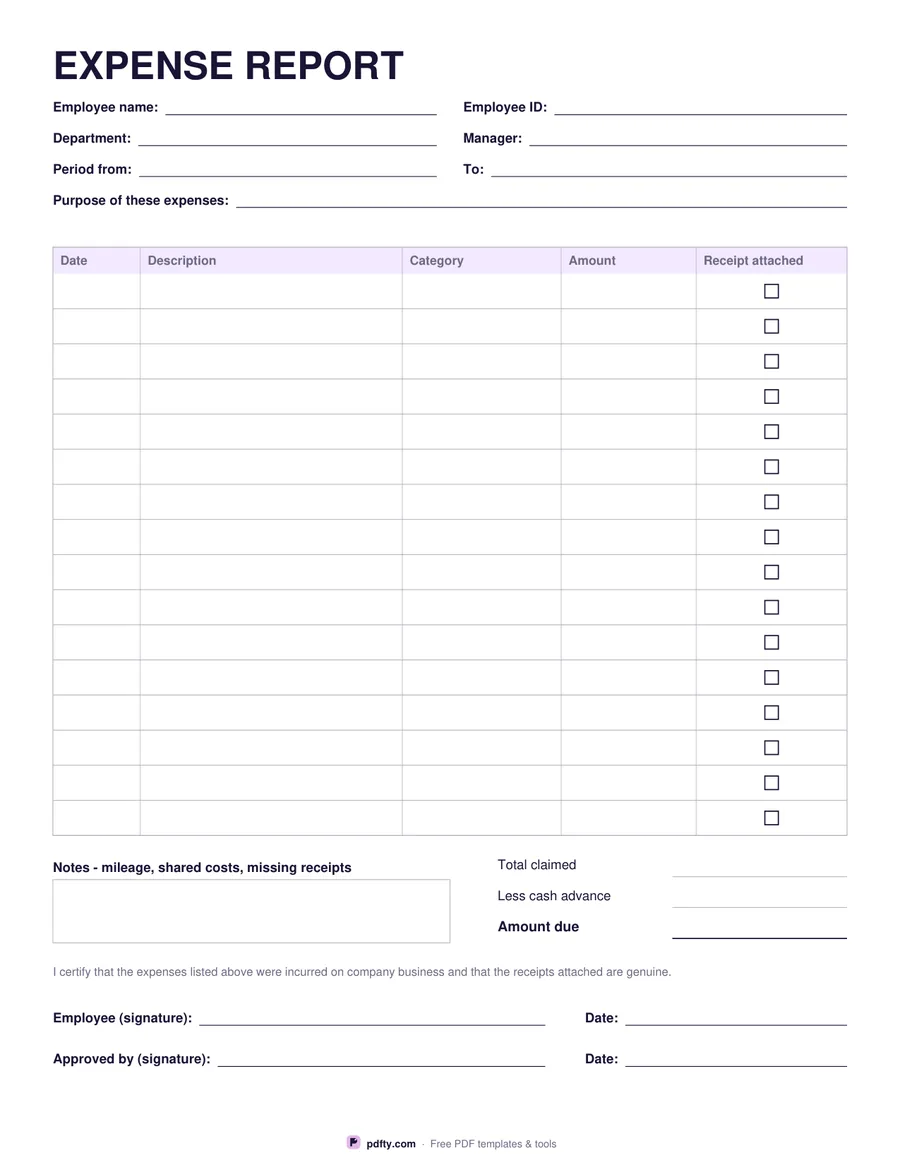
Free fillable expense report with 16 expense rows and approval signatures
Paper size
Fill & edit free online

Free · no watermark · no sign-up for your first 20 downloads a day

Fillable PDF — type into the fields online or in any PDF viewer before printing.

This is the sheet an employee fills in to get money back. The header asks for the employee's name and ID, their department and manager, the period the claim covers, and a line for the purpose of the expenses — a conference, a site visit, a month of mileage. Keeping the purpose on the form saves the approver from asking later.

The table gives sixteen rows with columns for date, description, category and amount, plus a tick box on each line to confirm the receipt is attached. Below it, the totals block covers the total claimed, any cash advance already paid, and the amount still due to the employee. A notes box sits beside the totals for mileage workings, shared costs or a missing receipt that needs explaining.

The page finishes with a short certification sentence and two signature lines: one for the employee, one for the approver, each with a date. All fields and tick boxes are fillable, so a claim can be typed, signed with pdfty's Sign PDF tool and emailed, or printed and filled in by hand. Amounts are labelled without a currency symbol. US Letter or A4.
How to use it

  1. 1

    Fill in the header

    Name, employee ID, department, manager, the period claimed and what the expenses were for.

  2. 2

    List each expense

    One row per receipt: date, description, category and amount. Tick the box when the receipt is attached.

  3. 3

    Total the claim

    Add the total claimed, subtract any cash advance, and write the amount due.

  4. 4

    Sign and send for approval

    Sign and date, then pass it to your manager for their signature.

Frequently asked questions

Yes. There is no watermark and no sign-up for your first 20 downloads each day; after that a free account keeps downloads going. You may print the file as often as you like for personal, school or business use.
No. Amounts are typed by hand — the form does not add anything up, so it behaves the same in every PDF viewer.
Sixteen rows on one page. For a longer claim, print a second sheet and merge the filled copies with pdfty's Merge PDF tool.
Tick it on every line where a receipt is attached, so the approver can see at a glance which items still need backup.
Yes. Photograph them, turn the images into a PDF with JPG to PDF, then merge that file onto the back of the claim.
Yes. Open it in a PDF app that supports forms, type into the fields and tap the tick boxes.

More free templates

Work with your PDF