Printable Password Log (Free PDF)

A paper record of where your accounts live and how to get back into them, written around hints and recovery details rather than the passwords themselves.
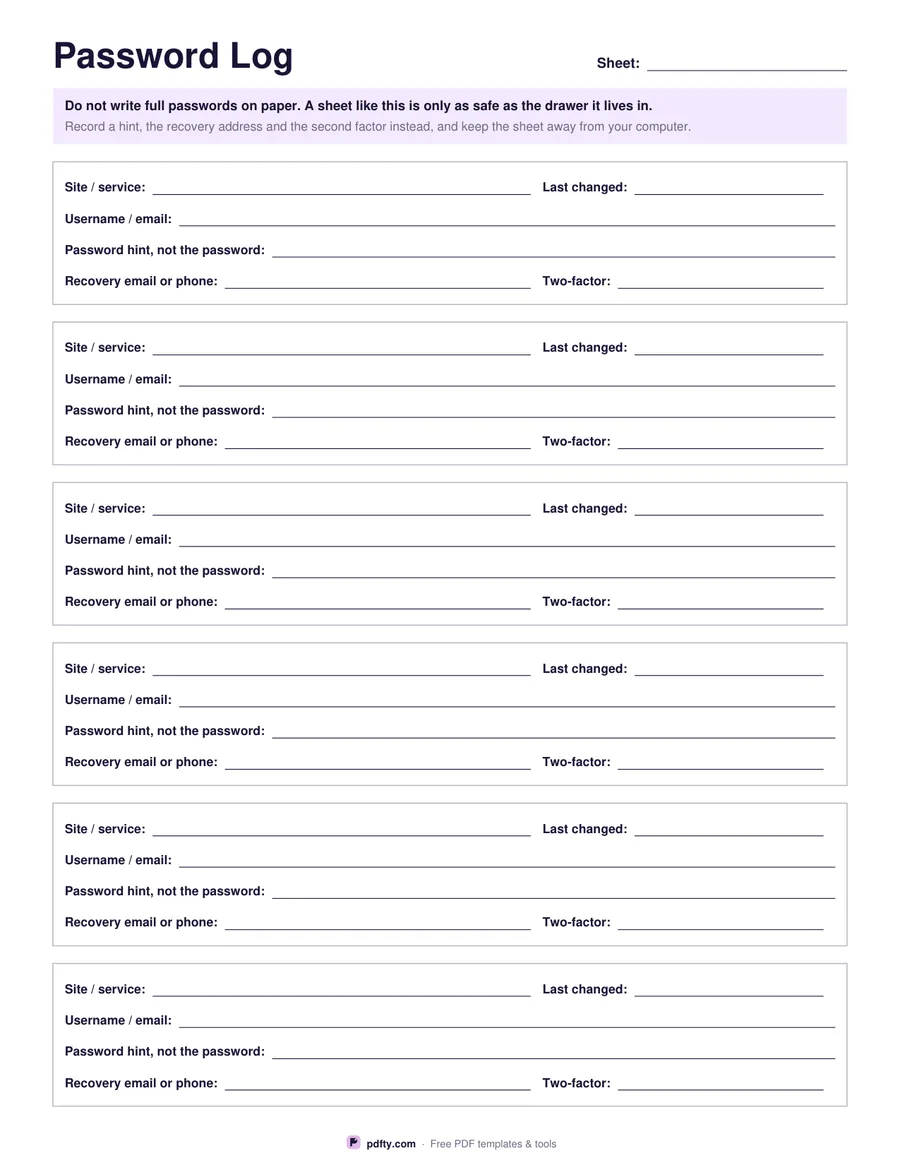
Printable password log sheet with entries for site, username, password hint and recovery details
Six compact entries, without the notes line.
Entries per page
Paper size
Fill & edit free online

Free · no watermark · no sign-up for your first 20 downloads a day

Fillable PDF — type into the fields online or in any PDF viewer before printing.

Writing full passwords on paper is a genuine risk: a sheet in a desk drawer or taped under a keyboard can be read by anyone who walks past, and one photograph of it travels anywhere. This log is deliberately built the other way round. Each entry records the site or service, the username, a hint that only means something to you, the recovery email or phone, the two-factor method and the date you last changed it.

That is usually all you need. When you are locked out, what gets you back in is knowing which address the reset email goes to and which app holds the code, not the password itself. The sheet says this in print at the top, so anyone who picks it up knows what it is and is not. A password manager is still the better everyday tool; keep this for the handful of accounts that have to survive losing your phone.

Choose four entries per page, which leaves each one a notes line and plenty of writing room, or six for a denser sheet. Every line is a PDF form field, although for this sheet in particular, filling it in by hand and keeping it locked away is the safer habit. Print as many pages as you have accounts worth recording, and date the sheet so you know which copy is current. One page, US Letter or A4.
How to use it

  1. 1

    Choose how many entries

    Four per page for more room and a notes line, or six for a denser sheet. Then pick US Letter or A4.

  2. 2

    Print or fill it in

    Print at 100% ("Actual size") so lines and boxes keep their exact spacing, or fill the form fields on screen in any PDF viewer.

  3. 3

    Fill in hints, not passwords

    Write the site, the username, a hint only you would understand, the recovery email or phone and the second factor. Leave the password itself out.

  4. 4

    Store it somewhere locked

    A drawer that locks, a safe, or with your other documents — not taped to the monitor and not in a bag you carry around.

Frequently asked questions

Yes. There is no watermark and no sign-up for your first 20 downloads each day; after that a free account keeps downloads going. You may print the file as often as you like for personal, school or business use.
Not the passwords themselves. A sheet of plain passwords is readable by anyone who finds it and copies in one photo. This log is designed for hints, recovery addresses and two-factor details, which are far less useful to a stranger and are what you actually need when you are locked out.
For everyday use, yes: a manager generates a unique password per site and fills it for you. Paper makes sense as a backup for the few accounts you would need if your phone and laptop went missing on the same day.
Four gives each account a notes line and more writing room. Six fits half again as many accounts on the page using the same fields minus the notes line.
Every line is a form field, so you can. If you do, do not leave the saved file on a shared computer or in unprotected cloud storage, because a PDF is far easier to copy than a sheet of paper.
Print as many pages as you need and keep them in one place, or join filled copies into a single file with pdfty's Merge PDF tool before you print.

More free templates

Work with your PDF