Printable Academic Planner (Free PDF)

A student's week on one page: subjects down the side, days across the top, and strips for homework and exams underneath.
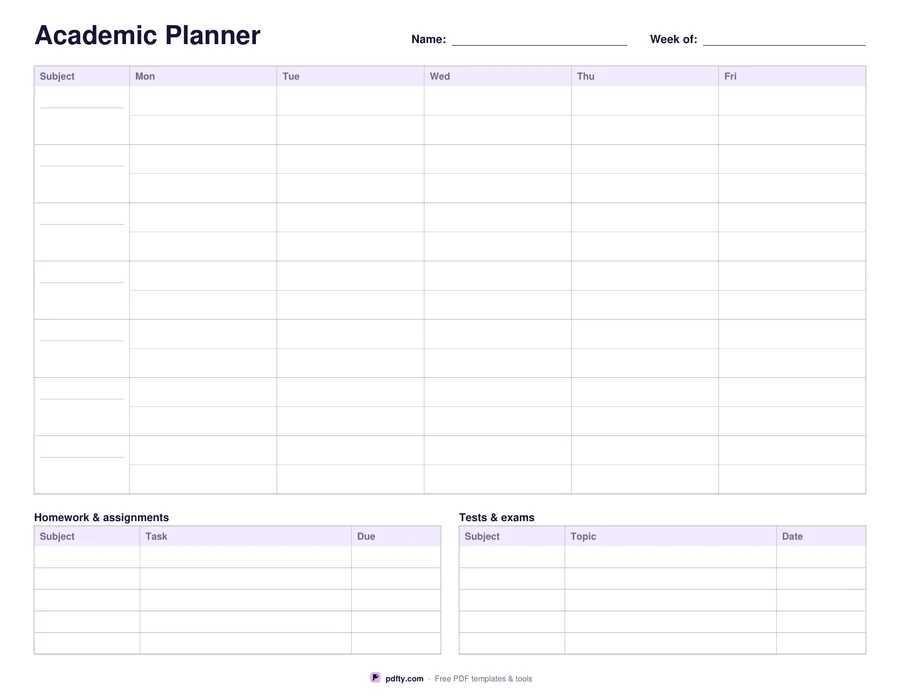
Printable academic planner with subject rows, five day columns and homework and exam strips
Day columns
Paper size
Fill & edit free online

Free · no watermark · no sign-up for your first 20 downloads a day

Fillable PDF — type into the fields online or in any PDF viewer before printing.

The main grid has seven subject rows and either five or seven day columns, whichever matches your timetable. You type your own subjects into the first column — maths, biology, the seminar that only runs on Thursdays — and each cell below a day holds the room, the topic or the task for that lesson. A faint rule across the middle of every cell gives you two lines of handwriting without crowding.

Underneath sit the two strips that make a school week survivable. Homework and assignments has five rows of subject, task and due date. Tests and exams has five rows of subject, topic and date. They are separate on purpose: a piece of coursework and a test next Friday need different attention, and seeing both at the foot of the timetable stops either from arriving as a surprise.

Name, week of, every grid cell and all thirty strip cells are form fields, so a student can fill the timetable once at the start of term, print a stack, and only write in the changing parts. The sheet is one landscape page in US Letter or A4, with light gray rules that photocopy cleanly for a whole class set.
How to use it

  1. 1

    Choose five or seven days

    Five for a school timetable, seven if weekend study or practice belongs on the sheet.

  2. 2

    Type your subjects

    Fill the first column with your own subjects or periods, then save the file as your term template.

  3. 3

    Print or fill it in

    Print at 100% ("Actual size") so lines and boxes keep their exact spacing, or fill the form fields on screen in any PDF viewer.

  4. 4

    Fill the strips each week

    Add homework with its due date and any tests, and print a fresh copy every Monday.

Frequently asked questions

Yes. There is no watermark and no sign-up for your first 20 downloads each day; after that a free account keeps downloads going. You may print the file as often as you like for personal, school or business use.
Seven rows. If you have more periods than that, print two copies or use one row for a double period.
No — the subject column is fillable so the sheet matches your own timetable. Type them once and reuse the file all term.
Homework and assignments records subject, task and due date. Tests and exams records subject, topic and date, so revision targets stay separate from daily work.
Yes. Print it blank and photocopy it for a class, or fill the subject column first so everyone starts from the same timetable.
Yes. Fill the form fields in any PDF reader, or import it into GoodNotes or OneNote and write on it with a stylus.

More free templates

Work with your PDF