Employment Application Form (Free PDF)

A neutral two-page job application a candidate can fill in on screen and sign.
Free two-page employment application form with education and work history
Paper size
Fill & edit free online

Free · no watermark · no sign-up for your first 20 downloads a day

Fillable PDF — type into the fields online or in any PDF viewer before printing.

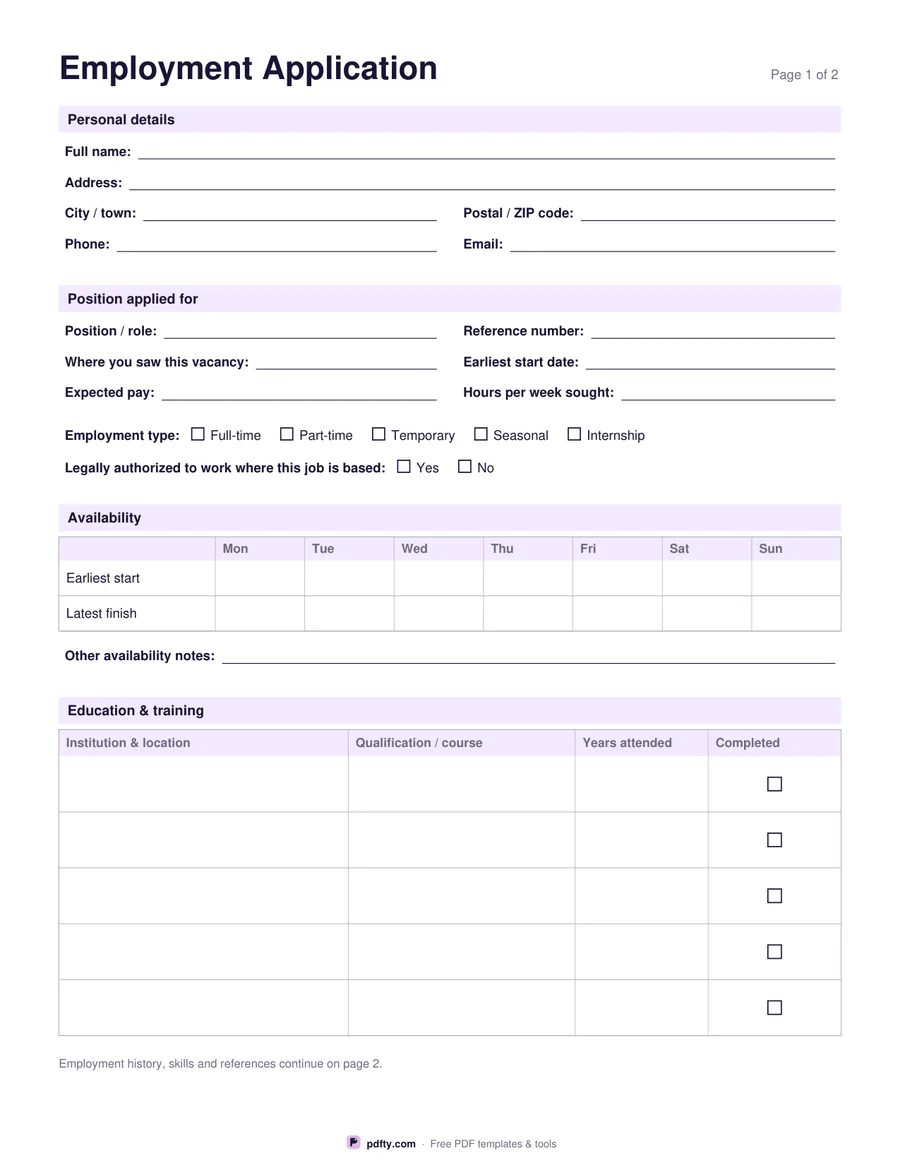
A standard application form lets you compare candidates on the same information instead of reading twenty differently organised resumes. Page one opens with personal details — name, address, city, postal code, phone and email — then the position applied for: the role, a reference number, where the vacancy was seen, the earliest start date, expected pay and the hours sought, with tick boxes for full-time, part-time, temporary, seasonal or internship work.

Availability gets a seven-day grid with an earliest start and latest finish for each day, plus a line for anything else the candidate needs to say about their hours. Education and training closes page one with five rows for the institution, the qualification or course, the years attended and a tick for whether it was completed. Page two carries the employment history: three employer blocks with job title, dates, reason for leaving and a box for main duties and achievements.

After that come a skills, training and qualifications box, three reference rows with name, relationship, organisation and contact details, and a declaration with a signature and date. The questions stay with what the job needs — nothing about age, marital status, nationality, religion or health. Everything is a form field, so candidates can type their answers, sign the PDF and send it back. US Letter or A4.
How to use it

  1. 1

    Download and send it out

    Email the blank PDF to candidates or print copies for applicants who call in.

  2. 2

    Fill in pages one and two

    Personal details, the role and availability, education, then employment history, skills and references.

  3. 3

    Sign the declaration

    The candidate signs and dates page two to confirm the information is accurate.

  4. 4

    Print or fill it in

    Print at 100% ("Actual size") so lines and boxes keep their exact spacing, or fill the form fields on screen in any PDF viewer.

Frequently asked questions

Yes. There is no watermark and no sign-up for your first 20 downloads each day; after that a free account keeps downloads going. You may print the file as often as you like for personal, school or business use.
Yes. Both pages are made of form fields and tick boxes, so a candidate can complete it in Adobe Reader, Preview, Chrome or Edge and send it back by email.
Those questions are unlawful or restricted in many places at the application stage, so the form leaves them out and sticks to what the job needs.
Three employers with a duties box each, and three references. A candidate with a longer history can attach a resume — merge the two PDFs into one file.
With pdfty's Sign PDF tool on the filled form, or by printing page two, signing and scanning it back. You can also add your company name and logo beside the heading in pdfty's editor before you send the form out.
Flatten the PDF with pdfty's Flatten tool once it comes back; the answers then print and store as fixed text.

More free templates

Work with your PDF