Tax Deduction Log (Free Printable PDF)

A line for every cost you mean to claim, with the receipt ticked off as it goes in the folder.
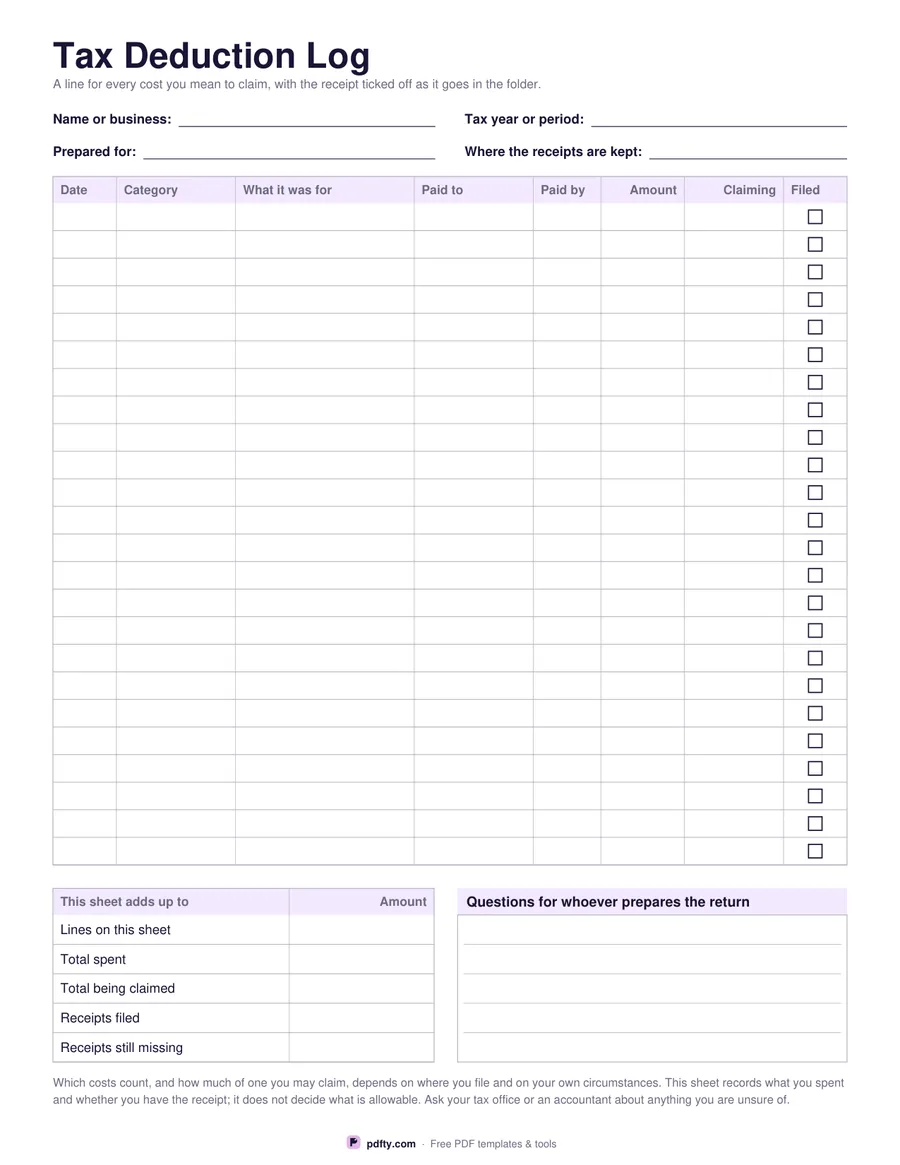
Printable tax deduction log with date, category, amount and receipt filed column
Entry rows
Paper size
Fill & edit free online

Free · no watermark · no sign-up for your first 20 downloads a day

Fillable PDF — type into the fields online or in any PDF viewer before printing.

Eight columns: the date, the category, what the cost was for, who you paid, how you paid, the amount, the part you are claiming and a tick for the receipt. The two money columns sit side by side on purpose - plenty of costs are only partly business, and writing the full amount and the claimed amount next to each other is what stops that distinction being invented from memory in a hurry months later.

The header takes your name or business, the tax year or period, who the log is being prepared for and where the paper receipts are kept, which is the field people are most grateful for in the following January. Underneath the table, a summary panel counts the lines, the total spent, the total being claimed, the receipts filed and the receipts still missing, and a ruled panel beside it holds questions for whoever prepares the return.

The sheet records facts and nothing else. It names no country, prints no rate, no allowance and no threshold, and makes no claim about what is deductible, because that depends entirely on where you file and on your own circumstances. What it gives you is a complete, dated list that matches the pile of receipts, which is what an accountant actually wants and what turns a shoebox into twenty minutes of work. One page, US Letter or A4.
How to use it

  1. 1

    Choose 24 or 30 rows

    Twenty-four rows are roomier to write in; thirty fit a busier month or quarter.

  2. 2

    Download and head the sheet

    Fill in the period, who it is for and where the receipts are kept, then print or type.

  3. 3

    Print or fill it in

    Print at 100% ("Actual size") so lines and boxes keep their exact spacing, or fill the form fields on screen in any PDF viewer.

  4. 4

    Log it the day you spend it

    Write the line, file the receipt and tick the box. Anything unticked at the end of the period is a receipt to hunt for.

Frequently asked questions

Yes. There is no watermark and no sign-up for your first 20 downloads each day; after that a free account keeps downloads going. You may print the file as often as you like for personal, school or business use.
No. Which costs count, and how much of one you may claim, depends on where you file and on your own circumstances. The sheet records what you spent and whether you have the receipt; ask your tax office or an accountant about anything you are unsure of.
The amount is what you paid; the claiming column is the part you intend to put on the return. Keeping them apart means a partly personal cost is split once, at the time, rather than guessed at later.
Yes. Every cell, the summary panel and the questions panel are all form fields, so the log can be kept as a PDF and emailed to whoever prepares the return.
Twenty-four or thirty per sheet. Print one per month or per category and number them; the period field at the top keeps a set together.
None is printed, so the log suits any country and any currency.

More free templates

Work with your PDF