Printable Weekly Cleaning Planner (Free PDF)

A block for every day of the week with six lines each, so the cleaning is spread across seven evenings instead of eaten by a Saturday.
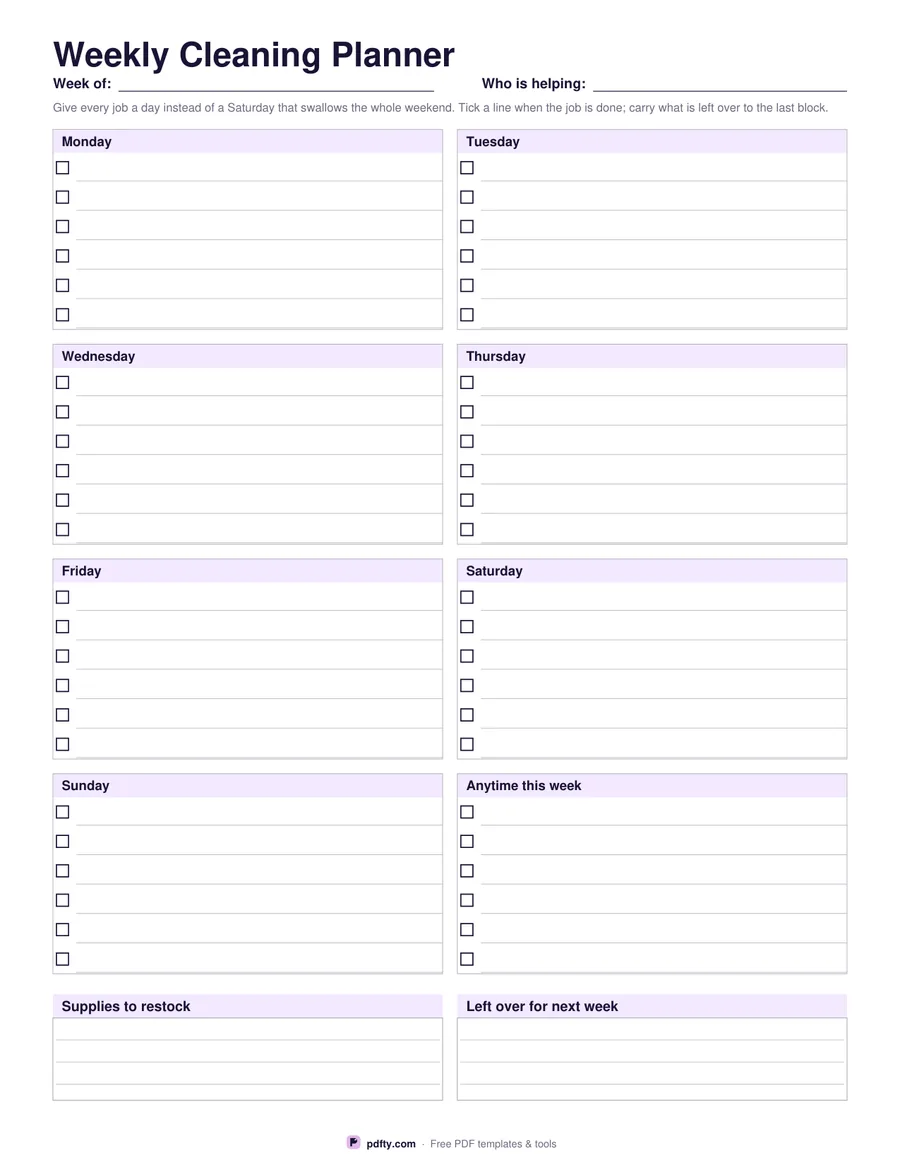
Printable weekly cleaning planner with a block of tasks for each day
Week starts on
Paper size
Fill & edit free online

Free · no watermark · no sign-up for your first 20 downloads a day

Fillable PDF — type into the fields online or in any PDF viewer before printing.

Eight blocks fill the page: one for each day of the week and one headed Anytime this week, for the jobs that do not care which evening they happen on. Each block has six lines, and each line has a checkbox and a writing line, so a day holds a realistic handful of jobs rather than an aspirational list of twenty.

The point of assigning jobs to days is that it makes the week visible before it starts. Bathroom on Tuesday, floors on Thursday, and the weekend stays the weekend. Anything not done moves to the Anytime block rather than quietly disappearing, and at the foot of the page two ruled panels catch what the week threw up: supplies to restock, and what is left over for next week.

Choose a Monday or Sunday start before downloading. All forty-eight task lines, their checkboxes and both panels are form fields, so you can type a routine once, print seven copies and tick them by hand, or fill a fresh one each Sunday. It is one page in US Letter or A4 with no dates printed, so the same sheet prints again every week.
How to use it

  1. 1

    Choose the week start

    Monday or Sunday first, whichever matches how your household runs.

  2. 2

    Give each job a day

    Type or write up to six jobs per day, and park the rest in the Anytime block.

  3. 3

    Print or fill it in

    Print at 100% ("Actual size") so lines and boxes keep their exact spacing, or fill the form fields on screen in any PDF viewer.

  4. 4

    Tick as you go

    At the end of the week move anything unticked to the leftovers panel and start a fresh sheet.

Frequently asked questions

Yes. There is no watermark and no sign-up for your first 20 downloads each day; after that a free account keeps downloads going. You may print the file as often as you like for personal, school or business use.
Six lines per day and six in the Anytime block, which is forty-eight lines in all.
Yes. Fill the lines in a PDF viewer, save the file, then print a copy each week and tick the boxes by hand.
A room schedule crosses rooms with tasks for a whole month. This one is a single week with jobs assigned to particular days.
Yes. Choose two-sided printing in the print dialog and one sheet gives you two pages of the same layout, which is handy when one page is not enough.
Yes. Open the PDF in GoodNotes, Notability or Xodo and write on it with a stylus, or fill the form fields and keep the file on the device instead of printing it.

More free templates

Work with your PDF