Functional Resume Template (Fillable PDF)
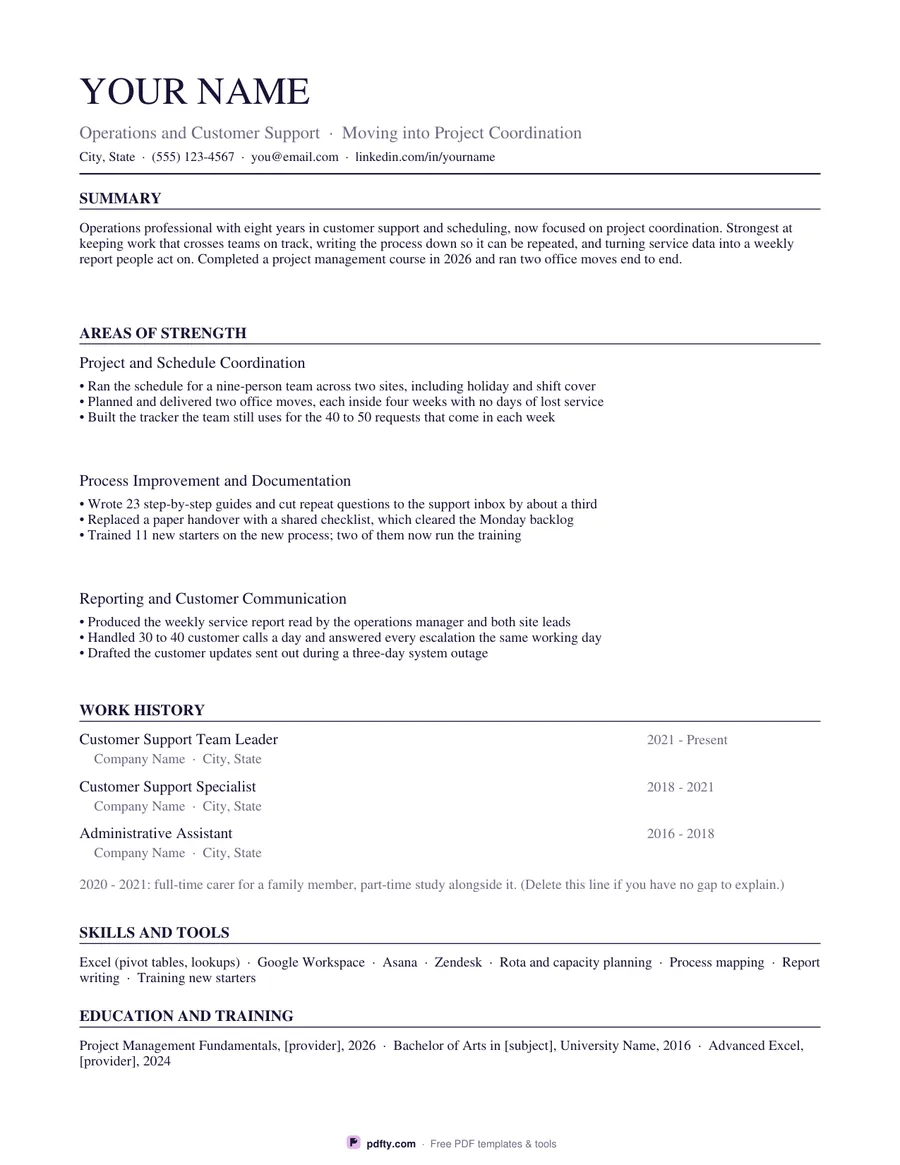
The skills-first layout: three clusters of achievements at the top, a short dated job list below, and a line for a gap if you have one.
Free · no watermark · no sign-up for your first 20 downloads a day
Fillable PDF — type into the fields online or in any PDF viewer before printing.
A functional resume puts what you can do above where you did it. This one opens with a four-line summary, then three skill clusters, each with its own heading and three achievement bullets, then a short work history of three roles with titles, employers and dates but no bullets, then a career break line, skills and tools, and education. The clusters are the point: they let related achievements from different jobs, voluntary work or study sit together instead of being split across a timeline.
The sample text is a full worked example rather than placeholders. It describes someone moving from customer support into project coordination, with clusters for coordination, process documentation and reporting, and a career break line you can type over or delete. Reading it through is the quickest way to see how to group your own work: pick the three things the role asks for, give each a heading in the job's own words, and put your strongest three examples under each.
Everything, including the cluster headings, is a form field, so you can rewrite the whole page on screen. Choose Classic, a serif with ruled headings, or Modern, a sans-serif with a small accent bar, and US Letter or A4; the page is designed to stay on one side in both. This layout is one way of presenting a change of direction or a gap, not the only one, and some application forms ask for a straight date order instead, so check what the employer asks for before you send it.