Classroom Seating Chart (Free Printable PDF)

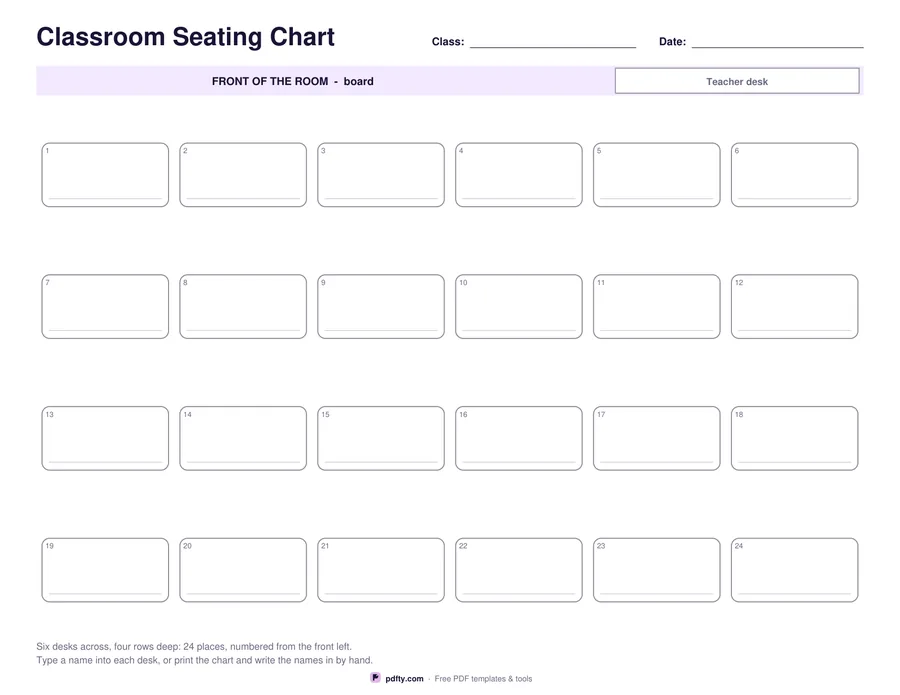
A plan of the room with a numbered desk for every child, laid out in rows, table groups or a horseshoe.
Printable classroom seating chart with numbered desks
Desk layout
Paper size
Fill & edit free online

Free · no watermark · no sign-up for your first 20 downloads a day

Fillable PDF — type into the fields online or in any PDF viewer before printing.

A seating chart is the fastest way to learn thirty names, and the easiest thing to hand a substitute teacher. This landscape plan puts the board and the teacher desk along the top so the sheet matches the room as you face it, and gives every desk a number and a line to write a name on. Class and date lines sit at the top right.

The layout option covers the three common arrangements. Rows gives twenty-four desks six across and four deep, numbered from the front left. Groups gives six labelled table groups of four, which shows at a glance who is sitting with whom. Horseshoe gives sixteen desks around three sides of an open floor, with the opening facing the board, which suits discussion lessons and drama.

Every desk has its own name field, so the chart can be typed up once and reprinted whenever the seating changes, or printed blank and filled in with a pencil so names can be rubbed out. The numbering runs in a fixed order, so a register can be read against the chart without hunting around the page, and a supply teacher can call on children by name from the first minute of the lesson.
How to use it

  1. 1

    Choose the layout

    Rows, six table groups of four, or a horseshoe around an open floor.

  2. 2

    Type the names

    Click each desk and type the name, or print the chart blank and write the names in pencil.

  3. 3

    Print or fill it in

    Print at 100% ("Actual size") so lines and boxes keep their exact spacing, or fill the form fields on screen in any PDF viewer.

  4. 4

    Keep a copy for cover

    Leave a printed chart on the desk so a substitute teacher can use names from the first minute.

Frequently asked questions

Yes. There is no watermark and no sign-up for your first 20 downloads each day; after that a free account keeps downloads going. You may print the file as often as you like for personal, school or business use.
Twenty-four in the rows and table groups layouts, and sixteen in the horseshoe.
The board and the teacher desk are at the top of the page, so the chart reads the way you see the room when you are standing at the front.
Yes, every desk has its own name field. Save the file and reprint it whenever the seating changes.
Print two copies and use the second for the extra desks, or write two names on a desk where children share a table.
Landscape, which matches the shape of most classrooms. It prints on one sheet of US Letter or A4.

More free templates

Work with your PDF