Printable No-Spend Challenge Tracker (Free PDF)

A month of numbered boxes to tick on every day you spend nothing, with your own rules written at the side.
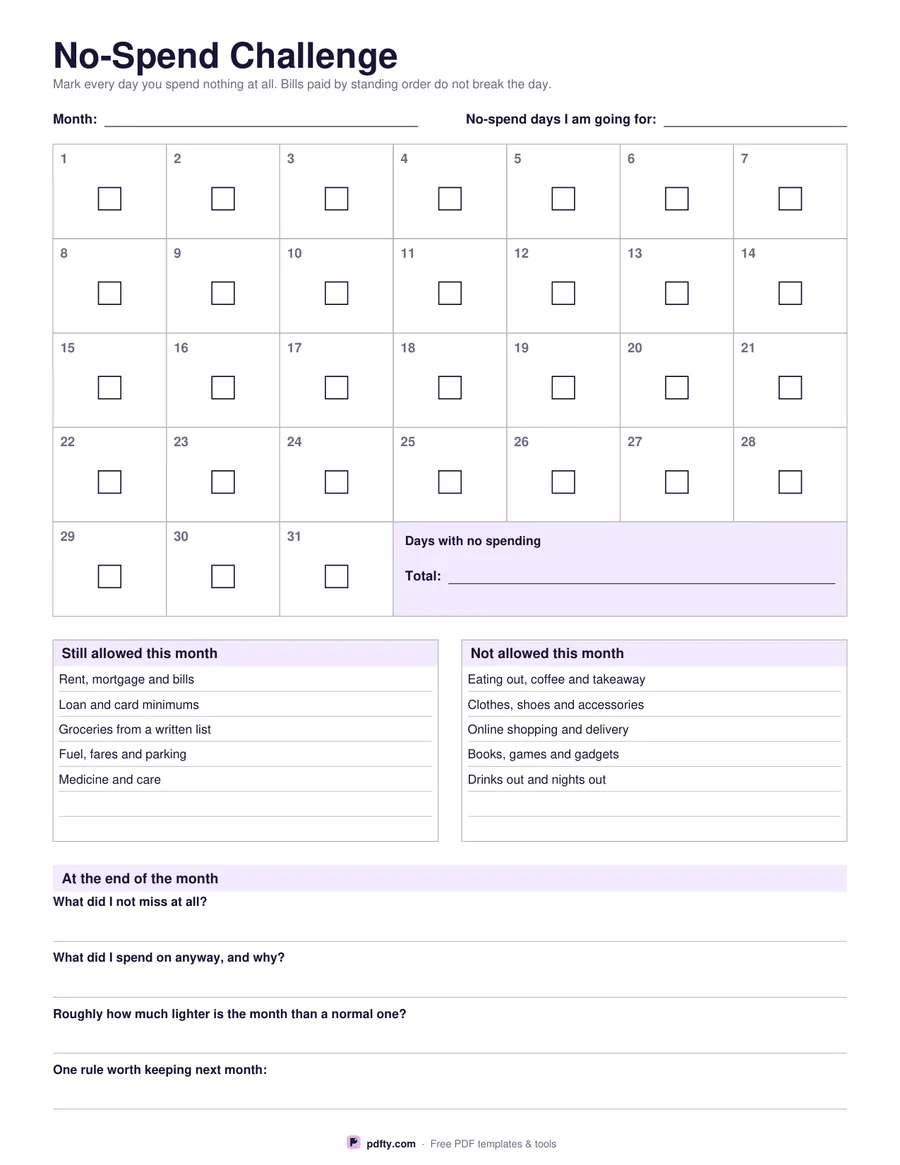
Printable no-spend challenge sheet with a 31-day grid, spending rules and reflection questions
Paper size
Fill & edit free online

Free · no watermark · no sign-up for your first 20 downloads a day

Fillable PDF — type into the fields online or in any PDF viewer before printing.

A no-spend month works on one simple idea: on as many days as you can, nothing leaves your account except the bills that were already set up. The grid at the top of this sheet has thirty-one numbered boxes, each with a tick box in the middle to mark or colour in on a day you spent nothing. The last four cells of the grid are given over to a tally, where you write the total of no-spend days against the number you were aiming for.

The challenge only works if the rules are decided in advance, so two panels sit under the grid. One is headed "Still allowed this month" and comes pre-printed with rent and bills, loan and card minimums, groceries from a written list, fuel and fares, and medicine, plus two blank lines of your own. The other, "Not allowed this month", lists eating out, clothes, online shopping, books and games, and nights out, again with blank lines so you can add the thing that always catches you.

The bottom third is a reflection strip, filled in once the month is over: what you did not miss at all, what you spent on anyway and why, roughly how much lighter the month was than usual, and the one rule worth keeping next month. The day boxes are real PDF tick boxes and every rule line and reflection box is a typing field, so the sheet works on a fridge door or on screen.
How to use it

  1. 1

    Write your rules first

    Fill in what is still allowed this month and what is not, before the month starts, so a tricky day does not get to rewrite the rules.

  2. 2

    Set a target

    Write the number of no-spend days you are going for at the top of the sheet.

  3. 3

    Print or fill it in

    Print at 100% ("Actual size") so lines and boxes keep their exact spacing, or fill the form fields on screen in any PDF viewer.

  4. 4

    Mark the days and look back

    Tick or colour every day you spent nothing, count them up in the tally box, then fill in the four reflection lines at the end of the month.

Frequently asked questions

Yes. There is no watermark and no sign-up for your first 20 downloads each day; after that a free account keeps downloads going. You may print the file as often as you like for personal, school or business use.
That is for you to decide, and the sheet asks you to decide it in writing. Most people count only money they chose to spend that day, so a standing order or direct debit does not break the streak.
Yes. Every day box is a real PDF tick box, and the rules, tally and reflection lines are typing fields. You can also print the sheet and colour the boxes in.
Leave the extra boxes blank, or cross them out. The grid always prints thirty-one so the same sheet works for any month.
No. Plenty of people run a no-spend fortnight or a no-spend week first. Use the boxes you need and ignore the rest.
Not to the penny. The reflection strip asks roughly how much lighter the month was, which is usually the figure that sticks. For exact numbers, keep an expense tracker alongside it.

More free templates

Work with your PDF