Printable Travel Itinerary Template (Free PDF)

A landscape trip plan: travel and accommodation across the top, then every day as a table of times, places and booking references.
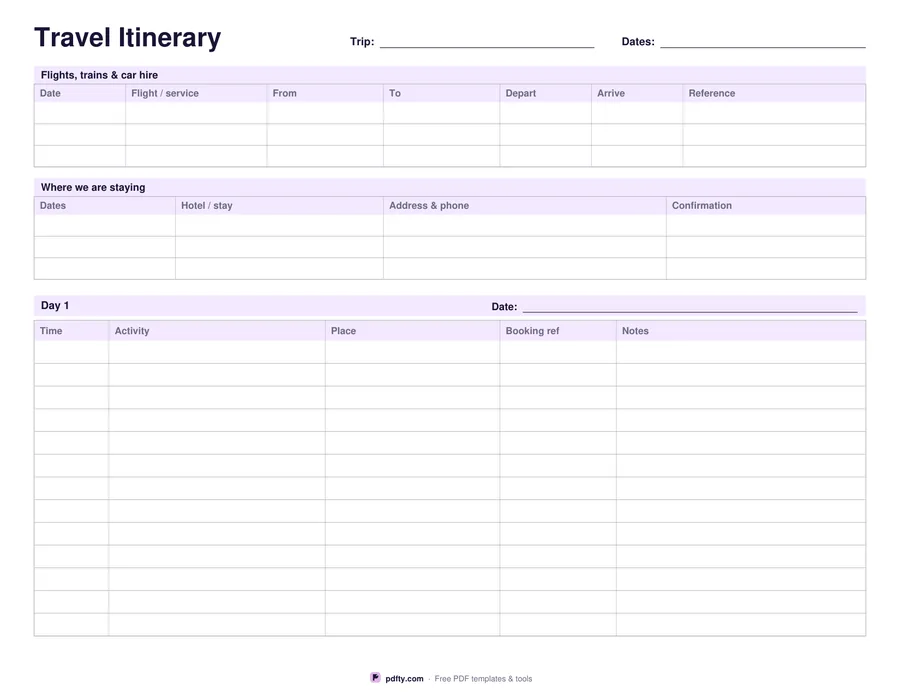
Printable travel itinerary with flights and hotels tables and a day-by-day schedule
Days
Paper size
Fill & edit free online

Free · no watermark · no sign-up for your first 20 downloads a day

Fillable PDF — type into the fields online or in any PDF viewer before printing.

The top of the first page is the part you need at the airport. A flights, trains and car hire table takes three journeys with date, service, from, to, departure, arrival and reference. Below it, a second table takes three places to stay with dates, name, address and phone, and the confirmation number. Everything a check-in desk or a taxi driver asks for sits on one sheet instead of in four different emails.

The rest of the page is the day itself: time, activity, place, booking reference and notes, ruled into about thirteen rows on the first page. Choose one, three or seven days. One day gives a single landscape page. Three or seven give that first page plus a full page for every later day, each with its own date line, around nineteen rows, and two write-in boxes for meals and places to try and for costs and reminders.

Every cell is a PDF form field, so you can type the plan up, print a copy for each traveller and still have a blank column to write in on the road. It is landscape so long place names and addresses fit without wrapping, and it prints in plain grey and lavender that will not drain a cartridge. US Letter or A4.
How to use it

  1. 1

    Pick the number of days

    One, three or seven. Each day after the first gets its own page with a date line and write-in boxes.

  2. 2

    Fill in travel and hotels first

    Type the flight or train details and the places you are staying, with every reference number, into the two tables at the top.

  3. 3

    Print or fill it in

    Print at 100% ("Actual size") so lines and boxes keep their exact spacing, or fill the form fields on screen in any PDF viewer.

  4. 4

    Plan each day in the table

    Add times, activities, places and booking references, and leave a few rows blank for what the trip decides on its own.

Frequently asked questions

Yes. There is no watermark and no sign-up for your first 20 downloads each day; after that a free account keeps downloads going. You may print the file as often as you like for personal, school or business use.
About thirteen on the first page, which also carries the travel and hotel tables, and about nineteen on each later day page. A4 is a little shorter in landscape, so it fits one row fewer.
Yes, every cell is a form field. Fill it in Adobe Reader, Preview, Chrome or Edge, save it, and email the file to the people travelling with you.
Addresses, hotel names and booking references are long. Landscape gives the place and notes columns enough width that they do not wrap or get cut off when you print.
Yes. Download the seven-day version twice, or download one day and print as many copies of the day page as you need.
Yes. Any PDF viewer that supports forms will let you type into it, and the file is small enough to keep offline for when there is no signal at the airport.

More free templates

Work with your PDF