Printable Check Register (Free Fillable PDF)

The classic chequebook page: one line per payment or deposit, with the balance carried down the sheet.
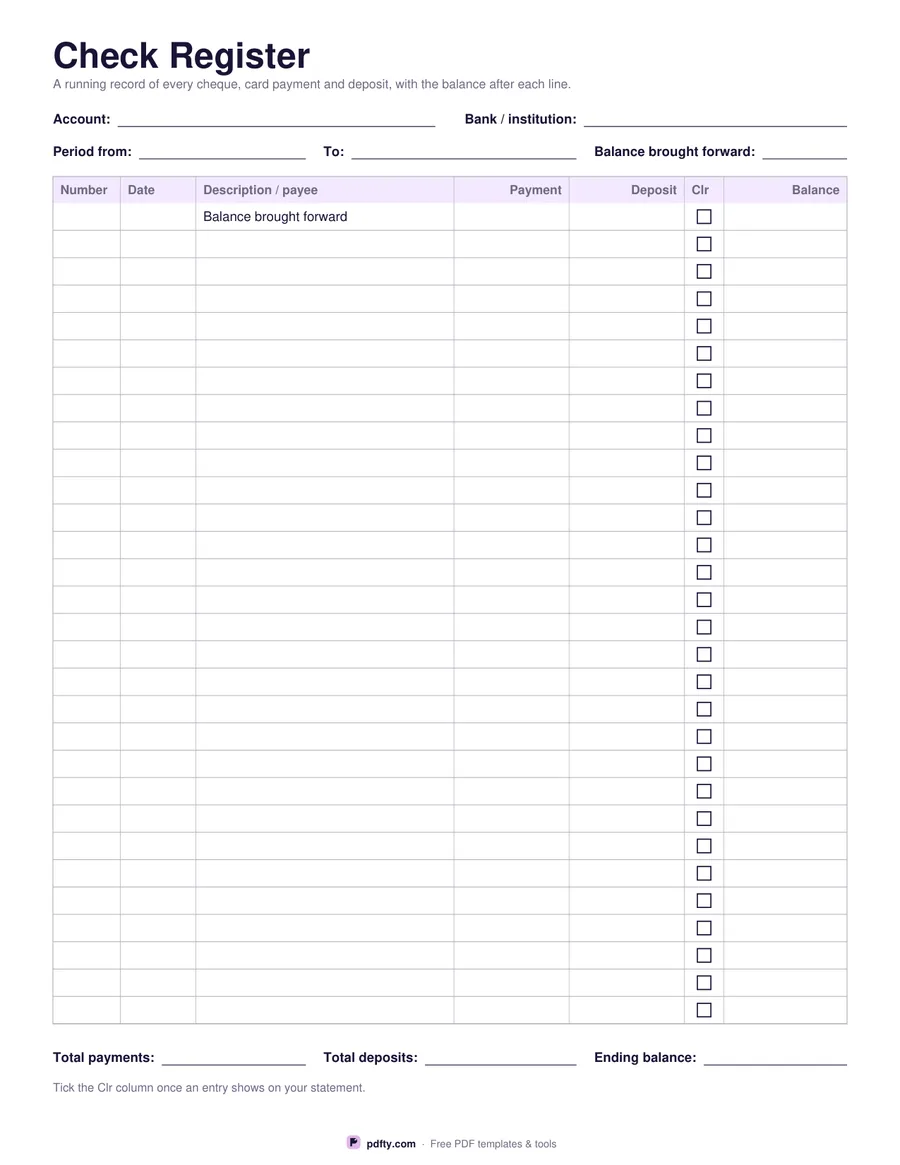
Printable check register with 30 rows for number, date, payee, payment, deposit and running balance
Cleared column
Paper size
Fill & edit free online

Free · no watermark · no sign-up for your first 20 downloads a day

Fillable PDF — type into the fields online or in any PDF viewer before printing.

This is the register that used to come stapled inside a chequebook, printed on a full page so there is room to write. Thirty rows run down the sheet with six columns: the cheque or reference number, the date, the description or payee, the payment going out, the deposit coming in and the balance after that line. The first row is printed "Balance brought forward" so the page starts where the last one ended, and the money headers sit right-aligned over their figures.

Above the table are fields for the account, the bank, the period the sheet covers and the opening balance. Below it are three more for total payments, total deposits and the ending balance, so a sheet can be closed off and filed. Nothing on the page prints a currency symbol: the same register works for dollars, euros, pounds, rand or rupees, and for a current account, a joint account or a small club treasury.

Choose the version with a cleared column and a narrow tick box sits between the deposit and the balance, for marking each entry once it shows on your statement, which makes reconciling a statement a matter of ticking down the page. Choose without and the five remaining columns get the extra width instead. Every cell is a form field, so you can keep the register on a laptop and type each entry, or print it and write by hand.
How to use it

  1. 1

    Decide about the cleared column

    Keep it if you reconcile against a bank statement; leave it out for wider payment and description columns.

  2. 2

    Choose the paper size

    US Letter or A4, then download the PDF.

  3. 3

    Print or fill it in

    Print at 100% ("Actual size") so lines and boxes keep their exact spacing, or fill the form fields on screen in any PDF viewer.

  4. 4

    Carry the balance down

    Write each payment or deposit on its own line, work the balance down the column and copy the ending balance to the top of the next sheet.

Frequently asked questions

Yes. There is no watermark and no sign-up for your first 20 downloads each day; after that a free account keeps downloads going. You may print the file as often as you like for personal, school or business use.
Yes. Every cell, including the account details at the top and the three totals at the bottom, is a form field. Open the PDF in Adobe Reader, Preview, Chrome or Edge, type your entries and save the file.
Thirty, plus the brought-forward line at the top. Print as many copies as you need and number them; the ending balance of one sheet becomes the opening balance of the next.
No. The fields are plain text boxes with no calculation script, which keeps the file opening correctly in every PDF app. Work the running balance out yourself and write it in.
None is printed. The payment, deposit and balance columns are blank money columns, so the register suits any country.
Yes. The margins are equal on both sides, so a two-sided print lines up and gives you sixty entries per sheet of paper.

More free templates

Work with your PDF