Inventory Count Sheet (Free Printable PDF)

A stocktake sheet with expected, counted and variance side by side, so a discrepancy shows up on the spot.
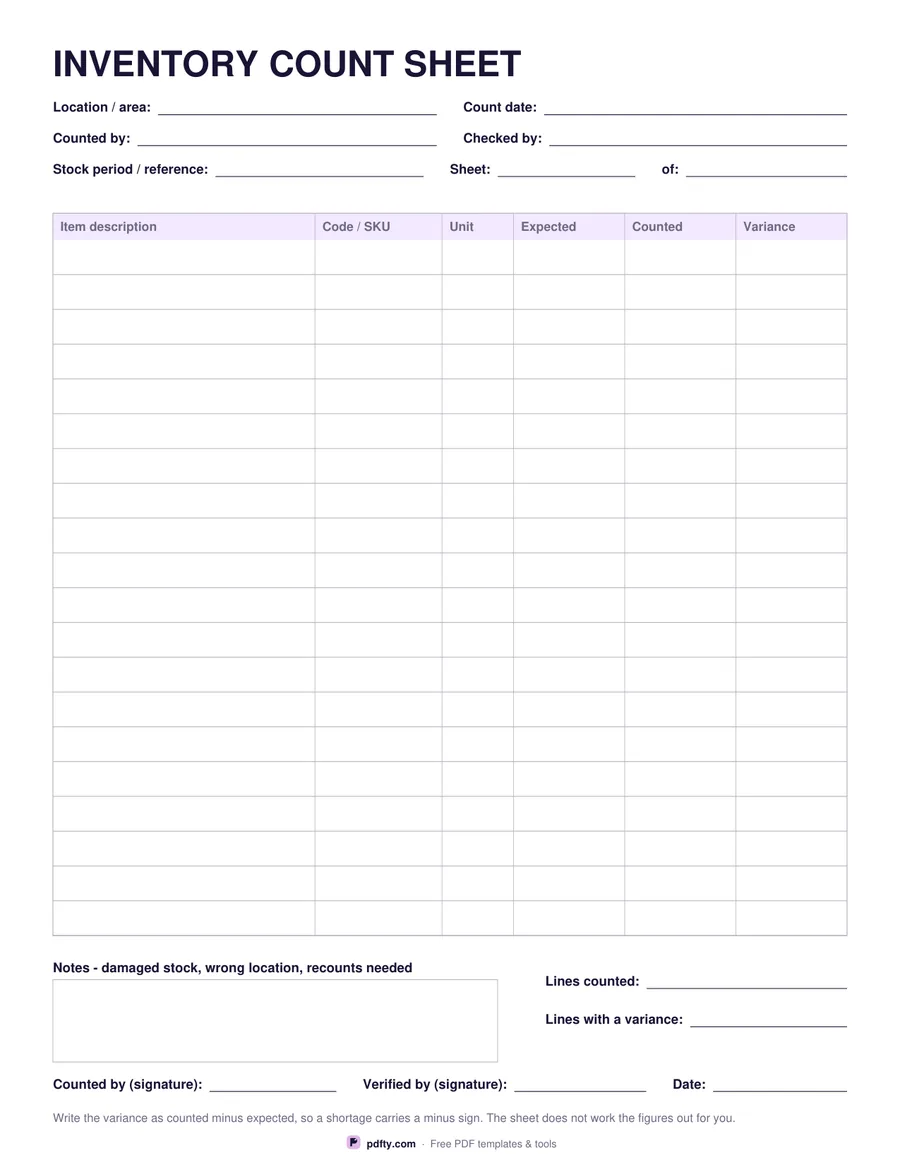
Free printable inventory count sheet with expected, counted and variance columns
Rows
Paper size
Fill & edit free online

Free · no watermark · no sign-up for your first 20 downloads a day

Fillable PDF — type into the fields online or in any PDF viewer before printing.

Counting stock works best when the paperwork is dull and identical every time. This sheet starts with the location or area being counted, the count date, who counted it and who checked it, a reference for the stock period, and a sheet number so a count that runs to several pages stays in order. Fill that header in before you start walking the shelves and the sheets can never be mixed up afterwards.

The table gives you twenty rows, or twenty-six if you choose the denser layout, with columns for item description, code or SKU, unit, expected, counted and variance. Expected is what the system says you hold, counted is what you actually found, and variance is the difference you write in yourself — counted minus expected, so a shortage carries a minus sign. Listing all three in one row makes the problem lines obvious without a calculator.

Below the table there is a notes box for damaged stock, items found in the wrong place and lines that need a recount, plus two short lines for how many lines you counted and how many came out with a variance. Two signature lines and a date close the sheet off. Every cell is a fillable form field, so you can pre-fill the item list and expected quantities on screen, print the sheets for the count, and write the rest in pen.
How to use it

  1. 1

    Fill in the header

    Location or area, count date, who is counting, who is checking, and the sheet number.

  2. 2

    Pre-fill the item list if you have one

    Type the descriptions, codes, units and expected quantities on screen, then print the sheets for the count.

  3. 3

    Count and record

    Write the counted quantity on each line and the variance beside it, as counted minus expected.

  4. 4

    Print or fill it in

    Print at 100% ("Actual size") so lines and boxes keep their exact spacing, or fill the form fields on screen in any PDF viewer.

Frequently asked questions

Yes. There is no watermark and no sign-up for your first 20 downloads each day; after that a free account keeps downloads going. You may print the file as often as you like for personal, school or business use.
No. Figures are typed by hand — the form does not add anything up, so it behaves the same in every PDF viewer.
Twenty rows in the roomy layout, twenty-six in the compact one. For a bigger count, print several sheets and number them in the "Sheet __ of __" boxes.
Yes. That is the usual way to use it — type the item list and expected quantities, print, then count against them.
How the item is counted: each, box, pack, metre, kilo. It stops a count of twelve boxes being read as twelve items.
Yes. Open it in any PDF app that supports forms and type straight into the cells, then save a copy per location.

More free templates

Work with your PDF