Printable Subscription Tracker (Free Fillable PDF)

List every recurring payment, the card it comes off and the last day you can cancel it.
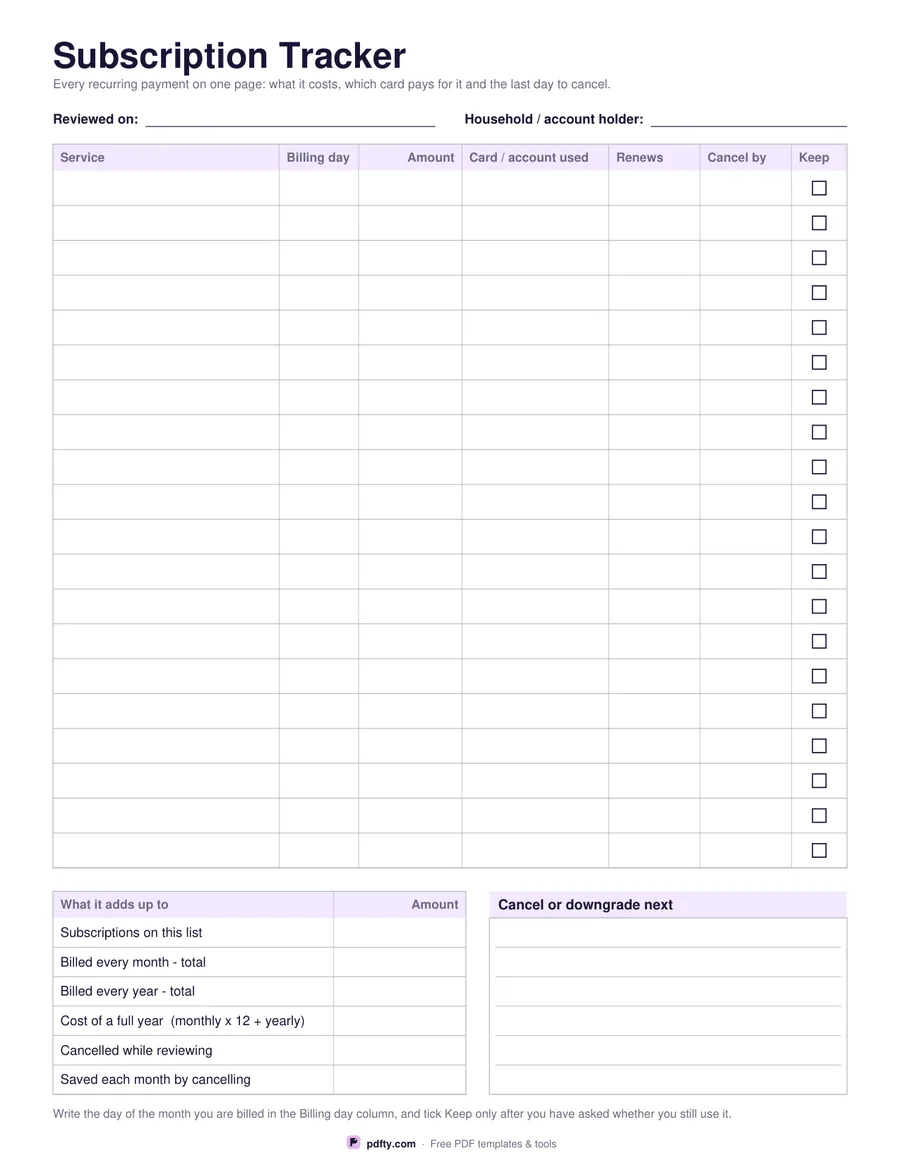
Printable subscription tracker with service, billing day, amount, card, renewal and cancel-by columns
Paper size
Fill & edit free online

Free · no watermark · no sign-up for your first 20 downloads a day

Fillable PDF — type into the fields online or in any PDF viewer before printing.

Subscriptions are easy to start and easy to forget. This sheet gives you twenty rows with seven columns: the service, the day of the month you are billed, the amount, the card or account it comes off, the renewal date, the last day you can cancel without paying for another term, and a Keep tick box you only fill once you have asked yourself whether you still use it.

The panel below turns the list into a number. Six printed rows ask for the subscriptions on the list, the total billed every month, the total billed every year, the cost of a full year worked out as the monthly total times twelve plus the yearly ones, how many you cancelled while reviewing and how much that saves each month. Beside it, a ruled box headed "Cancel or downgrade next" holds the ones you have decided about but not yet dealt with.

Fields at the top record the date you did the review and whose accounts these are, which matters when one household has several. The amount column is right-aligned and no currency symbol is printed anywhere. Everything except the Keep boxes is a typing field, and those are real PDF tick boxes, so the whole review can be done on screen and saved, or printed and worked through with a pen and a cup of coffee.
How to use it

  1. 1

    Download the sheet

    Pick US Letter or A4 and download the PDF.

  2. 2

    List everything that recurs

    Go through your bank and card statements for the last two months and write down every payment that repeats, with the billing day and the card it comes off.

  3. 3

    Print or fill it in

    Print at 100% ("Actual size") so lines and boxes keep their exact spacing, or fill the form fields on screen in any PDF viewer.

  4. 4

    Decide and total

    Tick Keep only for the ones you use, write a cancel-by date for the rest, then fill in the monthly and yearly totals at the bottom.

Frequently asked questions

Yes. There is no watermark and no sign-up for your first 20 downloads each day; after that a free account keeps downloads going. You may print the file as often as you like for personal, school or business use.
Yes. Every column is a form field and the Keep column is a real PDF tick box, so you can complete the review in a PDF viewer and save it.
Twenty on one page, which covers most households. If you are tracking a business as well, print a second copy and keep them together.
No, but it shows you how: the summary row spells out monthly total times twelve plus the yearly plans. Do the sum on a calculator and write the answer in.
Many subscriptions renew for a whole term unless you cancel a few days beforehand. Write that last safe date down when you sign up, and the sheet will warn you in time.
None. The amount column prints no symbol, so it suits any country or a mix of currencies if you note them yourself.

More free templates

Work with your PDF