Sales Order Form (Free Fillable PDF)

Confirm an order on one page: what the customer is buying, where it goes, when, and on what terms.
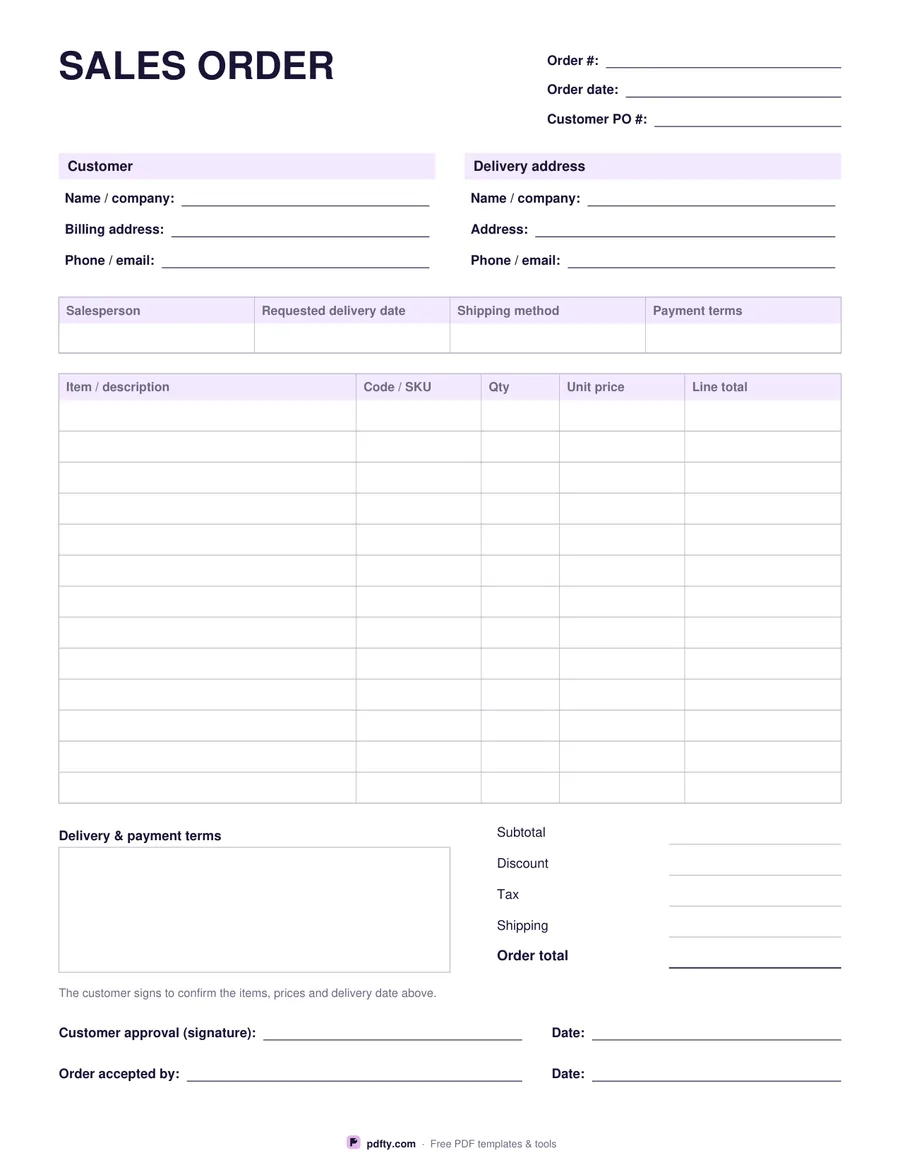
Free fillable sales order form with line items, totals and approval signatures
Paper size
Fill & edit free online

Free · no watermark · no sign-up for your first 20 downloads a day

Fillable PDF — type into the fields online or in any PDF viewer before printing.

A sales order is the seller's record of an order taken — the step between a quote and an invoice. The header carries your order number, the order date and the customer's own purchase order number, so both sides can find the same job later. Below it are two blocks: the customer with their billing address, and the delivery address, which is often somewhere else entirely.

A four-cell strip records the salesperson, the requested delivery date, the shipping method and the payment terms. The table under it has thirteen rows with columns for item or description, code or SKU, quantity, unit price and line total. Totals run down the right: subtotal, discount, tax, shipping and the order total, with a terms box beside them for deposits, lead times and anything else agreed on the phone.

The page finishes with two signature rows — customer approval with a date, and the person in your business who accepted the order. Everything is a fillable form field, so you can type the order up, email the PDF for approval, and print the signed copy for the job file. Money columns are labelled Unit price, Line total and Order total with no currency symbol, so the form suits any market. US Letter or A4.
How to use it

  1. 1

    Number the order

    Give it your own order number and record the customer's purchase order number beside it.

  2. 2

    Fill in the customer and delivery details

    Billing address on the left, delivery address on the right — they are often different.

  3. 3

    List what was ordered

    One row per item with its code, quantity, unit price and line total, then fill in the totals block.

  4. 4

    Confirm the order

    Add the delivery date and terms, send it to the customer to approve, and sign the acceptance line.

Frequently asked questions

Yes. There is no watermark and no sign-up for your first 20 downloads each day; after that a free account keeps downloads going. You may print the file as often as you like for personal, school or business use.
Same transaction, opposite sides. The buyer raises a purchase order; the seller records the same order on a sales order form and uses it to pick, ship and invoice.
No. Figures are typed by hand — the form does not add anything up, so it behaves the same in every PDF viewer.
Thirteen rows. For a longer order, print a second sheet, write "page 2" on it and merge the filled copies with pdfty's Merge PDF tool.
The money columns carry no currency symbol, so the same sheet works wherever you trade. Write the currency once at the top if it is not obvious.
Yes. Send them the filled PDF and they can sign it with pdfty's Sign PDF tool or any PDF app that supports signatures.

More free templates

Work with your PDF