Staff Leave Request Form (Free PDF)

One page for a holiday request: the dates, who covers the work, and the manager's decision.
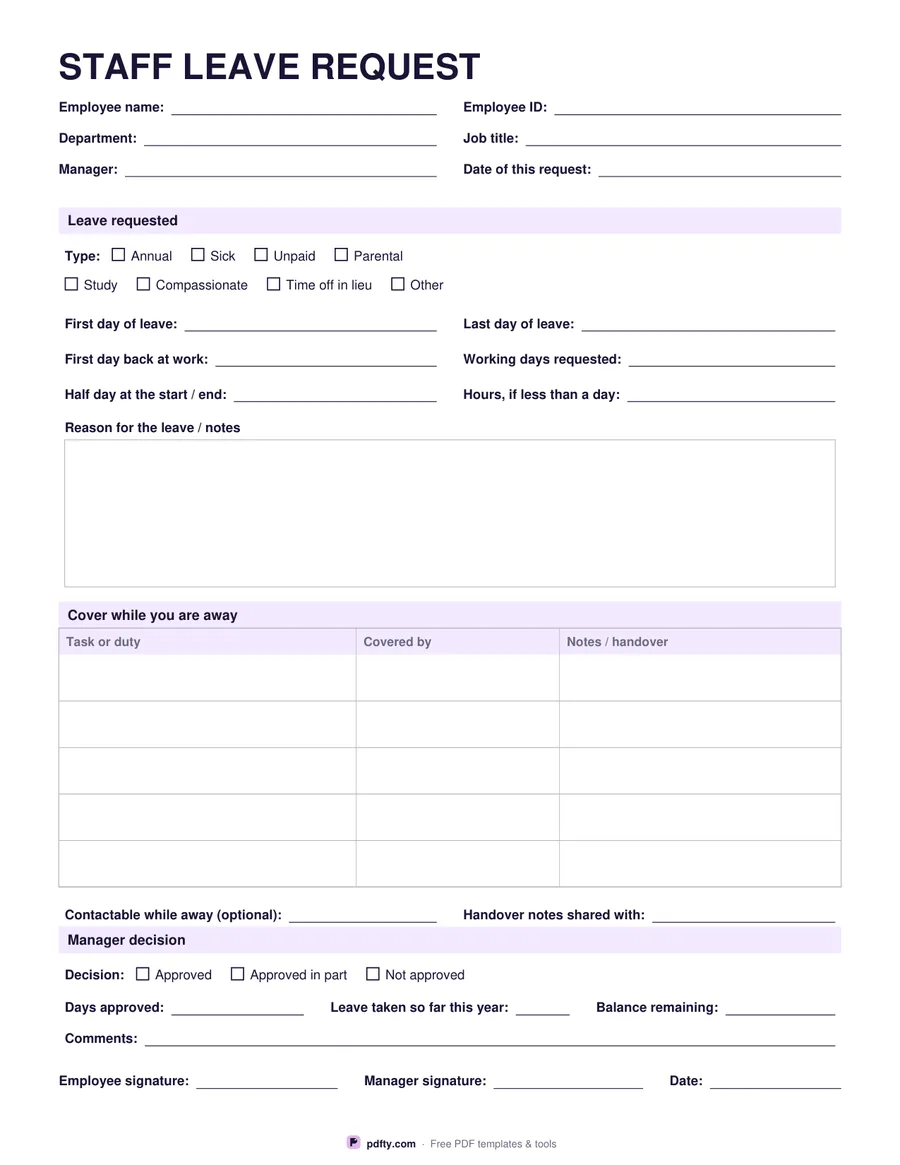
Free printable staff leave request form with dates, cover table and manager approval
Paper size
Fill & edit free online

Free · no watermark · no sign-up for your first 20 downloads a day

Fillable PDF — type into the fields online or in any PDF viewer before printing.

Most leave arguments come from a request that was never written down. This form keeps it to one page. The top records the employee's name and ID, their department and job title, their manager, and the date the request was made. The leave requested section has eight tick boxes — annual, sick, unpaid, parental, study, compassionate, time off in lieu and other — so the request is categorised before it reaches anyone's inbox.

Then come the dates, which are where mistakes happen: first day of leave, last day of leave, first day back at work, and the number of working days requested, with lines for a half day at either end and for hours if the request is shorter than a day. A notes box takes the reason, where the employee wants to give one, and a five-row table covers the handover — the task or duty, who is covering it, and any notes the cover needs.

The manager decision section closes the form: approved, approved in part or not approved, the days approved, the leave already taken this year, the balance remaining, a comments line, and signature lines for both the employee and the manager with a date. Every field and tick box is fillable, so the form can be typed, signed with pdfty's Sign PDF tool and emailed, or printed and filled in by hand. US Letter or A4.
How to use it

  1. 1

    Fill in who you are

    Name, employee ID, department, job title, your manager and today's date.

  2. 2

    Give the dates

    Tick the leave type, then the first and last day of leave, the day you are back, and the working days it uses up.

  3. 3

    Arrange the cover

    List the tasks that need covering while you are away, who is covering each one, and anything they need to know.

  4. 4

    Send it for a decision

    Sign it and pass it to your manager, who records the decision, the balance remaining and their signature.

Frequently asked questions

Yes. There is no watermark and no sign-up for your first 20 downloads each day; after that a free account keeps downloads going. You may print the file as often as you like for personal, school or business use.
Yes. Every line, tick box and table cell is a form field, so you can type the request, sign the PDF and email it to your manager.
No. Figures are typed by hand — the form does not add anything up, so it behaves the same in every PDF viewer. Work the days out against your own calendar and write the figure in.
Annual, sick, unpaid, parental, study, compassionate, time off in lieu, and an Other box for anything your employer offers that is not listed.
The reason box is there if you want it or your employer asks for it. The form works without it — the dates and the cover are the parts that matter operationally.
Yes. Print a stack for the office, or keep the PDF on a shared drive. There is no watermark and nothing to sign up for.

More free templates

Work with your PDF