Printable Receipt Log (Free Fillable PDF)

A line per receipt so the pile in the drawer matches a list when tax time comes around.
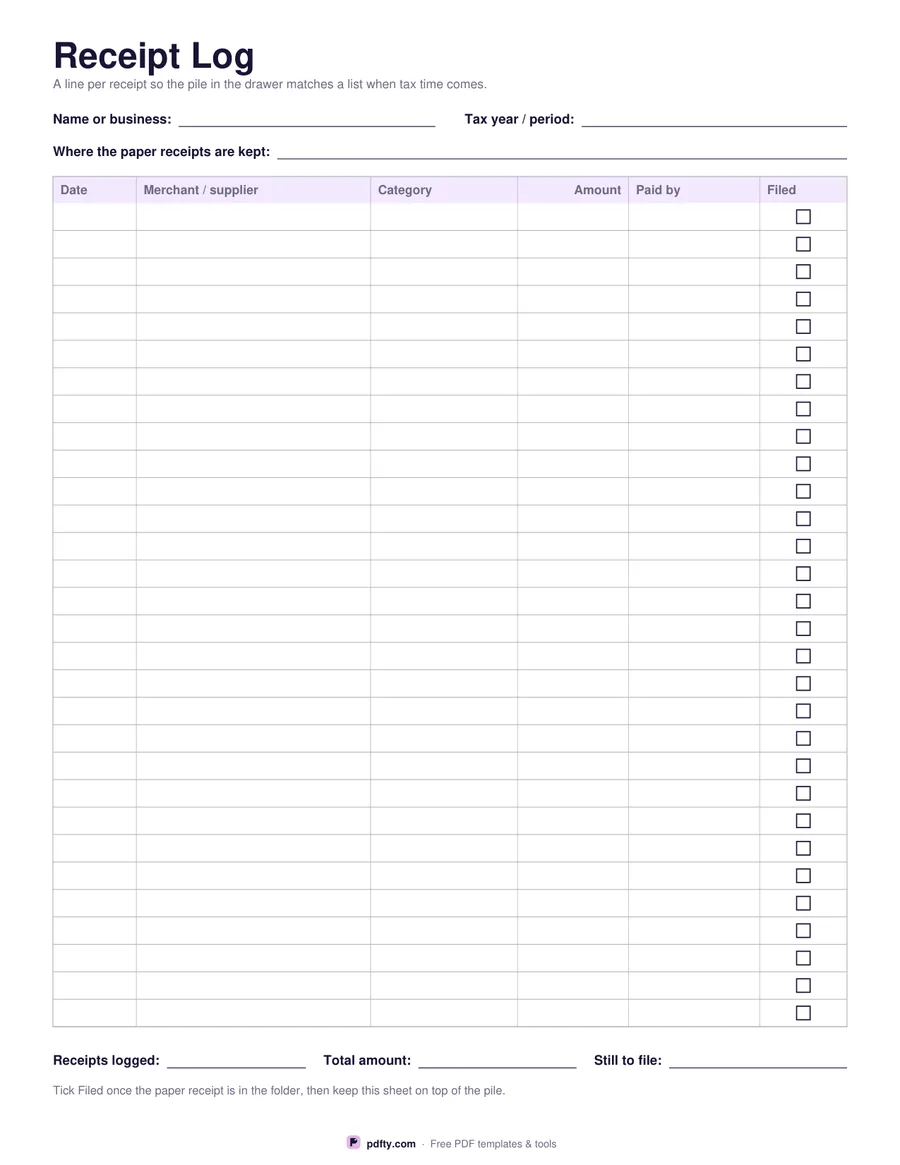
Printable receipt log with rows for date, merchant, category, amount, payment method and a filed tick box
Rows
Paper size
Fill & edit free online

Free · no watermark · no sign-up for your first 20 downloads a day

Fillable PDF — type into the fields online or in any PDF viewer before printing.

Receipts fade, and a shoebox full of them is not a record. This log gives you a line per receipt with six columns: the date, the merchant or supplier, the category you want it counted under, the amount, how you paid, and a tick box for whether the paper receipt has actually been filed. Ticking that last column as you go is what stops the end of the year turning into an afternoon of sorting paper.

Fields at the top record the name or business the log belongs to, the tax year or period it covers, and where the paper receipts are kept, which is the first thing you or an accountant will want to know. At the bottom are three more fields: receipts logged, total amount and how many are still to file, with a reminder to keep the sheet on top of the pile so the list and the paper stay together.

Choose thirty rows for taller lines that are easy to write on by hand, or forty when you are logging a busy month and want everything on one page. The amount column is right-aligned and prints no currency symbol, so the log works for a sole trader, a landlord, a freelancer or a household keeping track of deductible costs anywhere in the world. Every cell is a form field and the filed column is a real tick box.
How to use it

  1. 1

    Choose the number of rows

    Thirty gives taller rows for handwriting; forty fits a busier month on the same page.

  2. 2

    Head the sheet

    Fill in the name or business, the tax year or period, and where the paper receipts are kept.

  3. 3

    Print or fill it in

    Print at 100% ("Actual size") so lines and boxes keep their exact spacing, or fill the form fields on screen in any PDF viewer.

  4. 4

    Log and file

    Write each receipt down as it arrives, tick Filed once the paper is in the folder, then total the amount at the end of the period.

Frequently asked questions

Yes. There is no watermark and no sign-up for your first 20 downloads each day; after that a free account keeps downloads going. You may print the file as often as you like for personal, school or business use.
Yes. Every cell is a form field, the Filed column is a real PDF tick box, and the header and total fields are fillable too. Save a copy per month or per tax year.
Thirty or forty, depending on the version you pick. For a full tax year, print several and number them, or keep one sheet per month in a folder.
A log is a summary, not a substitute: keep the original receipts, which is what the Filed column is for. Check your own tax authority's rules on how long to keep them and in what form.
Whatever your accounts already use: travel, materials, software, office, meals, utilities. Using the same words all year makes the totals quick to add up.
No. The amount column is a plain right-aligned money column, so the log works in any currency.

More free templates

Work with your PDF