Credit Note Template (Free Fillable PDF)

Reverse part or all of an invoice: what is being credited, why, and how the customer gets it back.
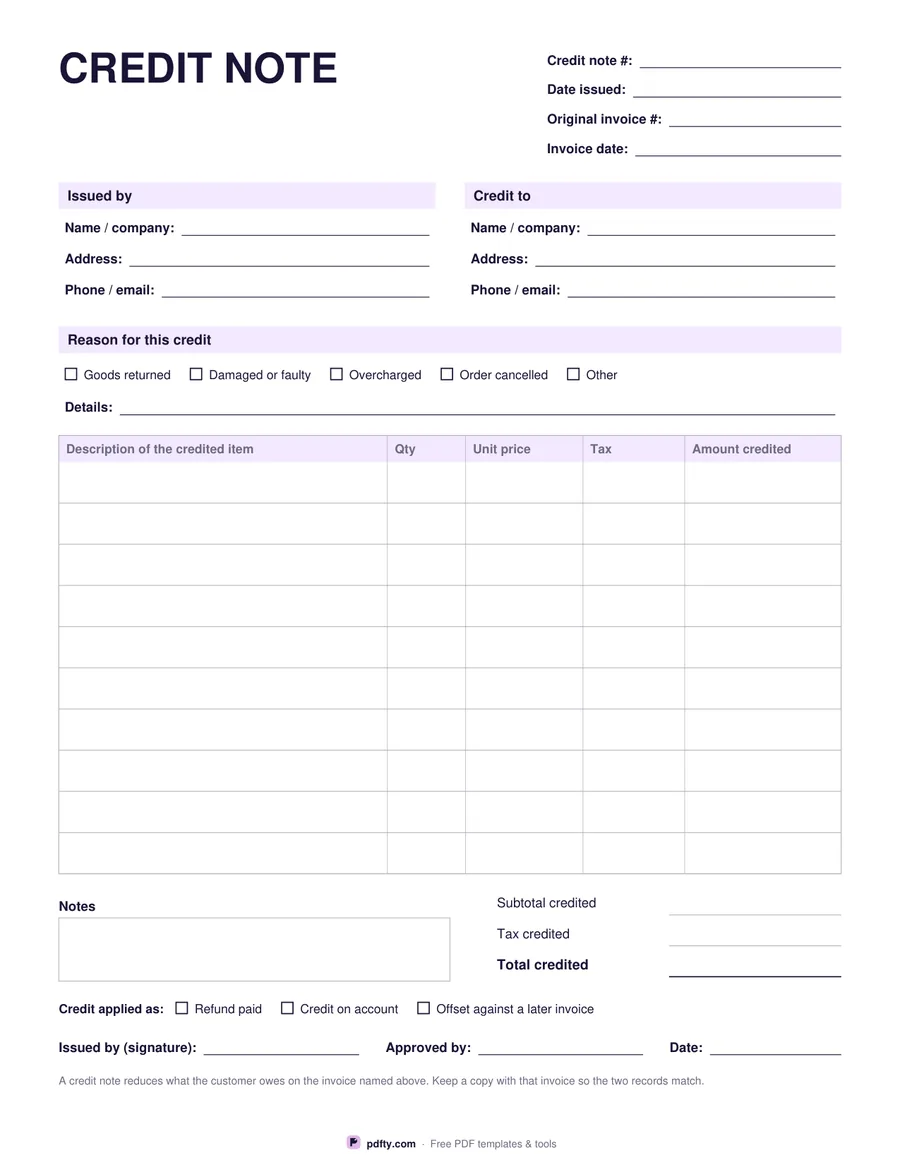
Free fillable credit note with original invoice reference, reason and credited lines
Paper size
Fill & edit free online

Free · no watermark · no sign-up for your first 20 downloads a day

Fillable PDF — type into the fields online or in any PDF viewer before printing.

A credit note is an invoice in reverse, and it has to point clearly at the invoice it corrects. The header asks for the credit note number and date issued, then the original invoice number and its date, so your books and the customer's agree. Underneath are the two familiar blocks — issued by, and credit to — laid out the same way as an invoice so the pair of documents can be read side by side.

The reason comes next, because a credit without a reason causes questions later: tick boxes for goods returned, damaged or faulty, overcharged and order cancelled, plus an Other box and a details line to explain in your own words. The table below gives ten rows with columns for the description of the credited item, quantity, unit price, tax and amount credited, and the totals block covers subtotal credited, tax credited and total credited.

At the foot, tick boxes record how the credit is applied — refund paid, credit on account, or offset against a later invoice — followed by a notes box and lines for who issued it, who approved it and the date. Every field is fillable, so you can type the note, email it to the customer and print a copy for the invoice file. Amounts are shown without a currency symbol. Prints on US Letter or A4.
How to use it

  1. 1

    Link it to the invoice

    Give the credit note its own number, then record the original invoice number and date it corrects.

  2. 2

    Say why

    Tick the reason — returned, damaged, overcharged, cancelled or other — and add a line of detail.

  3. 3

    List what is being credited

    One row per item with quantity, unit price, tax and the amount credited, then fill in the totals.

  4. 4

    Record how it is applied

    Refund paid, credit on account, or offset against a later invoice. Sign it and file it with the invoice.

Frequently asked questions

Yes. There is no watermark and no sign-up for your first 20 downloads each day; after that a free account keeps downloads going. You may print the file as often as you like for personal, school or business use.
It reduces what a customer owes on an invoice already issued — for returned or faulty goods, an overcharge, or a cancelled order — without deleting the original invoice.
No. Figures are typed by hand — the form does not add anything up, so it behaves the same in every PDF viewer.
Yes. List only the lines you are crediting and total those. Keep the original invoice number in the header so the part-credit is traceable.
Ten rows, which covers most corrections. For a longer credit, print a second sheet and merge the filled copies with pdfty's Merge PDF tool.
Yes. Every line, tick box and the notes box is a form field. Fill it on screen, sign it with pdfty's Sign PDF tool, and send the PDF.

More free templates

Work with your PDF