Printable Study Planner (Free PDF)

A revision plan on one page: twenty topics with a planned date, a done box and a confidence score out of five.
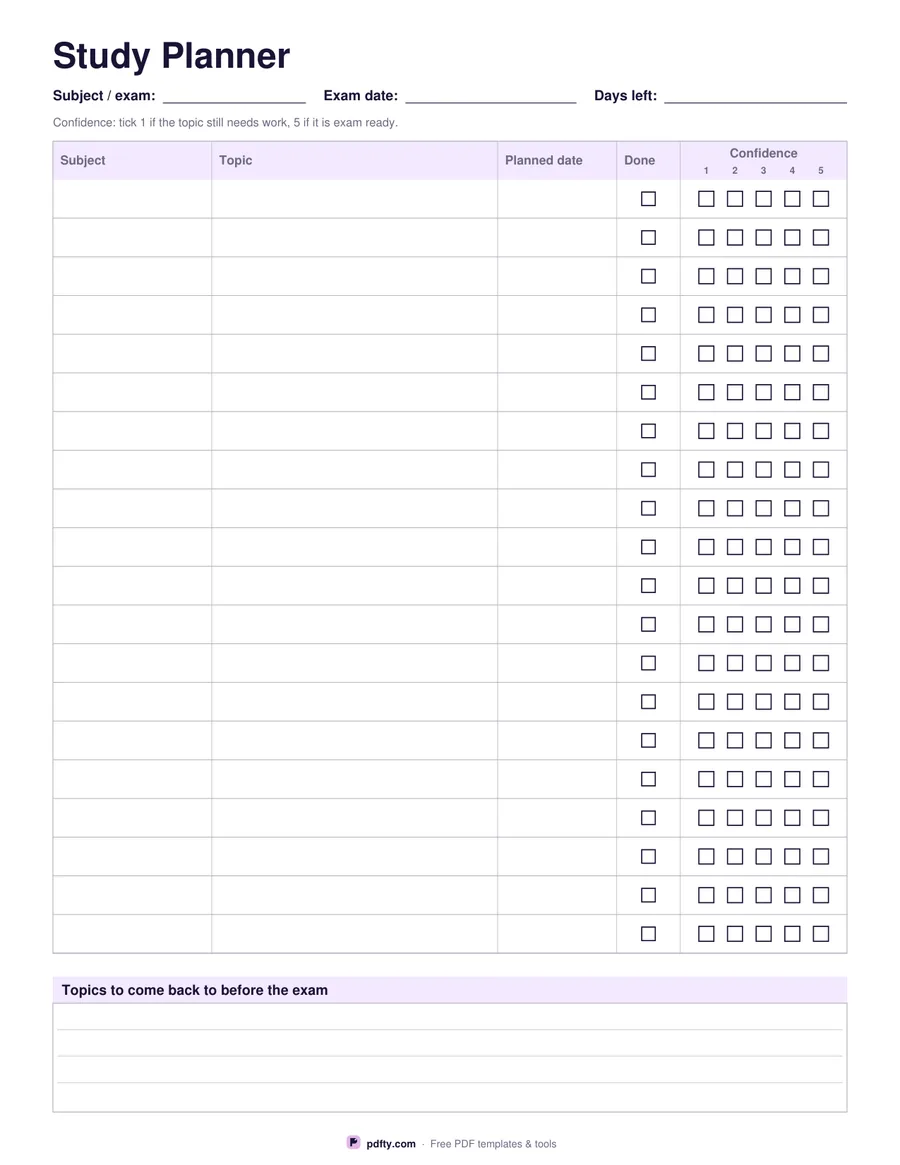
Printable study planner with twenty revision rows, planned dates, done boxes and confidence ratings
Paper size
Fill & edit free online

Free · no watermark · no sign-up for your first 20 downloads a day

Fillable PDF — type into the fields online or in any PDF viewer before printing.

A revision plan fails when it only lists what to study and never records how it went. This sheet has five columns for twenty rows: subject, topic, the date you plan to study it, a done checkbox, and a confidence rating of five small boxes numbered one to five. Tick one while the topic still needs work and five when it is exam ready, and the finished column shows you where to spend the last week before the paper.

Above the table sit three fields for the subject or exam, the exam date and the number of days left, so the sheet carries its own deadline. Below the table a ruled box headed topics to come back to before the exam collects the ones that never got past a two or a three. Twenty rows is roughly one subject's revision plan, so print one sheet per paper and keep them together.

All 184 fields are fillable, including every confidence box, so the plan can be built on a laptop and updated as you go, or printed blank and filled in with a pen and a highlighter. It is one portrait page of vector lines, drawn separately for US Letter and A4, which means it prints sharp from a home printer or a school copier.
How to use it

  1. 1

    Download the planner

    Pick US Letter or A4 and download the one-page PDF.

  2. 2

    List the topics

    Write the subject or exam, the exam date and the days left, then fill the twenty rows with subjects, topics and planned dates.

  3. 3

    Score each topic

    Tick the done box when you have studied a topic and tick a confidence box from 1 to 5 for how ready it feels.

  4. 4

    Print or fill it in

    Print at 100% ("Actual size") so lines and boxes keep their exact spacing, or fill the form fields on screen in any PDF viewer.

Frequently asked questions

Yes. There is no watermark and no sign-up for your first 20 downloads each day; after that a free account keeps downloads going. You may print the file as often as you like for personal, school or business use.
Twenty rows, which is about one subject's revision plan. Print one sheet per exam paper.
Five numbered boxes per row. Tick 1 if the topic still needs work and 5 if it is exam ready, so the low scores show you what to revisit.
Yes. The header fields, every subject, topic and date cell, the done checkboxes, all one hundred confidence boxes and the bottom box are fillable.
Yes, use the subject column for different subjects and the planned date column for the week you intend to cover each topic.
Yes. Open it in GoodNotes, Notability or Xodo and write on it with a stylus, or fill the form fields and keep it on screen.

More free templates

Work with your PDF