Networking Contact Log (Fillable PDF)

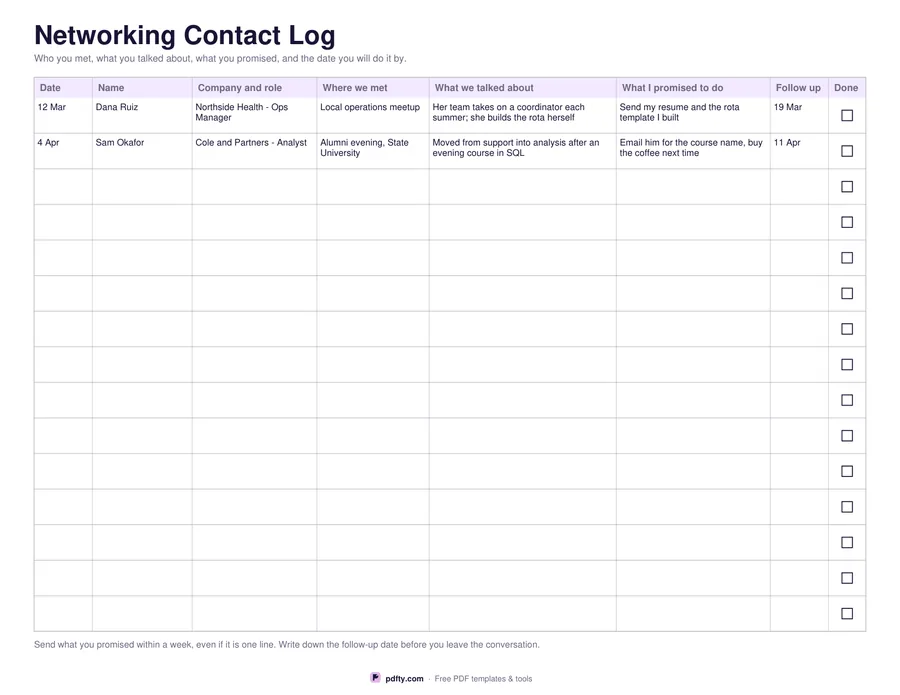
Fifteen rows for the people you meet: where you met, what you talked about, what you promised, and the date you will do it by.
Printable networking contact log with fifteen rows and follow-up dates
Paper size
Fill & edit free online

Free · no watermark · no sign-up for your first 20 downloads a day

Fillable PDF — type into the fields online or in any PDF viewer before printing.

A landscape log with fifteen rows and eight columns: date, name, company and role, where you met, what you talked about, what you promised to do, a follow-up date and a tick box for when it is done. The two wide middle columns are the ones that matter later, because the detail you can still remember a month after an event is rarely the one that turns out to be useful, and what you said you would send is easy to forget by the next morning.

Two rows come filled in as examples, showing the kind of note that is worth writing: who the person is, the one thing they said that you can act on, and the specific promise, such as sending a template or asking for a course name. Everything else is blank and fillable. Keep one sheet per event, or run one sheet across a few months of coffees and meetups and tick the done boxes as you clear them.

Every cell is a form field, so you can type the rows up afterwards and keep the file, and the tick boxes are clickable. Printed, it is one page in US Letter and A4 with rows deep enough for two handwritten lines in the wide columns. If you fill several sheets over a long search, merge them into a single PDF so the whole log stays in one file and in date order.
How to use it

  1. 1

    Write it down the same day

    Fill in the date, name, company and where you met while you still remember the conversation.

  2. 2

    Note the promise

    Record exactly what you said you would do and give it a follow-up date, not a vague soon.

  3. 3

    Tick it off

    Do what you promised, tick the done box, and the open rows are what is left to chase.

  4. 4

    Print or fill it in

    Print at 100% ("Actual size") so lines and boxes keep their exact spacing, or fill the form fields on screen in any PDF viewer.

Frequently asked questions

Yes. There is no watermark and no sign-up for your first 20 downloads each day; after that a free account keeps downloads going. You may print the file as often as you like for personal, school or business use.
Fifteen rows per page, with two of them pre-filled as examples that you can type over. Print more copies or merge several filled sheets into one file for a longer search.
Yes. All seven text columns are form fields and the done column is a tick box. Fill it in any PDF viewer, or print it and write on the rows.
Landscape, so the two description columns are wide enough to be worth writing in. It is one page in both US Letter and A4.
The one or two things you could act on later: what their team is working on, how they got into the role, a name they mentioned. Skip the small talk.
Yes. Fill in as many as you need, then use pdfty's free Merge PDF tool to put them in one file in date order.

More free templates

Work with your PDF