Printable Project Planner (Free PDF)

One project on one page: objective, deliverables, milestones, risks, budget and team, with nothing you have to invent.
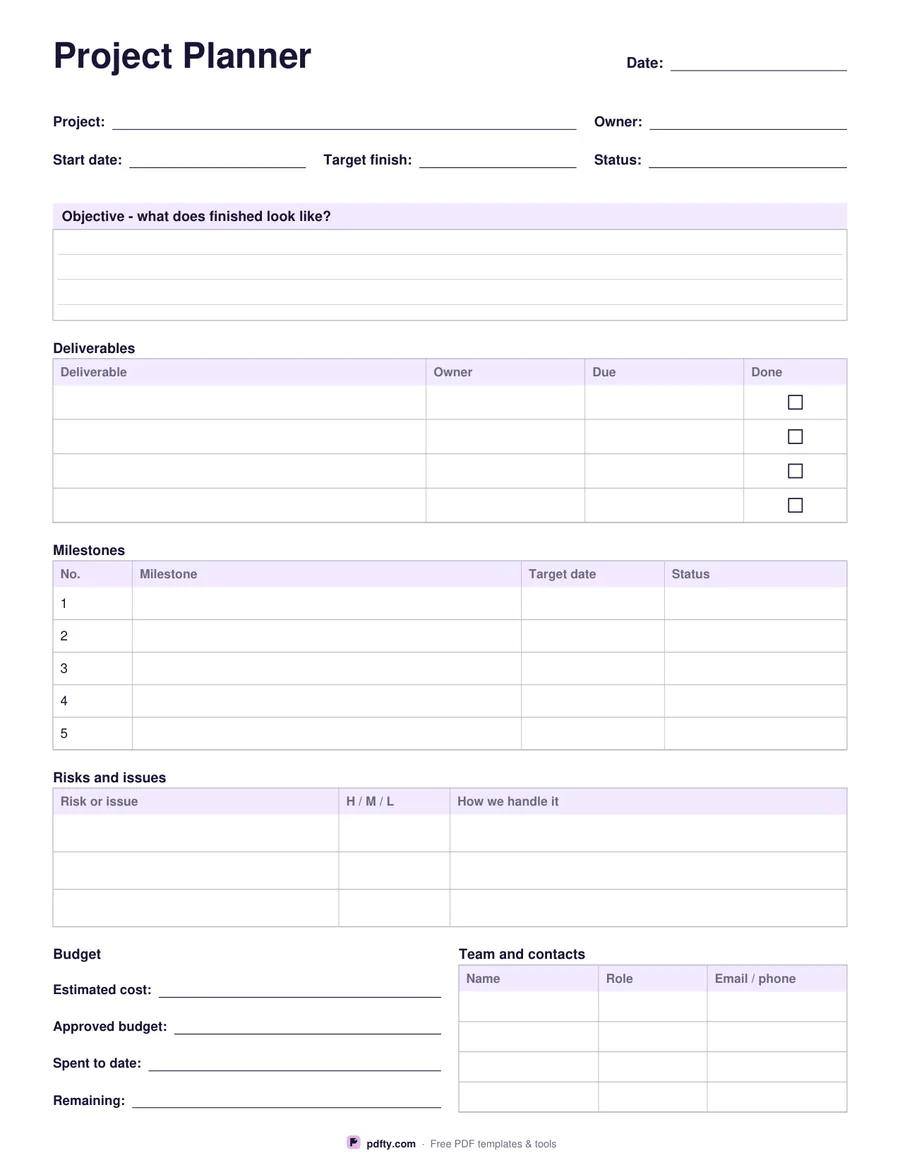
Printable one page project planner with objective, deliverables, milestones, risks, budget and team
Paper size
Fill & edit free online

Free · no watermark · no sign-up for your first 20 downloads a day

Fillable PDF — type into the fields online or in any PDF viewer before printing.

The header takes the project name, owner, start date, target finish and status. Under it a ruled box asks the only question that matters at the start: what does finished look like. Then come the three tables that carry the plan. Deliverables has four rows with owner, due date and a done checkbox. Milestones has five numbered rows with a target date and a status cell. Risks and issues has three wide rows with an H, M or L impact cell and a column for how you will handle it.

The foot of the page splits in two. On the left a budget block with four lines: estimated cost, approved budget, spent to date and remaining. On the right a team and contacts table with four rows for name, role and an email or phone. Together they answer the two questions a project sheet is usually missing when somebody picks it up in a meeting: what it costs and who to ask.

All 63 fields are fillable, so you can type the plan, print it for the kick-off, then update the status cells by hand as the work moves. It is one portrait page of vector lines laid out separately for US Letter and A4. If you need the week-by-week timeline instead, the Gantt Chart template covers that; this sheet is the brief that sits in front of it.
How to use it

  1. 1

    Download the planner

    Pick US Letter or A4 and download the one-page PDF.

  2. 2

    Write the objective

    Fill the header fields, then describe in the objective box what finished actually looks like.

  3. 3

    Fill the tables

    List four deliverables, five milestones with target dates, three risks, the budget lines and the team contacts.

  4. 4

    Print or fill it in

    Print at 100% ("Actual size") so lines and boxes keep their exact spacing, or fill the form fields on screen in any PDF viewer.

Frequently asked questions

Yes. There is no watermark and no sign-up for your first 20 downloads each day; after that a free account keeps downloads going. You may print the file as often as you like for personal, school or business use.
The Gantt Chart template is a timeline: tasks down the side, weeks across, bars shaded in. This sheet holds the written plan around that timeline, including the objective, risks, budget and team.
Yes. Every header field, the objective box, all three tables, the budget lines and the team table are form fields, 63 in all.
Five numbered rows, each with a milestone description, a target date and a status cell.
Print one page per project. Filled copies can be combined into a portfolio pack with pdfty's Merge PDF tool.
Fill it on screen, then run it through pdfty's Flatten PDF tool so the text becomes part of the page before you circulate it.

More free templates

Work with your PDF