Printable Job Search Tracker (Free PDF)

One landscape sheet for every application: where it went, who you spoke to, what happened and the date you chase it.
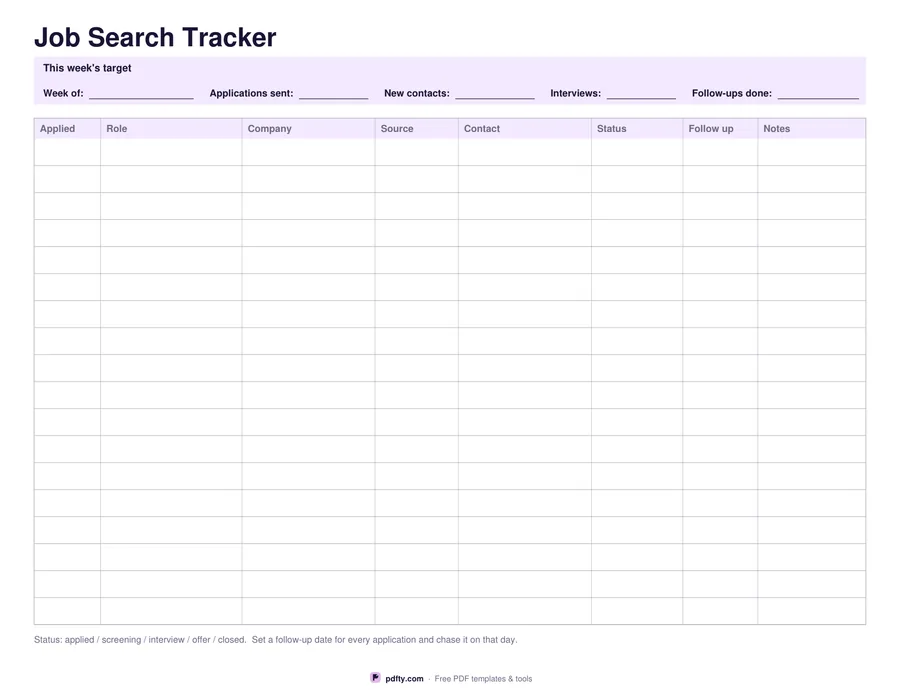
Printable job search tracker with columns for date applied, role, company, status and follow-up date
Rows
Paper size
Fill & edit free online

Free · no watermark · no sign-up for your first 20 downloads a day

Fillable PDF — type into the fields online or in any PDF viewer before printing.

Eight columns, filled in the order an application happens: the date you applied, the role, the company, where you found it, the contact or email address, the status, the date to follow up, and notes. Choose 18 rows, which leaves plenty of writing room, or 26 for a heavy search week. The sheet is landscape so company names and contact addresses fit without being cut off or wrapped onto a second line.

The follow-up column is the one that matters. Most applications go quiet, and the difference between an answer and silence is usually one polite message a week later. Writing the date down when you apply turns chasing into a scheduled task instead of a decision you have to make again every morning. The footnote keeps the status wording consistent: applied, screening, interview, offer, closed.

A target strip across the top holds the week, the number of applications sent, new contacts made, interviews and follow-ups done. A job search with a weekly number is easier to keep going than one measured by results you do not control. Every cell and every line is a PDF form field, so you can keep the sheet on a laptop and reprint it, or print it blank and fill it in by hand. US Letter or A4.
How to use it

  1. 1

    Pick the number of rows

    18 rows gives taller cells for handwriting; 26 fits more applications on the same page. Then choose US Letter or A4.

  2. 2

    Set a target for the week

    Fill the strip at the top with the week and the number of applications, contacts, interviews and follow-ups you are aiming for.

  3. 3

    Print or fill it in

    Print at 100% ("Actual size") so lines and boxes keep their exact spacing, or fill the form fields on screen in any PDF viewer.

  4. 4

    Add a follow-up date to every row

    Write the chase date as you apply, then work the follow-up column each morning rather than rereading the whole sheet.

Frequently asked questions

Yes. There is no watermark and no sign-up for your first 20 downloads each day; after that a free account keeps downloads going. You may print the file as often as you like for personal, school or business use.
18 or 26, depending on the option you choose. Both are a single landscape page with eight columns: applied, role, company, source, contact, status, follow up and notes.
Yes. Every cell in the table and every line in the weekly target strip is a PDF form field, so you can keep one file open and update it as replies arrive.
Keep it to a few words so the column stays scannable. The sheet suggests applied, screening, interview, offer and closed, printed under the table as a reminder.
Yes. Use the source column for the person or site that led you to the role and the contact column for who you spoke to, and the weekly strip counts new contacts separately from applications.
Yes. Print one per week and merge or staple them, or download the 26-row version if you would rather keep a longer search on a single sheet.

More free templates

Work with your PDF