Student Progress Report (Free Printable PDF)

A one-page report: a grade and an effort mark for every subject, a comment beside each, and room for strengths and next steps.
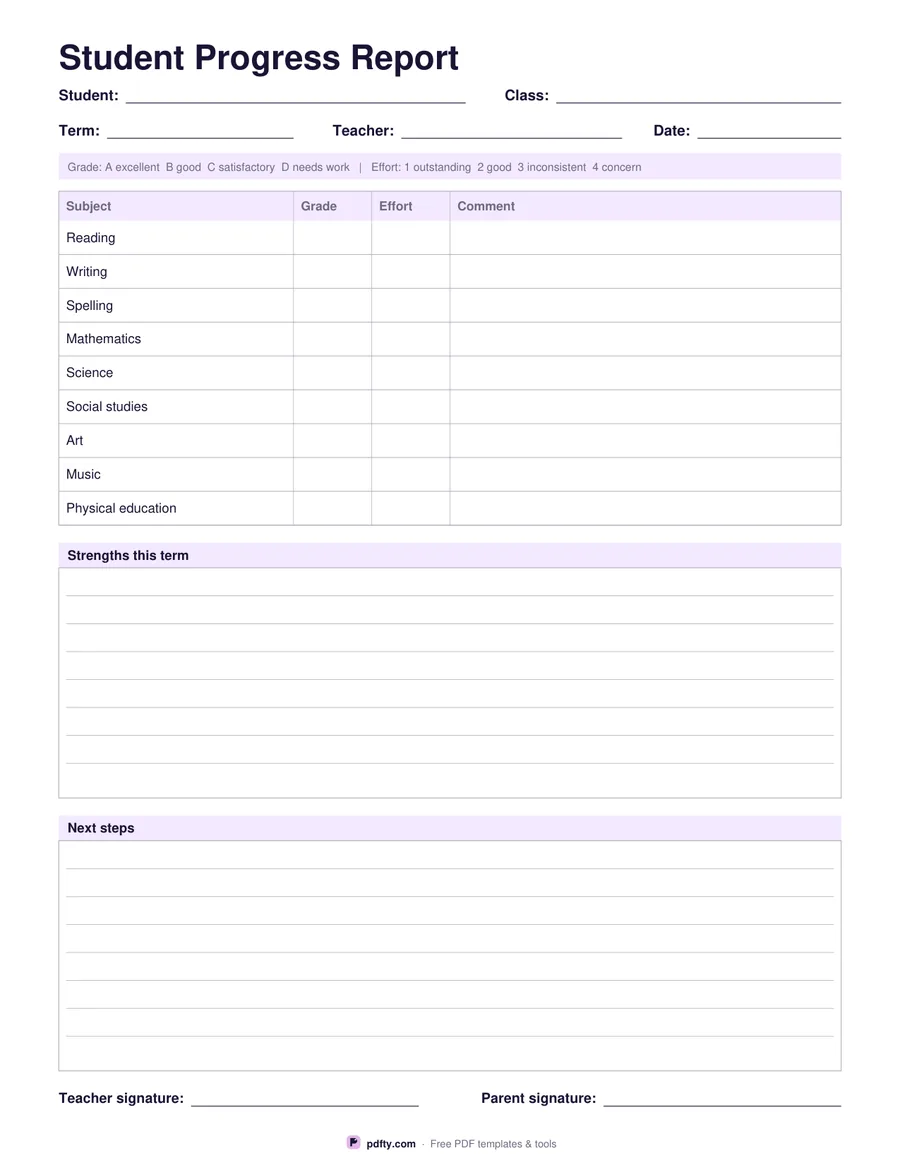
Printable student progress report with subjects, grades and comments
Subject list
Paper size
Fill & edit free online

Free · no watermark · no sign-up for your first 20 downloads a day

Fillable PDF — type into the fields online or in any PDF viewer before printing.

A full report card is a long document, but most of the time a teacher or tutor needs one page that a parent can read in a minute. This template gives a header for the student, class, term, teacher and date, a key band explaining the grade and effort scales, then a table with a row for every subject. It suits a class teacher, a tutor writing up a term of lessons, or a homeschooling parent keeping a record.

Each row has a grade column, an effort column and a wide comment column, which keeps judgement and explanation together instead of pushing all the comments to the end. The subject list depends on the option you choose: the elementary set runs from reading and writing through to physical education, while the secondary set uses English, mathematics, science, history, geography, a modern language, art and design, technology and PE.

Below the table are ruled boxes for strengths this term and next steps, then signature lines for the teacher and a parent. Every grade, effort mark, comment and box is a form field, so the report can be typed, saved and emailed, or printed blank and written up by hand at parents' evening. Flatten the finished file if you want to email a copy that cannot be edited.
How to use it

  1. 1

    Choose the subject list

    Elementary for primary school subjects, secondary for the older timetable.

  2. 2

    Fill in the header and the table

    Type the student, class, term and teacher, then a grade, an effort mark and a comment for each subject.

  3. 3

    Print or fill it in

    Print at 100% ("Actual size") so lines and boxes keep their exact spacing, or fill the form fields on screen in any PDF viewer.

  4. 4

    Write the next steps

    Use the two boxes for strengths and next steps, then sign and send the report home for a parent signature.

Frequently asked questions

Yes. There is no watermark and no sign-up for your first 20 downloads each day; after that a free account keeps downloads going. You may print the file as often as you like for personal, school or business use.
A key band at the top explains it: A to D for attainment and 1 to 4 for effort. You can write any other scale in the columns instead.
Nine, printed on the sheet: reading, writing, spelling, mathematics, science, social studies, art, music and PE, or the secondary set if you choose it.
Yes. Every field including the comment column and the two boxes is fillable, so the report can be completed on a computer and saved as a PDF.
Yes. Run the finished file through pdfty's Flatten PDF tool and the typed text becomes part of the page.
Yes. It gives a tidy termly record of grades, effort and next steps, which is useful for portfolios and reviews.

More free templates

Work with your PDF