Printable Shift Schedule / Staff Rota (Free PDF)
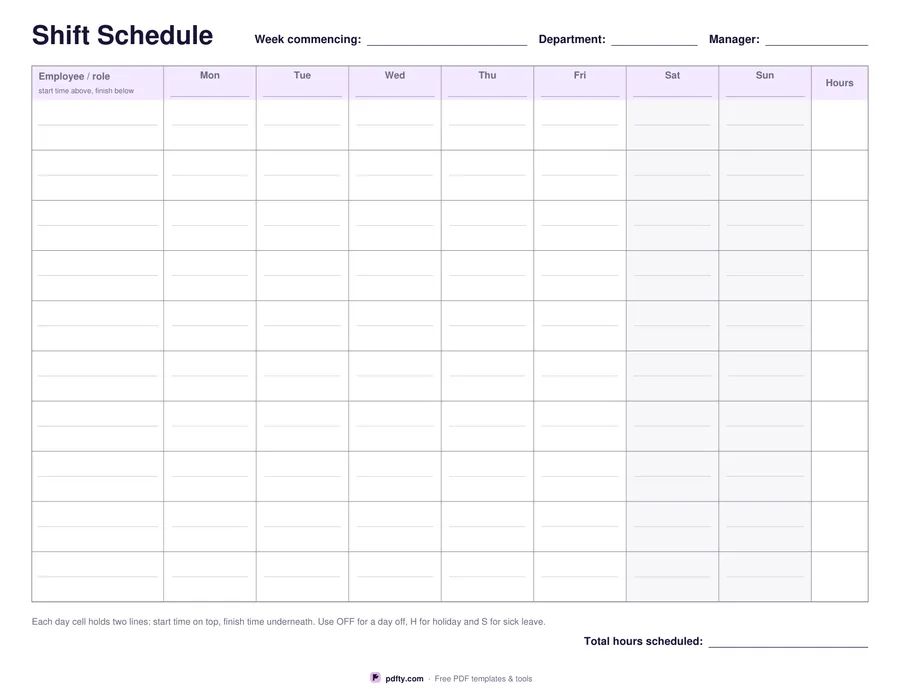
A week's rota on one landscape page: ten staff, seven days, a start and a finish time in every cell.
Free · no watermark · no sign-up for your first 20 downloads a day
Fillable PDF — type into the fields online or in any PDF viewer before printing.
Ten employee rows run down the side, each with a name line and a smaller line underneath for the role, so bar, kitchen, floor or ward is visible without a second sheet. Seven day columns run across, each with the day name printed and a date field in the header so one blank file covers any week. The weekend columns are lightly shaded, which makes the shape of the week readable from across the room.
Every day cell is split into two lines: the start time on top and the finish underneath. That is 140 time fields, enough for a full week of a small team without squeezing. A final column on the right takes the scheduled hours for each person, and the line under the grid totals the hours for the week. The footer reminds whoever fills it in to use OFF for a day off, H for holiday and S for sick leave, so the sheet reads the same way for everyone.
All 181 fields are fillable, so a manager can build the rota on screen, print it for the staff room and email the same file to the team. Choose whether the week starts on Monday or Sunday before you download. It is one landscape page of vector rules, laid out separately for US Letter and A4, and it prints cleanly in black and white.