Printable Petty Cash Log (Free Fillable PDF)

Every amount in and out of the cash box on one page, with voucher numbers and who took the money.
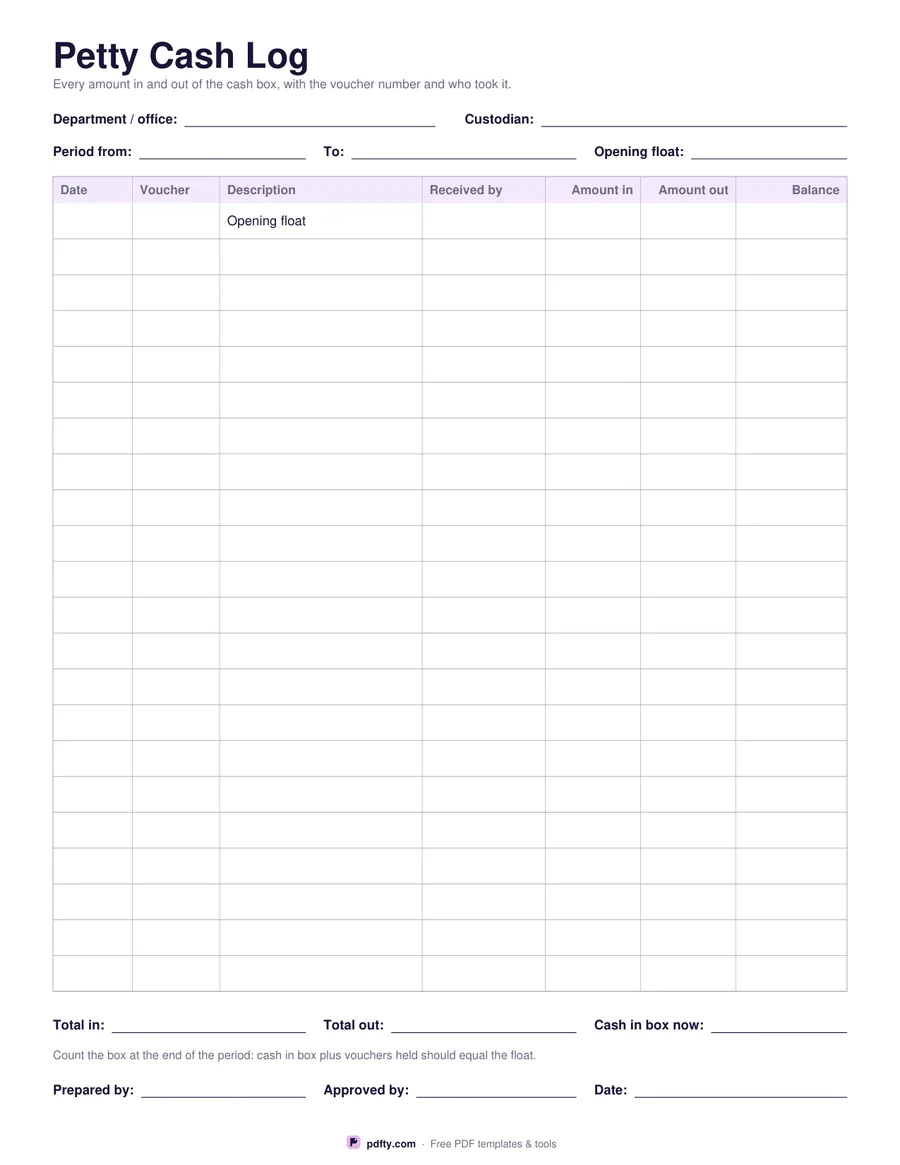
Printable petty cash log with opening float row, voucher numbers and amount in, amount out and balance columns
Paper size
Fill & edit free online

Free · no watermark · no sign-up for your first 20 downloads a day

Fillable PDF — type into the fields online or in any PDF viewer before printing.

A petty cash box only works if every note that leaves it is written down. This log gives you twenty-two rows with seven columns: the date, the voucher number, what the money was for, who received it, the amount in, the amount out and the balance left in the box. The first row is printed "Opening float", so the sheet starts with the cash you began the period with and every line after it adjusts the running balance.

The header has fields for the department or office, the custodian who looks after the box, the period the sheet covers and the float amount. Under the table, three fields record total in, total out and the cash in the box now, followed by a reminder that cash plus vouchers held should equal the float. Prepared by, approved by and date lines finish the sheet so it can be signed and filed with the receipts.

The money columns are right-aligned and carry no currency symbol, so the log suits an office anywhere. Every cell is a form field: a bookkeeper can type the month up on a computer and print a clean copy for the folder, or the sheet can be printed first, taped inside the lid of the cash box and filled in by hand as vouchers come in. It fits a single US Letter or A4 page.
How to use it

  1. 1

    Download the sheet

    Pick US Letter or A4 and download the PDF.

  2. 2

    Set the float

    Fill in the department, the custodian, the period and the opening float, then write the float on the first row.

  3. 3

    Print or fill it in

    Print at 100% ("Actual size") so lines and boxes keep their exact spacing, or fill the form fields on screen in any PDF viewer.

  4. 4

    Log and reconcile

    Add a row for every voucher, keep the balance column up to date, then count the box at the end of the period and sign the sheet.

Frequently asked questions

Yes. There is no watermark and no sign-up for your first 20 downloads each day; after that a free account keeps downloads going. You may print the file as often as you like for personal, school or business use.
Yes. Every cell in the table, the header details, the three totals and the signature lines are form fields. Type into them in any PDF viewer and save your copy.
Twenty-two, after the opening float line. Most offices get through a month on one sheet; if yours is busier, print two and number them.
The fixed amount of cash the box is topped back up to. Write it on the first row, then every payment out reduces the balance until the box is replenished, which you log as an amount in.
Yes. No currency symbol is printed anywhere, so the amount in, amount out and balance columns suit any country.
Yes. There are prepared by, approved by and date lines at the bottom. If you fill the sheet in on screen, print it for a wet signature or add a signature with a PDF signing tool.

More free templates

Work with your PDF