Printable Meal Prep Planner (Free PDF)

One cooking session on a page: what you are batch cooking, how many containers it fills, the days it covers and the shopping that has to happen first.
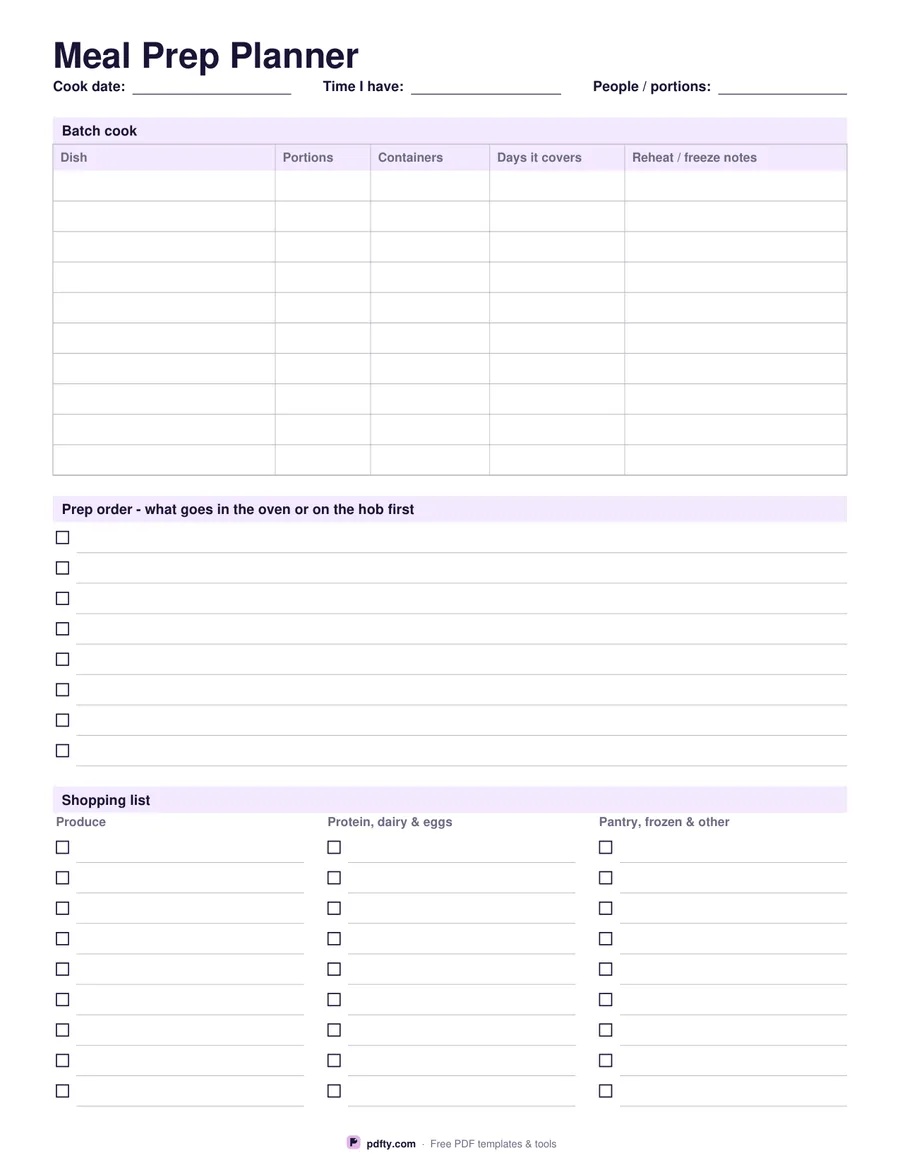
Printable meal prep planner with batch cook table, prep order checklist and shopping list
Paper size
Fill & edit free online

Free · no watermark · no sign-up for your first 20 downloads a day

Fillable PDF — type into the fields online or in any PDF viewer before printing.

This is a planner for the cooking session itself, not for the week's menu. The top table takes ten dishes and asks four things about each one: how many portions it makes, how many containers you need, which days it covers and how to reheat or freeze it. Filling that in before you shop is what stops the familiar Sunday problem of four trays of the same thing and nothing to put it in.

Underneath, a prep order checklist gives you eight blank lines with tick boxes, for the sequence that makes a two-hour session fit into one: rice on, oven to temperature, trays in, chop while they roast. At the foot of the page the shopping list runs in three columns headed produce, protein, dairy and eggs, and pantry, frozen and other, with nine checkbox lines in each.

Everything is fillable: the cook date, the time you have, the number of people, every table cell, every prep step and every shopping line. Type the plan on screen and print it for the kitchen, where it will get splashed and that is fine, or print it blank and write as you go. The checkboxes are real PDF boxes, so a shopping list ticked off on a phone in the supermarket works as well as one on paper. One page, US Letter or A4.
How to use it

  1. 1

    Set the session

    Fill in the cook date, how much time you actually have and how many people you are cooking for.

  2. 2

    List the dishes

    Write each batch with its portions, containers, the days it covers and a reheating note.

  3. 3

    Build the shopping list

    Work backwards from the dishes into the three shopping columns so nothing is missed.

  4. 4

    Print or fill it in

    Print at 100% ("Actual size") so lines and boxes keep their exact spacing, or fill the form fields on screen in any PDF viewer.

Frequently asked questions

Yes. There is no watermark and no sign-up for your first 20 downloads each day; after that a free account keeps downloads going. You may print the file as often as you like for personal, school or business use.
A meal planner lays out what you will eat each day. This one plans the cooking session: batches, containers, the order things go in the oven and the shopping that feeds it.
Ten rows in the batch table, eight prep steps and twenty-seven shopping lines in three columns.
Yes, all 123 fields are fillable, including the checklists. Tick boxes work in Adobe Reader, Preview, Chrome and Edge.
Print it on ordinary paper and keep a spare, or slip it into a plastic sleeve and tick the boxes with a dry-wipe pen.
Yes. Open the PDF in GoodNotes, Notability or Xodo and write on it with a stylus, or fill the form fields and keep the file on your device instead of printing it.

More free templates

Work with your PDF