Printable Bullet Journal Page (Free PDF)

A 5 mm dot grid page laid out as a monthly log: dates 1 to 31 down the side, a task column, and a key you can add to.
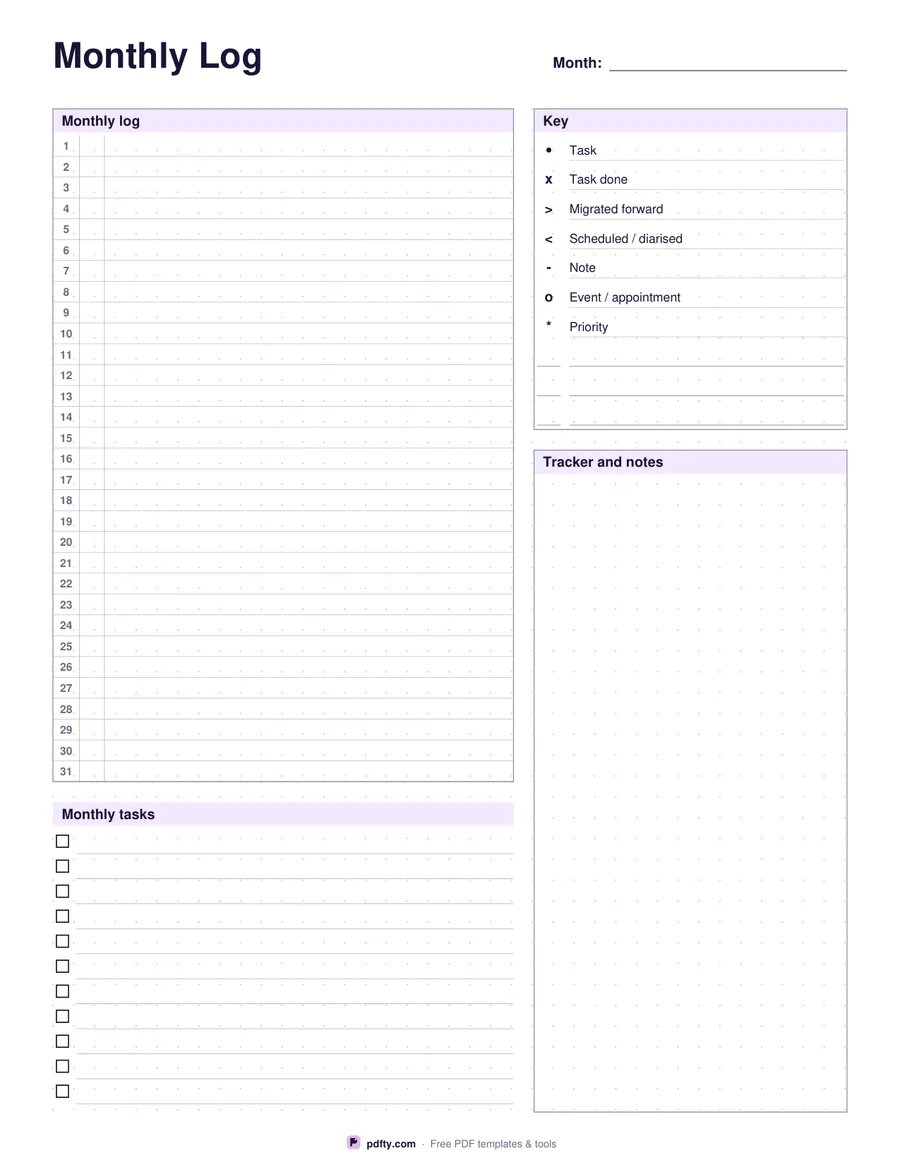
Printable bullet journal page with a 5 mm dot grid, monthly log and key legend
Paper size
Fill & edit free online

Free · no watermark · no sign-up for your first 20 downloads a day

Fillable PDF — type into the fields online or in any PDF viewer before printing.

The whole writing area is a 5 mm dot grid, the spacing most bullet journals use, and the layout is drawn on top of it rather than instead of it. On the left is the classic monthly log: the numbers 1 to 31 printed down a narrow date column, a second narrow column for the weekday letter, and a wide task column beside it, with one row per day at exactly one dot of pitch so your handwriting lines up with the grid.

The right side carries the key, which is the part people usually redraw by hand every month. Seven rows are printed with their symbols and meanings: a dot for a task, x for done, an arrow forward for migrated, an arrow back for scheduled, a dash for a note, o for an event and a star for a priority. Three blank rows underneath let you add your own symbols. Below the key the dotted area is left open for a tracker, a mood log or a collection.

Under the monthly log sits a monthly tasks checklist, eleven lines on US Letter and fourteen on A4, for everything that belongs to the month rather than to a day. The month field, both log columns, the custom key rows, the checklist and the tracker area are fillable, so you can type a log or print the page blank for pen and ink. One portrait page, drawn for US Letter and A4.
How to use it

  1. 1

    Download the page

    Pick US Letter or A4 and download the one-page PDF.

  2. 2

    Write the month

    Fill the month field at the top, then add the weekday letters beside the dates for the month you are logging.

  3. 3

    Add your own key symbols

    Three blank rows under the printed key take the symbols you use that are not in the standard set.

  4. 4

    Print or fill it in

    Print at 100% ("Actual size") so lines and boxes keep their exact spacing, or fill the form fields on screen in any PDF viewer.

Frequently asked questions

Yes. There is no watermark and no sign-up for your first 20 downloads each day; after that a free account keeps downloads going. You may print the file as often as you like for personal, school or business use.
5 mm, the spacing used by most bullet journal notebooks, so anything you plan on this page transfers to a notebook at the same scale.
No. The numbers 1 to 31 are printed, but the month and the weekday letters are blank, so the same page works for any month of any year.
Yes. The month, all 31 weekday and task lines, the three custom key rows, the monthly tasks checklist and the tracker area are form fields.
Print the page as often as you like, or make a booklet by combining copies with pdfty's Merge PDF tool and adding page numbers.
Yes. Import it into GoodNotes, Notability or Xodo and write on the dot grid with a stylus.

More free templates

Work with your PDF