Interview Preparation Sheet (Fillable PDF)

One page to fill in the day before: the role, the questions you expect with your answers, the questions you will ask, and what to take with you.
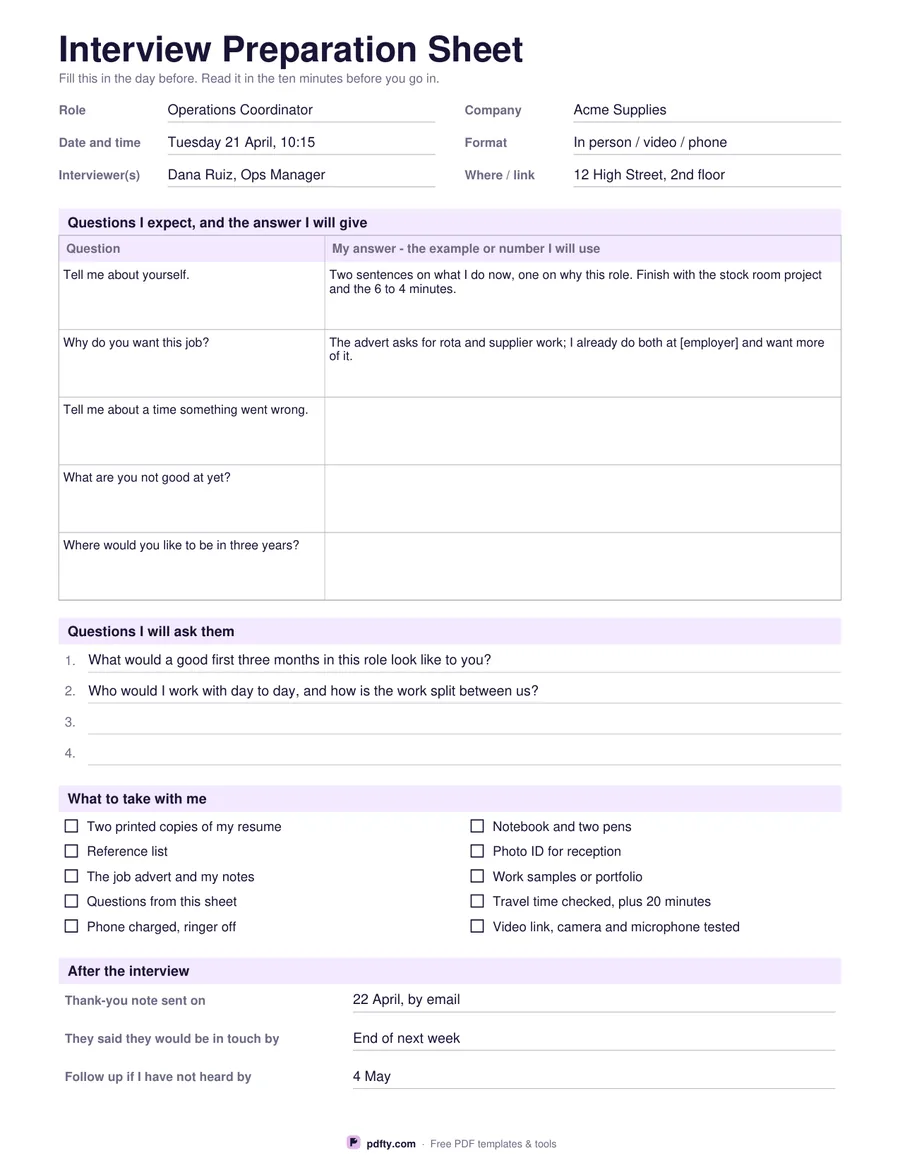
Printable interview preparation sheet with questions, answers and a checklist
Paper size
Fill & edit free online

Free · no watermark · no sign-up for your first 20 downloads a day

Fillable PDF — type into the fields online or in any PDF viewer before printing.

The sheet starts with six lines of detail you want in one place: role, company, date and time, format, who you are meeting and where to go or which link to click. Underneath is a five-row table for the questions you expect, each with a wide box for the answer you plan to give. Three common questions are already typed in, with the first two answered as examples, so you can see that the useful answer is a note about which example and which number you will use, not a script to memorize.

The second half is the part people forget. There are four numbered lines for questions you want to ask them, two of them filled in as a starting point, and a ten-item checklist of what to take, from printed copies of your resume and your reference list to a tested video link and a travel time with twenty minutes added. The last block has three dated lines for afterwards: when you sent your thank-you note, when they said they would be in touch, and the date you will follow up if they are not.

Every field is fillable, so you can prepare on screen and print the finished sheet to read on the way, or print it blank and write on it. It is one page in US Letter and A4. Download a fresh copy for each interview; the company and interviewer lines at the top are what stop two applications blurring together, and the follow-up date at the bottom is the thing most worth writing down before you forget it.
How to use it

  1. 1

    Fill in the details first

    Role, company, date and time, format, who you are meeting and the address or link go at the top.

  2. 2

    Prepare five answers

    Keep the three questions already on the sheet, add two you expect from the advert, and note the example you will use for each.

  3. 3

    Write two questions to ask

    Replace or keep the two suggestions, and add anything you still want to know about the role or the team.

  4. 4

    Print or fill it in

    Print at 100% ("Actual size") so lines and boxes keep their exact spacing, or fill the form fields on screen in any PDF viewer.

Frequently asked questions

Yes. There is no watermark and no sign-up for your first 20 downloads each day; after that a free account keeps downloads going. You may print the file as often as you like for personal, school or business use.
Yes. The detail lines, the question and answer table, the questions you will ask and the three follow-up lines are all form fields. The what-to-take list uses tick boxes you can click.
Five questions with answer boxes, plus four lines for questions you want to ask. Three of the five come pre-filled with common questions you can keep or type over.
Yes. The format line covers in person, video or phone, the where line takes a meeting link, and the checklist includes testing the link, camera and microphone.
Many people do, and having your questions written down is normal. If you would rather not, read it in the ten minutes beforehand and leave it in your bag.
Yes. Open the PDF in any viewer that supports form fields, such as Adobe Reader or your tablet's built-in reader, and type into the boxes.

More free templates

Work with your PDF