Printable Lost Pet Poster (Free PDF)

A poster you can fill in and put up in an hour: photo box, description, where and when, a reward line, and six tear-off strips with your number.
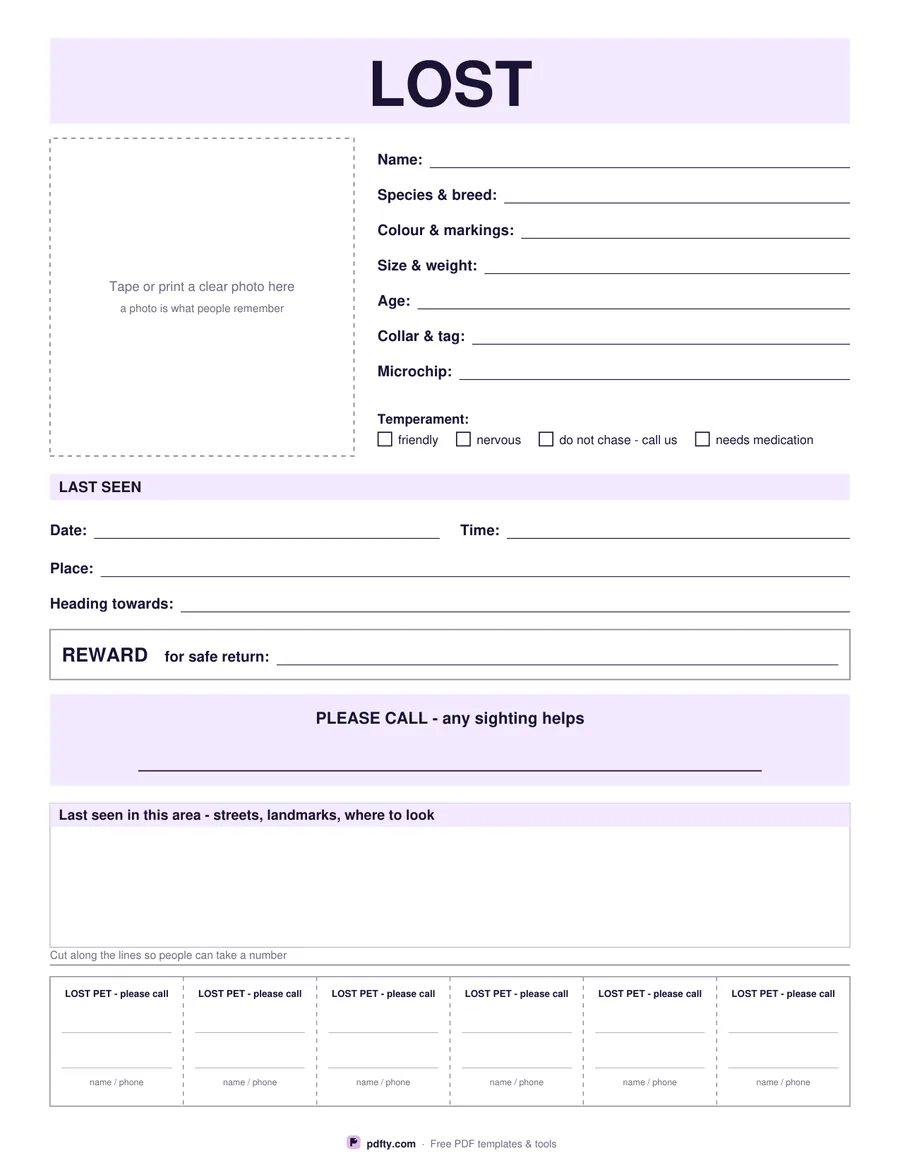
Printable lost pet poster with photo box, description, last seen details, reward line and tear-off phone strips
Paper size
Fill & edit free online

Free · no watermark · no sign-up for your first 20 downloads a day

Fillable PDF — type into the fields online or in any PDF viewer before printing.

The layout is built around how people read a poster from a few steps away. A full-width LOST band runs across the top. Underneath, a dashed photo box takes up the left third — tape or print a clear picture there, because that is the thing passers-by actually remember. The right side holds the description on seven ruled lines: name, species and breed, colour and markings, size and weight, age, collar and tag, microchip number.

Below the description, four tick boxes cover temperament — friendly, nervous, do not chase, needs medication — because telling people not to chase a frightened animal is often the single most useful line on the sheet. Then come the last-seen lines (date, time, place, which way it was heading), a bordered reward line, and a lavender call-out band with a wide field for your phone number in large type. A box underneath gives room to sketch or list the streets and landmarks where it went missing.

The foot of the page is six tear-off strips, divided by dashed cut lines, each with a line for the name and a line for the phone number. Every line on the poster is a PDF form field, so you can type it all in and print as many copies as you need; the strips have their own fields, so fill in the first and copy it across before you print. One page, US Letter or A4.
How to use it

  1. 1

    Fill it in on screen

    Type the name, description, where and when it was last seen, the reward line and your phone number, then fill the six tear-off strips.

  2. 2

    Add a photo

    Print the poster and tape a photo into the dashed box, or print your picture at that size and glue it in. A clear, recent photo matters more than the words.

  3. 3

    Print or fill it in

    Print at 100% ("Actual size") so lines and boxes keep their exact spacing, or fill the form fields on screen in any PDF viewer.

  4. 4

    Put them up and cut the strips

    Cut along the dashed lines at the foot so people can take a number. Print extras for vets, shelters, shops and dog walkers nearby.

Frequently asked questions

Yes. There is no watermark and no sign-up for your first 20 downloads each day; after that a free account keeps downloads going. You may print the file as often as you like for personal, school or business use.
Yes. Each of the six strips has its own name and phone field. They are separate fields, so type the first one and copy and paste it into the other five before printing.
It is a bordered space to tape or glue a photo into after printing, which is the quickest way and prints better on a home printer. If you would rather build a photo into the file, make the picture a PDF with pdfty's JPG to PDF tool and print both pages.
The headline is set large and the phone line takes 20-point type, so the two things a passer-by needs — that an animal is lost and the number to call — read from several steps away.
That is your call; the line is there if you want it and can be left blank. Many people simply write "reward" with no figure.
Yes. The design uses a pale lavender band and grey rules, both of which print cleanly in greyscale, so it still looks deliberate on an office printer.

More free templates

Work with your PDF