Performance Review Form (Free PDF)

Two pages that cover the objectives you set, how the work was done, what to develop and what the next period looks like.
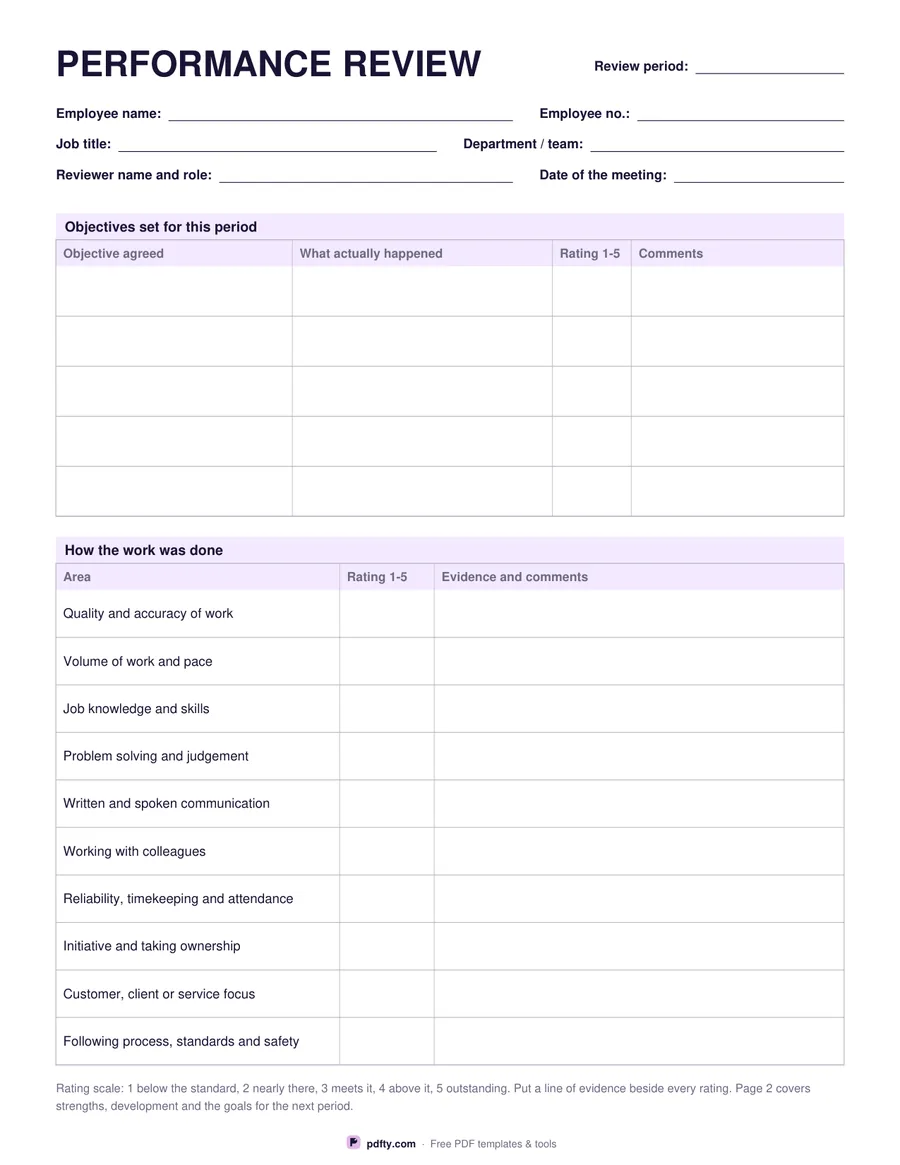
Printable performance review form with objectives, rated areas and signature lines
Rating scale
Paper size
Fill & edit free online

Free · no watermark · no sign-up for your first 20 downloads a day

Fillable PDF — type into the fields online or in any PDF viewer before printing.

Page one starts with the employee, job title, department, reviewer and the dates. Then comes the objectives table: five rows with the objective that was agreed, what actually happened, a rating and comments, because a review that does not revisit what was promised last time is just a conversation. Below it, ten areas are rated with evidence beside each one: quality and accuracy, volume and pace, job knowledge, problem solving, communication, working with colleagues, reliability and attendance, initiative, customer focus, and following process and safety.

Page two is the part people remember. A large box for strengths, an equally large one for the areas to develop, then a four-row table for the development and training agreed with the support needed and a date, and a five-row table for the goals of the next period with how each will be measured and a target date. An employee comments box gives the other side of the table a say in writing, which matters when the form is filed.

The sheet closes with an overall assessment - exceeds, meets, partly meets or below the role - and signature and date lines for both the employee and the reviewer. You can choose a one to five scale or a one to four scale, which removes the comfortable middle and forces a decision; the printed legend changes to match. Every box is fillable, so the form can be typed, emailed and signed, or printed for the meeting itself.
How to use it

  1. 1

    Choose the rating scale

    One to five keeps a neutral middle; one to four removes it so every rating is a decision.

  2. 2

    Download both pages

    US Letter or A4. The file is two pages and needs no sign-up.

  3. 3

    Print or fill it in

    Print at 100% ("Actual size") so lines and boxes keep their exact spacing, or fill the form fields on screen in any PDF viewer.

  4. 4

    Fill it in before the meeting, sign it after

    Draft the ratings and evidence first, discuss them, then agree the goals and have both people sign.

Frequently asked questions

Yes. There is no watermark and no sign-up for your first 20 downloads each day; after that a free account keeps downloads going. You may print the file as often as you like for personal, school or business use.
Two. Page one covers the objectives and the ten rated areas; page two covers strengths, development, next-period goals, employee comments and both signatures.
Yes. The objective and rating tables, the strengths and development boxes, the goal table and the comment box are all form fields.
It removes the middle rating, so a reviewer has to decide whether the work was below the standard or above it. The printed scale legend at the foot of page one changes with your choice.
Yes. The two pages are designed as a front and back, with equal margins, so a duplex print gives you the whole review on one sheet of paper.
No. There is nothing in it about pay bands, forced ranking or scoring rules; it records what was agreed, how the work went and what happens next.

More free templates

Work with your PDF