Beading Pattern Grid (Free Printable PDF)

Bead graph paper with the cells offset the way the stitch really works, plus a colour key so your chart says which bead each shade means.
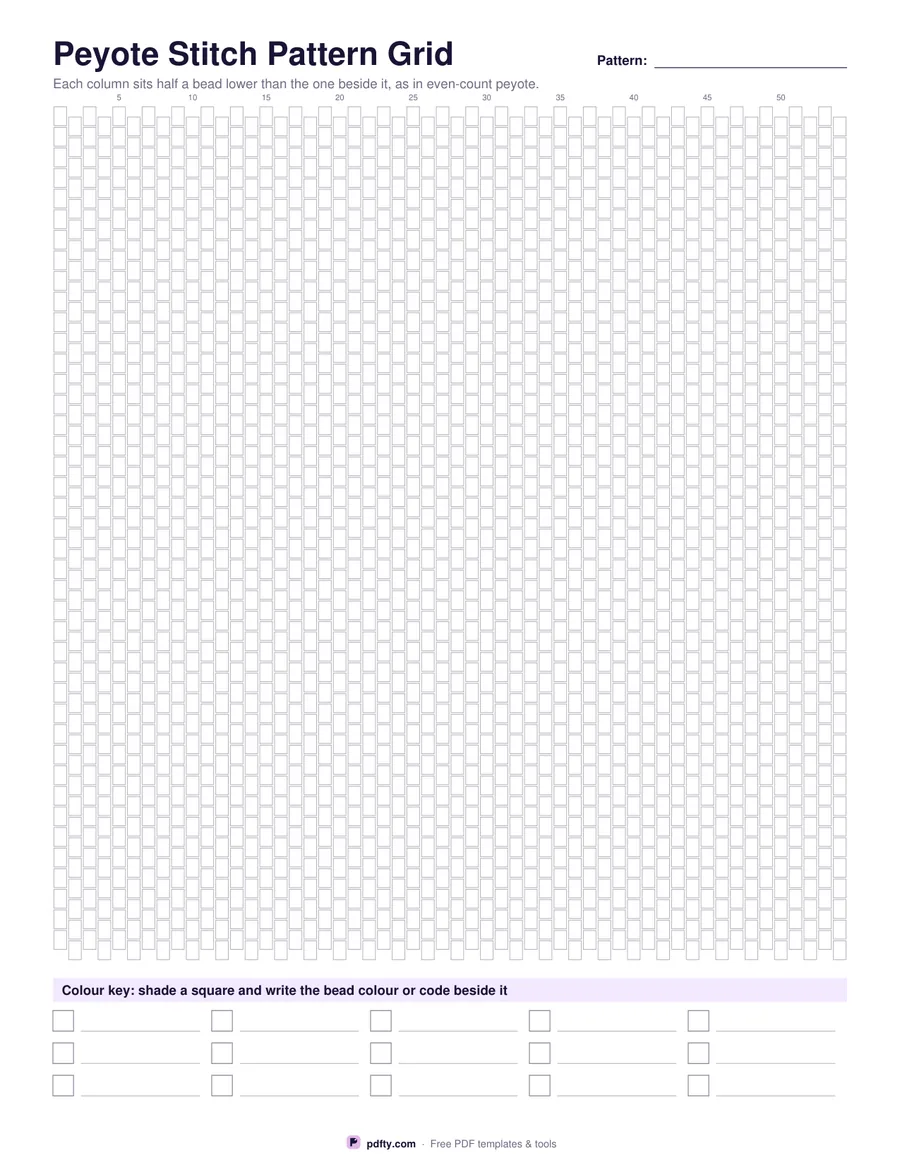
Printable peyote stitch beading grid with offset bead cells and a colour key
Stitch
Paper size
Fill & edit free online

Free · no watermark · no sign-up for your first 20 downloads a day

Fillable PDF — type into the fields online or in any PDF viewer before printing.

Ordinary square graph paper lies to you about beadwork: beads are not square and they do not sit directly above each other. This sheet draws the cells the way the stitch sits. The peyote grid is made of upright bead cells in columns, with every other column dropped half a bead, which is what even-count peyote does. The brick grid is made of lying-down bead cells in rows, with every other row shifted half a bead across, like courses of brickwork.

The grid fills the page, roughly fifty columns by forty rows for peyote and sixty-five rows for brick, with a small number every five columns or rows so you can count repeats and find your place in a long pattern. There is a line at the top to name the pattern. Colour the cells with pencils, then follow the chart bead by bead; the offset means the chart looks like the finished piece rather than a square approximation of it.

Along the bottom, fifteen key squares each have a line beside them. Shade a square in the pencil you used on the grid and write the bead colour, the manufacturer's code or the finish next to it, so a pattern you come back to in a year can still be beaded from the same tubes. The key lines are form fields if you prefer to type the bead codes; the grid itself is for colouring by hand.
How to use it

  1. 1

    Choose peyote or brick

    Peyote offsets the columns and stands the beads upright; brick offsets the rows and lays the beads flat.

  2. 2

    Print or fill it in

    Print at 100% ("Actual size") so lines and boxes keep their exact spacing, or fill the form fields on screen in any PDF viewer.

  3. 3

    Colour the pattern

    Shade the bead cells with coloured pencils, counting the numbers every five cells to keep repeats even.

  4. 4

    Fill in the colour key

    Shade a key square for each bead you used and write the colour name or code beside it, so you can buy the same beads again.

Frequently asked questions

Yes. There is no watermark and no sign-up for your first 20 downloads each day; after that a free account keeps downloads going. You may print the file as often as you like for personal, school or business use.
About fifty columns by forty rows for peyote, and about fifty by sixty-five for brick stitch, which covers a cuff bracelet or a large pendant.
Because the stitch is. In peyote every second column drops half a bead; in brick stitch every second row shifts half a bead sideways. A square grid would distort your design.
No, those sit on a square grid. Use the cross stitch grid or ordinary graph paper for loomwork.
Yes. The fifteen lines in the colour key and the pattern name are form fields; the grid itself is for colouring in.
Print at 100% and the cells keep their drawn size. The grid is a chart, not a template, so it does not need to be life size.

More free templates

Work with your PDF