Equipment Sign-Out Sheet (Free PDF)

One line per item that leaves the store, signed for on the way out and ticked off on the way back.
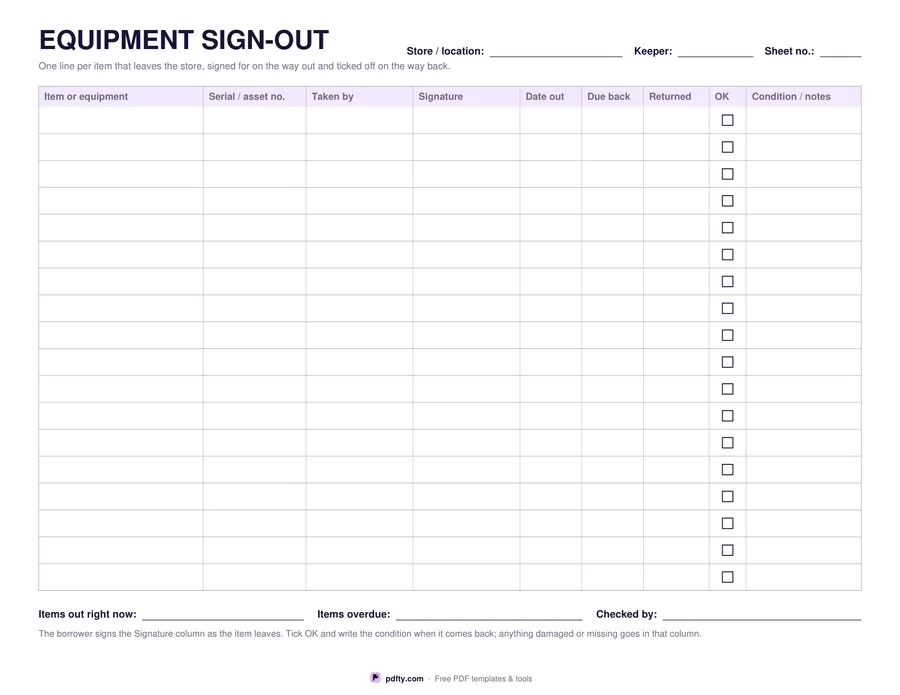
Printable equipment sign-out sheet with serial numbers, borrower signatures and return columns
Item rows
Paper size
Fill & edit free online

Free · no watermark · no sign-up for your first 20 downloads a day

Fillable PDF — type into the fields online or in any PDF viewer before printing.

Nine columns across a landscape page: the item or piece of equipment, its serial or asset number, who took it, their signature, the date out, the date it is due back, the date it actually came back, a tick for returned and a column for its condition or any notes. Eighteen rows give room to write; twenty-four suit a busy store. The header records the store or location, the keeper who looks after it and a sheet number.

The signature column is the part that makes the sheet work. A name in a book is an administrative note; a signature next to a serial number is somebody taking responsibility for a specific object. Pair it with the due back column and the overdue items are obvious at a glance - no cross-referencing, no searching a spreadsheet, just a date that has passed and no tick beside it.

Three fields under the table hold the number of items out right now, the number overdue and who checked. The condition column is where a scratched case, a missing charger or a bent tripod leg gets recorded on the day it comes back rather than discovered by the next borrower. It suits a tool store, an IT equipment cupboard, a school department, a camera kit room or a site container. Every cell is fillable; one page in US Letter or A4, landscape.
How to use it

  1. 1

    Choose 18 or 24 rows

    Eighteen rows are roomier for handwriting; twenty-four fit more items per sheet.

  2. 2

    Download the PDF

    US Letter or A4 in landscape, no sign-up needed.

  3. 3

    Print or fill it in

    Print at 100% ("Actual size") so lines and boxes keep their exact spacing, or fill the form fields on screen in any PDF viewer.

  4. 4

    Sign it out, tick it in

    The borrower signs as the item leaves; the keeper ticks it back and notes the condition when it returns.

Frequently asked questions

Yes. There is no watermark and no sign-up for your first 20 downloads each day; after that a free account keeps downloads going. You may print the file as often as you like for personal, school or business use.
Yes, every cell is a form field. The signature column is still best handled on paper, since a typed name is not a signature in any meaningful sense.
Eighteen or twenty-four rows, depending on the version. Use the sheet number field when one sheet fills up.
It is designed as one line per item, because the serial number and the condition belong to a specific object. For a kit that always travels together, list it as one item and name the case.
Landscape. Nine columns need the width, and it still prints on a standard sheet of US Letter or A4.
Yes. Put the key number or the registration in the serial column; everything else - taken by, signature, due back, returned - works the same way.

More free templates

Work with your PDF