Printable Pet Vaccination Record (Free PDF)

One card for one animal: its details at the top, then a row for every vaccination with the date it was given, the date it is due again and room for the vet to sign.
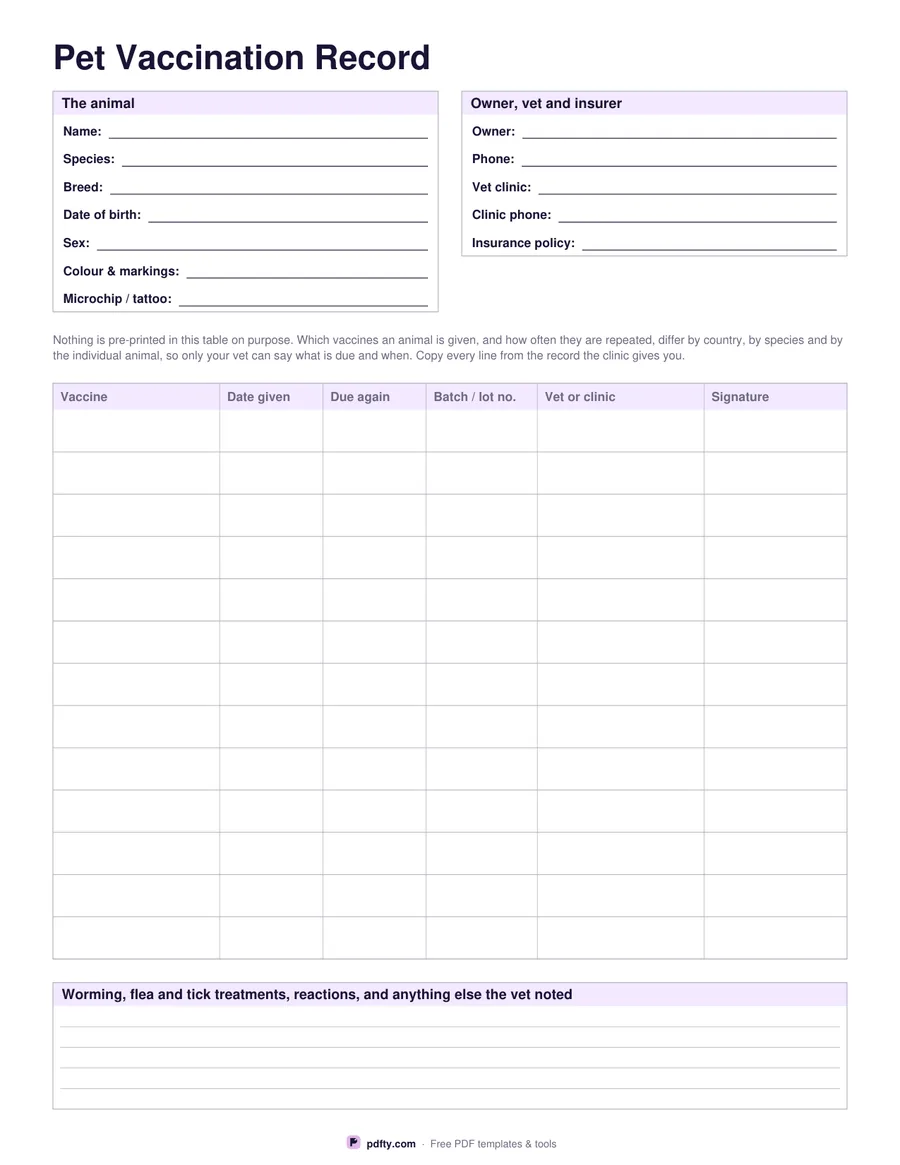
Printable pet vaccination record with animal details and 13 blank rows for vaccine, date, batch and signature
Paper size
Fill & edit free online

Free · no watermark · no sign-up for your first 20 downloads a day

Fillable PDF — type into the fields online or in any PDF viewer before printing.

The top of the sheet holds the animal in two boxes. The left one takes the name, species, breed, date of birth, sex, colour and markings and the microchip or tattoo number. The right one takes the owner and phone, the vet clinic and its phone, and the insurance policy number. Below that sits the table: thirteen ruled rows with columns for the vaccine, the date it was given, the date it is due again, the batch or lot number, the vet or clinic, and a signature.

The table is deliberately empty. Which vaccines an animal is given, and how often they are repeated, differ by country, by species and by the individual animal, so no printable can tell you what is due. Your vet can. Copy each line from the record the clinic gives you, including the batch number, which is the detail kennels, groomers and breeders most often ask to see and the one people forget to write down.

A ruled box at the foot takes worming, flea and tick treatments, any reaction the animal had, and anything else the vet noted. Every field on the page, including all six columns of all thirteen rows, is a PDF form field, so you can keep the record on screen and print a copy when somebody needs one. One page, US Letter or A4.
How to use it

  1. 1

    Download the record

    Choose US Letter or A4 and download the one-page PDF.

  2. 2

    Fill in the animal and the vet

    Type the name, species, breed, date of birth, microchip number, owner and clinic details into the two boxes at the top.

  3. 3

    Print or fill it in

    Print at 100% ("Actual size") so lines and boxes keep their exact spacing, or fill the form fields on screen in any PDF viewer.

  4. 4

    Add a row after every visit

    Copy the vaccine, the date, the date it is due again and the batch number straight from the clinic's own record, and ask the vet to sign.

Frequently asked questions

Yes. There is no watermark and no sign-up for your first 20 downloads each day; after that a free account keeps downloads going. You may print the file as often as you like for personal, school or business use.
Because there is no single answer. Vaccination schedules differ by country, by species, by breed and by the individual animal's health and history. Only your vet can say which vaccines are due and when, so the rows are left blank for you to copy from their record.
Thirteen rows on one page, plus a ruled box at the foot for worming, flea and tick treatments and any reaction. For a long-lived animal, print a second copy and keep them together.
Yes. Every box and every cell is a form field, so you can fill it in Adobe Reader, Preview, Chrome or Edge, save it, and print a copy for a boarding kennel or a new vet.
No. It is your own copy, handy for travel, boarding or moving to a new clinic. Keep the record book or card your vet issues, because that is the one with their stamp on it.
Yes. Nothing on the sheet is dog-specific — the species field is yours to fill in, and the blank rows suit any animal your vet vaccinates.

More free templates

Work with your PDF