Printable Two-Page Daily Spread (Free PDF)

The layout of an open planner - schedule on the left page, lists and notes on the right, a review strip across the bottom - printed on a single landscape sheet.
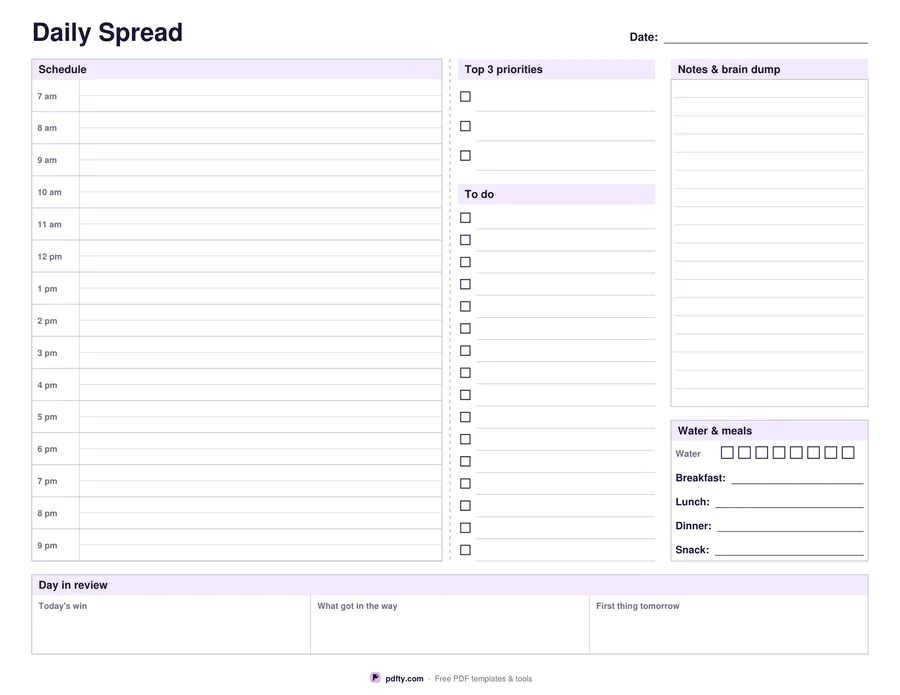
Printable two-page daily spread with an hourly schedule, to-do lists and a review strip
Day starts at
Paper size
Fill & edit free online

Free · no watermark · no sign-up for your first 20 downloads a day

Fillable PDF — type into the fields online or in any PDF viewer before printing.

Paper planners put a day across two facing pages: the timed schedule on the left, everything unscheduled on the right. This sheet keeps that layout but fits it on one landscape page, with a dashed fold line down the middle so it still reads as a spread. The left page is a fifteen-hour schedule column with a half-hour rule inside every hour. The right page carries the top three priorities, a to-do list of sixteen lines, a ruled notes area, eight water boxes and lines for breakfast, lunch, dinner and a snack.

Across the foot of the sheet runs a review strip split into three boxes: today's win, what got in the way, and the first thing to do tomorrow. Filling those three in takes a minute at the end of the day and gives the next morning a starting point. Every writing area on the sheet is a form field, so you can type the day on screen in any PDF reader, or print it blank and work in pen.

The schedule starts at 6 am, 7 am or 8 am, whichever matches your day, and runs fifteen hours from there. Choose US Letter or A4 and the whole spread is measured again for that sheet, so nothing is cut off or left floating. Print one for tomorrow, or print a stack and clip them into a folder - undated, so a skipped day costs nothing.
How to use it

  1. 1

    Pick your start hour

    Choose 6, 7 or 8 am; the schedule column runs fifteen hours from there.

  2. 2

    Choose the paper size

    US Letter or A4 - the spread is laid out again for the sheet you pick.

  3. 3

    Type it in or print it blank

    Every box is a form field, so you can plan the day on screen and then print, or print first and write by hand.

  4. 4

    Print or fill it in

    Print at 100% ("Actual size") so lines and boxes keep their exact spacing, or fill the form fields on screen in any PDF viewer.

Frequently asked questions

Yes. There is no watermark and no sign-up for your first 20 downloads each day; after that a free account keeps downloads going. You may print the file as often as you like for personal, school or business use.
No - it is one landscape page laid out like the two facing pages of a planner, with a dashed fold line down the centre. That way a day fits on a single sheet instead of needing two.
Fifteen, with a faint half-hour rule inside each one. Starting at 7 am the column runs to 9 pm; starting at 8 am it runs to 10 pm.
Yes. The date, every hour, the three priorities, the to-do lines, the notes area, the meal lines and the three review boxes are all fillable fields.
Yes. Open the PDF in an annotation app such as GoodNotes, Notability or Xodo and write on it with a stylus, or fill the form fields in any PDF reader and keep the file on screen.
Yes, typed field text prints like any other text. To lock it so it cannot be edited later, run the file through pdfty's Flatten PDF tool first.

More free templates

Work with your PDF