Printable Trivia Scorecard (Free PDF)

A quiz night score sheet with a column per team, a row per round, and a running total beside every round score so the leaderboard is always current.
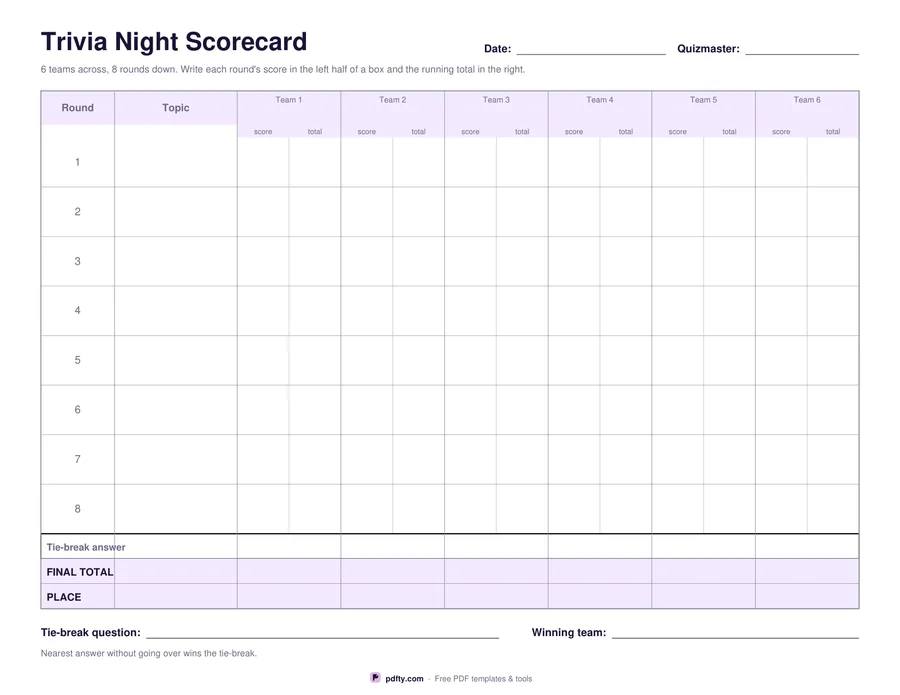
Printable trivia night scorecard with teams across and rounds down
Teams
Paper size
Fill & edit free online

Free · no watermark · no sign-up for your first 20 downloads a day

Fillable PDF — type into the fields online or in any PDF viewer before printing.

One landscape page runs a whole quiz night. Teams go across the top, eight rounds go down the side, and each round has a topic box so the quizmaster can write what the round was about. Every team's cell is split in two: the round score on the left, the running total on the right, so nobody has to add the column up between rounds to know who is leading.

Under the rounds there is a tie-break row with a box per team, a final total row and a place row, plus lines at the foot for the tie-break question and the winning team. The convention printed on the sheet is the usual one: nearest answer without going over takes it. Choose four teams for a family evening, six for a pub quiz or eight for a club night; the columns narrow as teams are added but stay wide enough for a score and a running total written by hand.

The team names, the round topics and every score, total, tie-break and final box are fillable form fields, so a quizmaster can type the teams in before printing and hand out a neat sheet, or run the whole night on a laptop and never print at all. Print it blank instead and it is an ordinary ruled score sheet for a pen. Flatten the file with pdfty's Flatten PDF tool afterwards if you want to keep a copy of the results that nobody can edit.
How to use it

  1. 1

    Choose how many teams

    Four, six or eight columns. The eight team sheet has narrower columns but the same eight rounds.

  2. 2

    Type the team names

    Click the header boxes in any PDF viewer and type the team names, or leave them blank and write them in on the night.

  3. 3

    Print or fill it in

    Print at 100% ("Actual size") so lines and boxes keep their exact spacing, or fill the form fields on screen in any PDF viewer.

  4. 4

    Score as you go

    Write each round's score on the left of a box and the new running total on the right, then settle a tie on the tie-break line.

Frequently asked questions

Yes. There is no watermark and no sign-up for your first 20 downloads each day; after that a free account keeps downloads going. You may print the file as often as you like for personal, school or business use.
Yes. Team names, round topics, every score and total box, the tie-break row and the final total are all form fields, so the sheet works on a laptop as well as on paper.
Eight, each with its own topic box. Leave the last rows empty for a shorter quiz.
A numeric question whose answer nobody knows, asked at the start. Each team writes a guess; if two teams finish level, the nearest answer without going over wins.
It is a single landscape page, so a two-sheet quiz is simply two copies. Print both sides of one sheet for a long night.
Yes. Text typed into the fields prints like ordinary text. To lock it, flatten the file with pdfty's Flatten PDF tool.

More free templates

Work with your PDF