Knitting Project Planner (Free Printable PDF)

One page for the whole project: pattern and size at the top, yarn and needles in tables, the gauge swatch you actually knitted, and a row counter you cross off as you go.
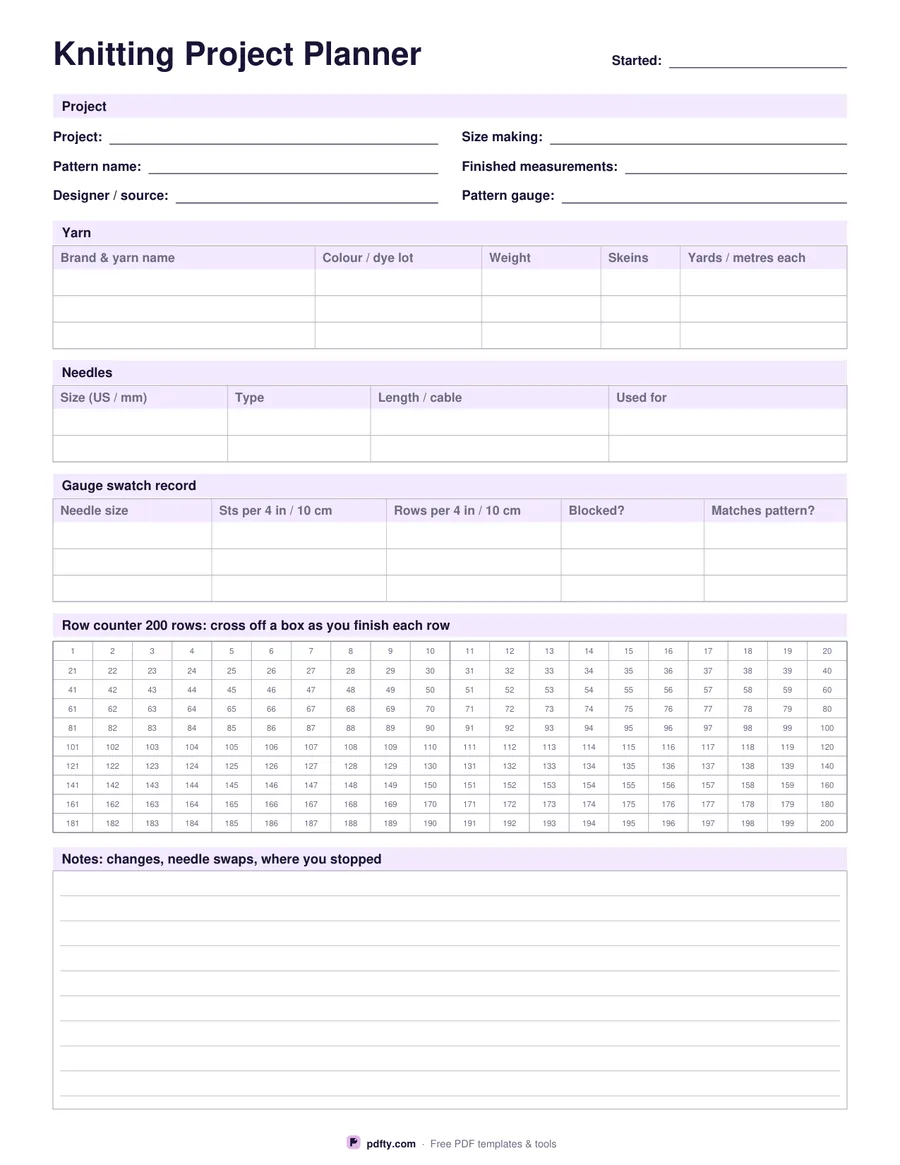
Printable knitting project planner with yarn, needle and gauge tables and a row counter grid
Row counter
Paper size
Fill & edit free online

Free · no watermark · no sign-up for your first 20 downloads a day

Fillable PDF — type into the fields online or in any PDF viewer before printing.

The page opens with six lines for the project itself: what you are making, the pattern name, the designer or where you bought it, the size you are knitting, the finished measurements and the gauge the pattern calls for. Below that a yarn table takes three yarns with brand, colourway and dye lot, weight, number of skeins and the yardage or metres per skein, which is the information you need again if you have to buy one more ball halfway through.

The needle table records two needles with size in US and mm, type, cable or needle length and what you used them for. The gauge swatch record is three rows wide: needle size, stitches over four inches or ten centimetres, rows over the same span, whether the swatch was blocked and whether it matched the pattern. Writing down the swatch that failed is as useful as the one that worked, so there is room for both.

The row counter is a grid of numbered boxes, 100 or 200 of them depending on the option you pick, with a heavier rule every ten so you can find your place at a glance. Cross one off at the end of each row. The rest of the page is a ruled notes block for needle swaps, short rows, decreases you changed and where you stopped. Every field is fillable, so you can type the project details before printing.
How to use it

  1. 1

    Choose the counter size

    100 boxes suit hats, socks and small accessories; 200 suit sweaters and blankets.

  2. 2

    Fill in the project details

    Type the pattern, yarn and needle details in any PDF viewer, or print the sheet blank and write them in.

  3. 3

    Print or fill it in

    Print at 100% ("Actual size") so lines and boxes keep their exact spacing, or fill the form fields on screen in any PDF viewer.

  4. 4

    Cross off a box each row

    Mark a numbered box as you finish each row, and keep the sheet with the project bag so you always know where you stopped.

Frequently asked questions

Yes. There is no watermark and no sign-up for your first 20 downloads each day; after that a free account keeps downloads going. You may print the file as often as you like for personal, school or business use.
Yes. Every box and line on the sheet is a PDF form field, so you can fill it in Adobe Reader, Preview, Chrome or Edge and print a tidy copy, or print it blank and write by hand.
Three yarns, two needles and three gauge swatch rows. That covers a colourwork project with a main and contrast yarn and a swatch knitted twice.
Skeins of the same colour from different dye lots can be visibly different. Writing the lot down means you can match it if you need another ball.
Choose the 200 row version for a sweater body or a blanket. For anything longer, print a second copy and keep counting.
Yes. Open the PDF in an annotation app such as GoodNotes, Notability or Xodo and write on it with a stylus, or fill the form fields and keep the file with your other project notes.

More free templates

Work with your PDF