Purchase Requisition Form (Free PDF)

The form somebody fills in before a purchase order exists: what is needed, what it is for, which budget pays and who signed it off.
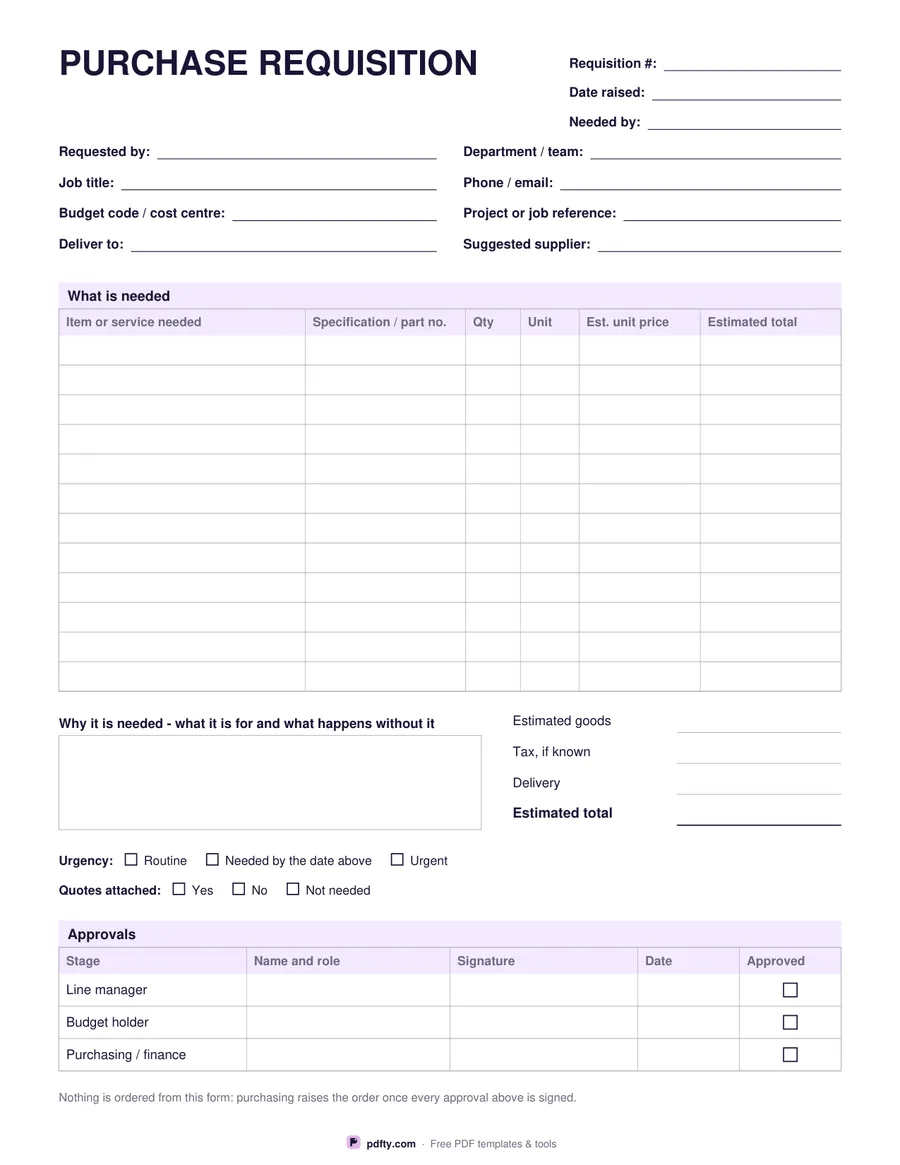
Printable purchase requisition form with item table, budget code and three approval signatures
Item rows
Paper size
Fill & edit free online

Free · no watermark · no sign-up for your first 20 downloads a day

Fillable PDF — type into the fields online or in any PDF viewer before printing.

A requisition is the internal request that comes before an order. This one starts with the requisition number, the date it was raised and the date the goods are needed, then a block for the requester: name, department, job title, contact, the budget code or cost centre it should be charged to, the project reference, where it should be delivered and any supplier already in mind. The point of those fields is that whoever approves it can do so without a single follow-up email.

The middle of the page is the item table, twelve rows or sixteen, with columns for the item or service, a specification or part number, quantity, unit, estimated unit price and estimated line total. Underneath, a box asks why it is needed and what happens if it is not bought, which is the question an approver actually wants answered. Beside it sit four totals: estimated goods, tax if known, delivery and the estimated total.

The bottom of the sheet is the approval trail. Tick boxes record how urgent the request is and whether quotations are attached, then a three-row table takes the line manager, the budget holder and purchasing or finance, each with a name and role, a signature, a date and an approved box. Every field is fillable, so a requester can type the form, email it for signature, or print it for a clipboard. It fits on one page in US Letter or A4.
How to use it

  1. 1

    Choose how many item rows you need

    Twelve rows leave more room to write; sixteen suit a longer list of parts.

  2. 2

    Download the PDF

    Pick US Letter or A4 and download. No sign-up, no watermark.

  3. 3

    Print or fill it in

    Print at 100% ("Actual size") so lines and boxes keep their exact spacing, or fill the form fields on screen in any PDF viewer.

  4. 4

    Send it for approval

    Fill in the budget code and the reason, then pass it to the manager, the budget holder and purchasing in turn.

Frequently asked questions

Yes. There is no watermark and no sign-up for your first 20 downloads each day; after that a free account keeps downloads going. You may print the file as often as you like for personal, school or business use.
No. A requisition is the internal request to buy something; the purchase order is what goes to the supplier afterwards. The note at the foot of this form says so plainly, so nobody treats a signed requisition as an order.
Yes. Every box, including the item table, the totals and the approval rows, is a form field. Open it in Adobe Reader, Preview, Chrome or Edge, type the request and save or email the file.
Twelve or sixteen rows, depending on the version you pick. For a longer list, attach a second sheet and write the reference in the specification column.
No. The fields are plain text boxes with no calculation script, which keeps the file opening correctly everywhere. Add the lines up yourself and write the estimated total in.
None. The price and total columns carry no currency symbol, so the form suits any country.

More free templates

Work with your PDF